Proxy Master configuration with proxy server

Trying to configure a connection in the current version of RDM using the Proxy Networks - Proxy Master Add On. The Add On has been enabled in RDM.
On the General tab I enter the target host name. I would like to enter the "Proxy Gateway" name but I don't see how to do it. It seems like there should be a pull down list under "Proxy gateway" but there are no items in that list and I don't see where you would configure a gateway value.
Am I missing something ?
All Comments (29)
Hello,
Are you referring to this Drop down? 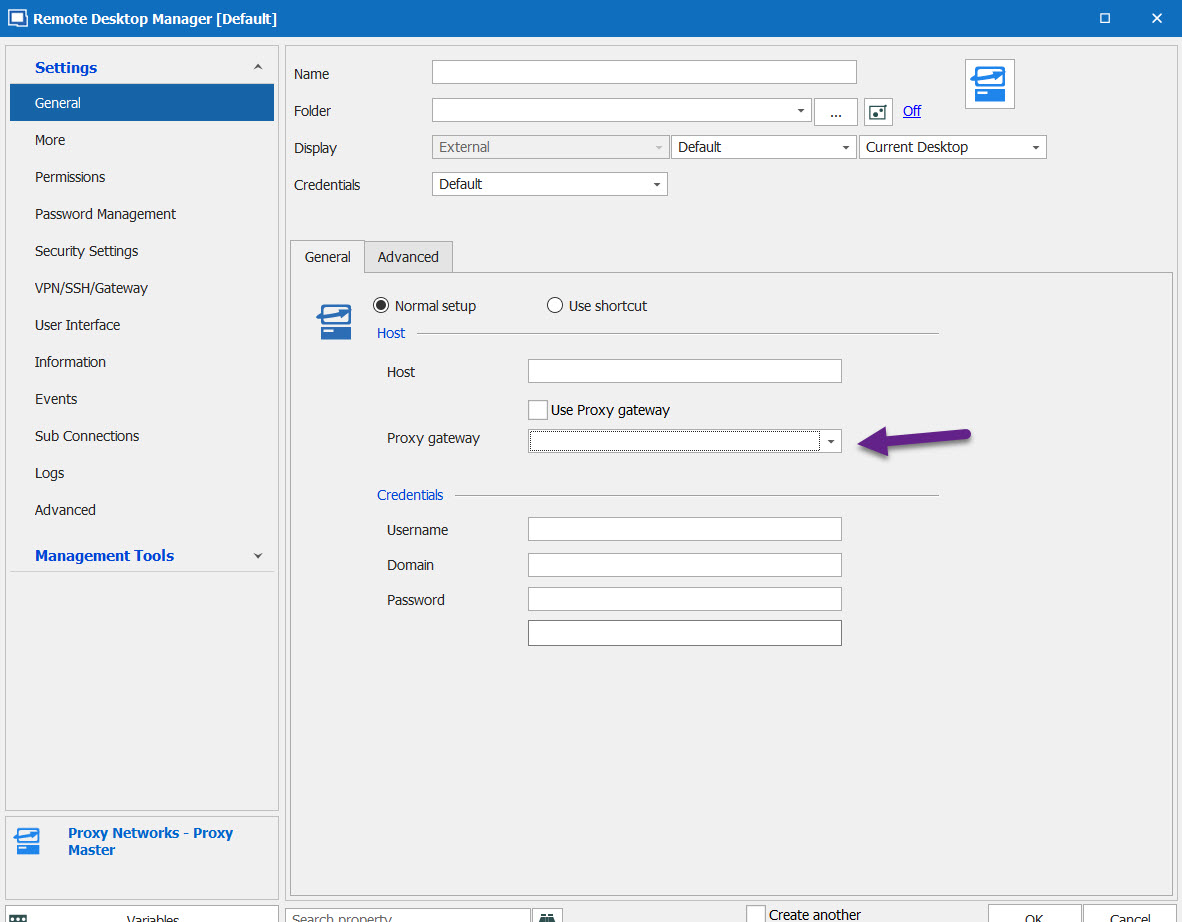
Best Regards,
Etienne Lord
proxy.jpg
And what would be your Remote Desktop Manager version?
Etienne Lord
Yes, I'm referring to the drop-down in your screen shot.
RDM version is 2020.1.14.0
Thanks
Hello,
I cannot test this on my side but I will have a look, could you send us a quick recording of the issue using the link I sent you in Private Message?
Best Regards,
Etienne Lord
Hello Etienne,
I am unable to share a recording due to security issues however I could arrange a remote session if necessary.
However the problem is straightforward and there would be really nothing to demonstrate, There is nothing in the "Proxy Gateway" field and nothing to pull down. My assumption is that this would be a reference to the Proxy Master proxy server but I don't see where that server gets configured in RDM and you cant add it to the pull-down. The RDM version is now 2020.1.16.0
Hello,
I believe I was able to reproduce the issue, I got a ticket open :)
Best Regards,
Etienne Lord
Thank you Etienne.
Hello,
In Remote Desktop Manager, the list is fetched from the following Registry :
HKEY_CURRENT_USER\Software\Funk Software, Inc.\Proxy v4\Proxy Master\Gateway Hosts
This is something that might have change with the versions of Proxy Master, would you be able to confirm if it still the same registry?
Best Regards,
Etienne Lord
Hello Etienne,
That registry path exists but there is nothing in it. This is our first time trying this so we are not sure what populates this field. What we do normally to establish a proxy session is go to the web interface on our Proxy Master host, search for the target machine and connect to it. So I'm not sure what would populate this entry in the registry of the machine that RDM is running on. Maybe there are some basic instructions that we are missing?
Hello,
Were you able to make it work outside of Remote Desktop Manager beforehand?
Best Regards,
Etienne Lord
Hello Etienne,
That the point. This is the first time we've tried this.
1) What is responsible for populating that field so that RDM can use it?
2) Can the field be populated via RDM ? If so how?
Hello,
This is a somewhat older integration so we will need to have a look, but we normally suggest trying outside of Remote Desktop Manager beforehand.
Best Regards,
Etienne Lord
Hello Etienne,
Yes, it works outside of RDM without issue. From my workstation (that is also running RDM) I connect to the proxy master server which allows us to open a proxy session from my workstation to the target Windows machine. So that all works and we have a large group of support people that do this on a daily basis. This is the first time we've tried this via RDM.
1) What is responsible for populating the "Proxy gateway" field in your screenshot so that RDM can use it?
2) Can the field be populated via RDM ? If so how?
Hello,
Just to let you know, we might have found the issue, we will work on a fix.
Best Regards,
Etienne Lord
Thanks for the update Etienne.
Hello Etienne. Can you please confirm the status of the fix ?
Hello,
It is still on the engineering's to-do list.
Best Regards,
Etienne Lord
Hello,
We made some changes to the Proxy Master integration that will be included in the next version. When this is release, you will be able to test it out and let us know if the issue is fixed :)
Best Regards,
Etienne Lord
Thank Etienne. What is the target release # and date for that version ?
Hello,
We do not have any ETAs for the new release yet.
It would be 2020.2.5.0 (+)
Best Regards,
Etienne Lord
Hello Etienne,
I see that there have been 3 new updates since you posted that and its up to version 2020.2.7.0 but I don't see this as being fixed in the release notes. Did I miss it?
Hello,
It will most probably appear in the official release note since we still have some tests to do. Were you able to give it a try in order to see if everything works as intended?
Best Regards,
Etienne Lord
Etienne,
If the fix hasn't appeared in any release up to the current 2020.2.7.0 and you cant tell me when it will appear why would I "give it a try in order to see if everything works as intended" ?
Hello,
Sorry, let me rephrase that. The fix should be in 2020.2.6.0 but it has not appear in the Release Notes. Therefore, it should be working as intended in 2020.2.7.0.
Best Regards,
Etienne Lord
Hello Etienne,
I am now on version 2020.2.12.0 and this is still not working for me.
Still don't see how to specify a gateway server in the Proxy Gateway entry in the screen shot above.
Please advise,
Hello,
I will investigate on that and keep you updated.
Best Regards,
Etienne Lord
Hello,
With RDM 2020.2.14.0 the Gateway dropdown list now work correctly! https://remotedesktopmanager.com/home/downloadenterprise
Best Regards,
Etienne Lord
Hmm, is it possible to embed a proxy in the browser in this way? I have several personal proxies that I use and I would like to automate switching between proxies in Firefox.So far I have used an extension called "Best Proxy Switcher" and I have used "Image Found" + click actions to select a specific proxy from a predefined list. However, this is not as reliable, especially when the macro needs to scroll through the proxy list. Setting up a new proxy connection in this way is quite difficult. I tried to search through https://proxycrawl.com/scraping-with-worldwide-backconnect-proxy but I think that here we need help from those who understand better than me.
Hello,
I would like to confirm which of our products you're using? Are you using RDM with a "Web Browser" entry type?
If so could you confirm which version of RDM you're using and which type of data source?
Let me know,
Best regards,
Samuel Dery