RDM 2019.1 bugs

Hello,
A couple small bugs I noticed in the latest beta:
Under Home tab, View section, right clicking any of the icons and pinning to top menu bar, the iconography looks like this:

The navigation pane UI is still bugged. Ticket Devo-1523
All Comments (116)
This is a know issue. Thank you
Regards
David Hervieux
Hello,
About your ticket, I'm not fully sure why it was closed, I will have a new ticket open for that a notify you on where the bug is directly on the ticket, sorry about the inconvenience.
Best Regards,
Etienne Lord
Thanks!
Is this a bug or expected behavior? When using the advanced search within the navigation tree, WaykNow is missing as a connection type. I have a number of WaykNow connections in the database, however they are all child entries of RDP connections.

@glaza That's a bug, Good catch!
Indeed if a type are only subconnection, the advance search won't be able to find it. Adding a wayk connection ( not as sub-connection ) should reveal all the wayk connection type in the advance search for a temporary workaround.
Thanks for reporting this, it should be easy to fix.
Best regards,
Alexandre Roy
Adding another possible bug...
The colored borders around an open session appear to be stuck at 1 pixel, despite being set to 5, or anything else. I'm using the black theme.


However, when the session is opening and it 'flickers' I can briefly see the desired border width. I've closed / re-opened RDM several times, and changed the border thickness multiple times.
Thank you. I have fixed the border issue.
Regards
David Hervieux
nevermind my last post (2.6.19). user error...
How can I activate session recording in beta version? I want to record only active *.rdp session not the whole window of application.
The recording is included in the beta but only with SQL Server data source. The next beta will enable it for all data sources.
Regards
David Hervieux
Thanks for your answer. How can I configure it to record only window of active *.rpd session and not the whole app window?
Is this a graphical artefact or intended?:


Yes indeed, these are graphic artifacts. One has already been fixed and will be available in the next version. But there is one that went unnoticed until now. I'll fix this right away and it should be available in the next version too.
Regards.
Denis Vincent
Thank you Denis.
Hello Martin,
The issue where entry types only found as sub connections in your tree wouldn't appear in the "Connection type" combobox of an advanced search should be fixed starting from the next version of RDM.
Regards,
Michaël Beaudin
Thank you!
Hello @Martin-GLAZE,
The advance search issue is now fixed internally and will be available in the next release.
Regards,
Alexandre Roy
Thanks Alexandre.
Two new bugs in 2019.1.6.0:
Whenever I attempt to open any Wayk Now sub-connection, using the cloud Wayk Now method, I receive this error and this error log:

ArgumentException - The path is not of a legal form.
at System.IO.Path.NormalizePath(String path, Boolean fullCheck, Int32 maxPathLength, Boolean expandShortPaths)
at System.IO.Path.InternalGetDirectoryName(String path)
at Devolutions.RemoteDesktopManager.Managers.WaykManager.InitLog()
at Devolutions.RemoteDesktopManager.Business.Connectors.EmbeddedWaykConnector.CreateFrame(EmbededConnectionResult result)
at Devolutions.RemoteDesktopManager.Business.Connectors.EmbeddedConnector.Connect(Connection connection, OpenConnectionMode openConnectionMode)
at Devolutions.RemoteDesktopManager.Managers.ConnectionManager.OpenConnection(Connection connection, OpenConnectionParameter parameter)
at Devolutions.RemoteDesktopManager.Managers.ConnectionManager.OpenConnections(Connection[] connectionList, OpenConnectionParameter parameter)
at Devolutions.RemoteDesktopManager.Managers.ActionManager.c2d3a897d165d9e56a0d53f388986ac51(Connection[] cfabc0254f46d7d8ae5a71db9e5a0b5b5, OpenConnectionMode c602973c05c2f5870e41c508b048b13c5, IConnectionSource c5b7a41272702648f46cf77ee6b3a92cb)
at Devolutions.RemoteDesktopManager.Managers.ActionManager.OpenConnections(OpenConnectionMode openConnectionMode, IConnectionSource source, Boolean checkOpenedConnection)
at Devolutions.RemoteDesktopManager.Managers.SessionMenuManager.c552f6de7933b91b08a4107f7410f30d0(Object c19f185fd70cefc696ba148af1c4faf54, EventArgs cf1018bb83ec7debd818319fd3cb4844e)
at System.Windows.Forms.ToolStripItem.RaiseEvent(Object key, EventArgs e)
at System.Windows.Forms.ToolStripMenuItem.OnClick(EventArgs e)
at System.Windows.Forms.ToolStripItem.HandleClick(EventArgs e)
at System.Windows.Forms.ToolStripItem.HandleMouseUp(MouseEventArgs e)
at System.Windows.Forms.ToolStrip.OnMouseUp(MouseEventArgs mea)
at System.Windows.Forms.ToolStripDropDown.OnMouseUp(MouseEventArgs mea)
at System.Windows.Forms.Control.WmMouseUp(Message& m, MouseButtons button, Int32 clicks)
at System.Windows.Forms.Control.WndProc(Message& m)
at System.Windows.Forms.ToolStrip.WndProc(Message& m)
at System.Windows.Forms.ToolStripDropDown.WndProc(Message& m)
at System.Windows.Forms.NativeWindow.Callback(IntPtr hWnd, Int32 msg, IntPtr wparam, IntPtr lparam)
The second error is a small visual bug:
Using the black theme, a highlight entry shares the same color as the carat, making the carat invisible:

There should be a carat next to the parent RDP entry.,
Additionally, attempting a Wayk Now connection from the quick-connect title bar item results in this error, for any connection:

Hi, we made some changes, the wayk now issue should be fixed in the next patch.
Regards,
Samuel Baker
Thanks Samuel!
I've been able to do something for the arrows:
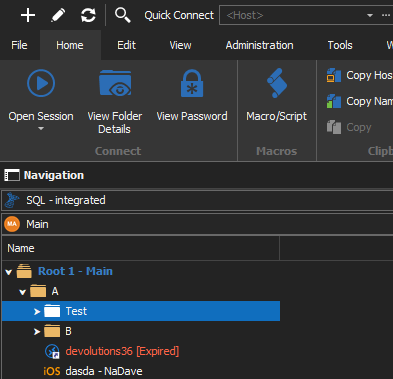
David Hervieux
Hi,
About your quick connect issue. Do you use a Wayk Now template? If so make sure the Power On Mode is set to "None" in the Events/Before Connect tab or that the MAC Address is correct in the Information tab.
Regards,
Samuel Baker
@David - thank you.
@Samuel - I am using a template. Since I am getting that error when I launch the connection from the 'Quick Connect' object, does that mean by default it uses the relevant template if one exists? How does it prioritize?
