Dark Mode
0 vote

when will be seeing dark mode integration in the Mac version?
All Comments (24)
Hi George,
I'm working on it at this exact moment. It is unlikely that a new release of RDM Mac will occur between now and the holiday season. My best guess would be somewhere in January-February.
Best regards,
Xavier Fortin
amazing! thats a great timeline!! very excited to see it
I saw it yesterday on Xavier's Mac and it's coming soon :)
David Hervieux
Xavier can you show us a teaser screenshot??? :)
Well, I can't see the harm in it.
Please note that everything is still a work in progress and some adjustments might still yet occurs. Especially in things that I'm not showing ;)
Best regards,
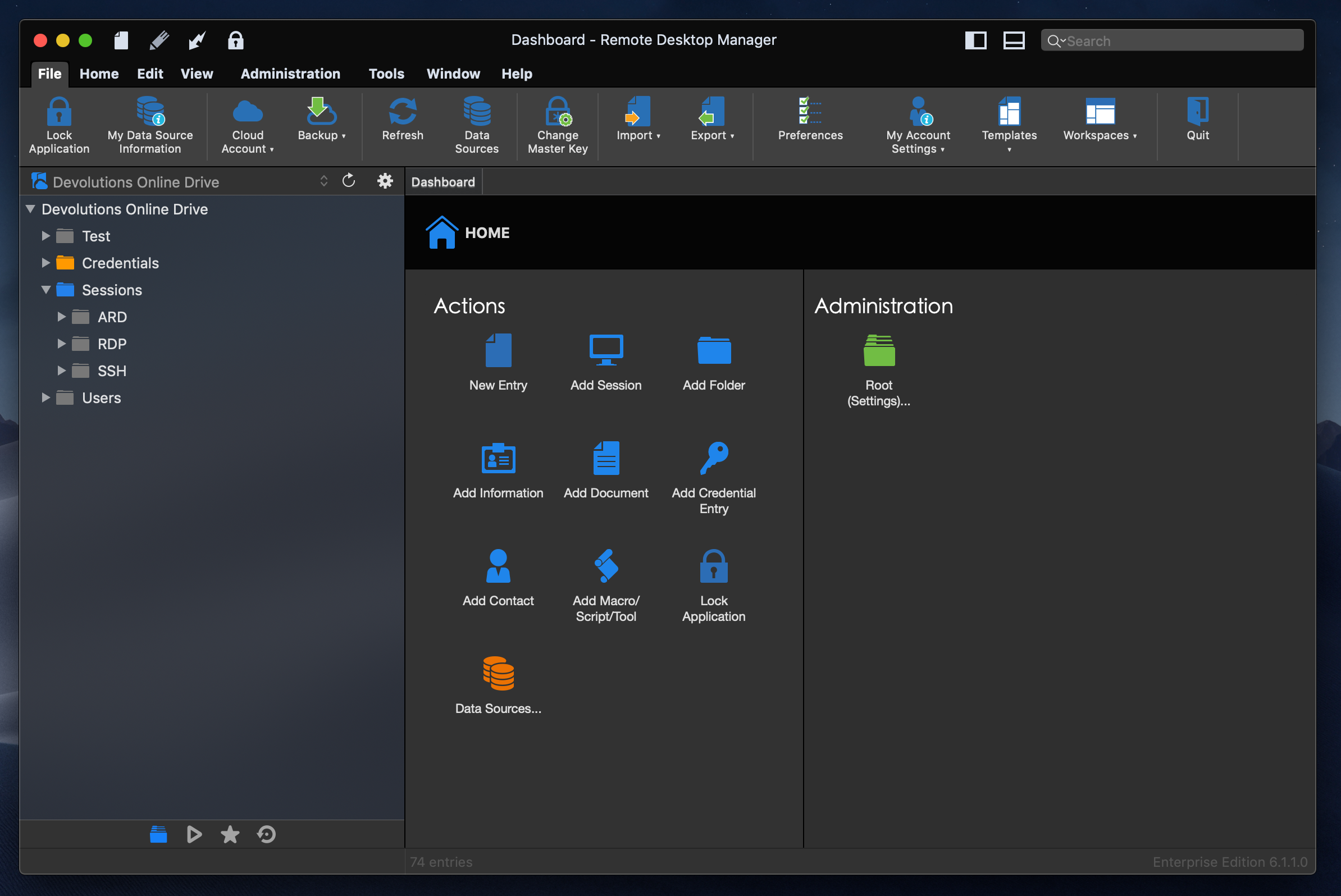
Xavier Fortin
RDMDarkTheme.png
Looking very nice! thanks for sharing.
Cant wait!!!!
Hi Xavier,
Dark mode looks great on the picture you posted. When will it go live for the Mac?
Hi,
Development is finished on it and we've updated the necessary components. This will be out in the next release of RDM Mac. I can't give an ETA for its release yet as it partially depends on a share set of features released alongside RDM Windows.
Best regards,
Xavier Fortin
Any chance on getting a beta?? I saw the windows beta with the dark theme dropped today, any eta on a Mac beta?
I'll see about this if I have more time next week. I'll post back if a beta release gets out.
You'll need to set the the General -> Application Start -> Auto Update -> Check for updates at startup to "All updates including beta" in the Preferences window.
Best regards,
Xavier Fortin
Hi,
A beta version of RDM (6.2.2.0) has been released today (with the Dark Theme). You should all be prompted to update if you changed the Auto Update preference.
Best regards,
Xavier Fortin
That’s great, might be slightly thick but how do I change the auto aupdate pref?
Thanks in advance.
Lee
Hi,
Of course. Here's where you can find the setting under the Preferences:
After changing the setting and closing the Preferences window, just do a Remote Desktop Manager -> Check for Updates and it should prompt you for the update.
Best regards,

Xavier Fortin
BetaUpdate.png
Thank you, 10/10 for looks. Great job
I have updated to beta version of RDM (6.2.2.0) and enabled Dark Mode on my MacOS but RDM does not change to Dark mode after I restarted it, restart the macbook also did not fix it. How do I enable Dark Mode on RDM?
Hi,
Nothing further should be required. I've just tested on my end and switching the Appearance setting under the System Preferences -> General it switch properly between the two appearances.
Can you give me a screenshot of the About window of RDM? Could you also confirm that the NSRequiresAquaSystemAppearance field in the app bundle Info.plist file (~/Applications/Remote Desktop Manager.app/Contents/Info.plist) is set to NO?
Best regards,
Xavier Fortin
Hello,
Screenshot of the about screen as requested. And the NSRequiresAquaSystemAppearance is set to False. Enabling and disabling the Dark mode option in General Preferences has no effect on RDM.
Screen Shot 2019-04-01 at 8.34.41 AM.png
Hi,
Can you provide the -> About This Mac window? Can you also provide the Application Logs of RDM Free (Help -> Application Logs -> Open)?
Best regards,
Xavier Fortin
Hello,
Screen shot and logs as requested. Thanks
Aled
RemoteDesktopManagerFree.log
Screen Shot 2019-04-01 at 8.59.56 AM.png
Hi,
The Dark Mode was a feature added for macOS Mojave while you seem to be working on High Sierra. I'm currently updating our High Sierra to the latest version. But I don't think the feature was retroported from Mojave to High Sierra (I'm open to be corrected on this).
Best regards,
Xavier Fortin
Dark mode looks fantastic. My only complaint, if it could be called that, is that the black title bar does not match the standard dark grey color all other apps use. It kind of makes RDM stick out like a sore thumb.
Never-mind, I just noticed the Classic UI has the colors the way I was expecting them.
Yes indeed. The Classic mode better follow the normal UI convention of other macOS app while the Ribbon mode has a darker title bar to better contrast with the ribbon tabs content.
Best regards,
Xavier Fortin