Barracuda NG Admin

We are trying to add a Barracuda NG Admin entry to our database. (Current version installed of the add-on V1.3.1.0)
We confirmed that using the Command line to start NG admin works but while starting from RDM we get a "Unable to find Barracuda NG Firewall Executable" although the path is configured in RDM. Even if we configure it Using "Advanced -> Global settings" to override to the exact path it still displays this message.
Is there any known issue with this?
All Comments (14)
Hello,
What is the configuration of Barracuda NG in File -> Options -> Path?
Could you post a screenshot of that window please.
Best regards,
Jeff Dagenais
The path window and a screenshot of the actual folder are attached.
NGadmin-RDM-2.png
NGadmin-rdm-1.png
Hello,
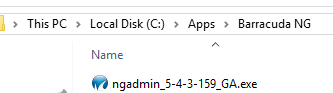
As I remember, RDM is looking at something like this
Could you try to rename your exectable to match something like in my screenshot?
Best regards,
Jeff Dagenais
2018-08-27_20-09-44.png
The same happens when the NGadmin has the filename "NGAdmin_7.0.1-073.exe"
Hello,
Let me verify this with our engineering department and get back to you.
Best regards,
Jeff Dagenais
Hello,
I had a chat with our engineering department and the filter is ngadmin_*_GA.exe. As per your previous post, _GA is missing at the end.
If you name your executable to NGAdmin_7.0.1-073_GA.exe, is it working?
Best regards,
Jeff Dagenais
That indeed works :)
Maybe as an update. All current versions/downloads for NGAdmin do not have a filename with the trailing _GA
Hello,
I'll have a look at this with our engineering department.
Thank you for your feedback.
Best regards,
Jeff Dagenais
Hello,
An update for Barracuda NG add-on will be available shortly containing a change for how RDM finds the executable. It should resolve your issue.
Regards,
Hubert Mireault
Hello!
Since the Update to Version 1.4.1 RDM says, that it cannot find the Executeable. I've renamed the Executeable to a Name like the one in the previous Screenshot, but it did not help. Which Name is needed from the Executeable to be found from the AddOn?
Would it be possible to add an Option to the AddOn to override the Default-Executeable-Name, not only the Folder Path?
@Bernhard Negele,
Could you go in File -> Options -> Path, select the Barracuda add-on and send us a screenshot of that window please.
Best regards,
Jeff Dagenais
Hello Jeff!
Seems like this Problem only appeared with RDM Beta 13.9.X, after Updating to Version 14.0 the Option to override the executeable File was visible and configurable.
Hello,
As I understand, it's now working?
Thank you for your feedback.
Jeff Dagenais
Hello Jeff!
It's working, Upgrading to RDM Version 14 solved the Problem.