13.0.13.0 Duplicate Root detected
Hello,
Got this error message after RDM Upgrade from 13.0.12.0 to 13.0.13.0 =>
Devolutions.RemoteDesktopManager.Business.Exceptions.RootException: Duplicate root detected!
bei Devolutions.RemoteDesktopManager.Business.DataSources.DatabaseConnectionDataSource.DetectDuplicateRoots(Connection root, IDbTransaction dbTransaction)
bei Devolutions.RemoteDesktopManager.Business.DataSources.DatabaseConnectionDataSource.c0cc7f9d508f1ec50318abae3c37f1fc0(Connection cbdc2310dae04de179a24c6e62a14e6e8, IDbTransaction c5a0ca8eaa594113c2f0b3cfe13dedff9)
bei Devolutions.RemoteDesktopManager.Business.DataSources.DatabaseConnectionDataSource.SaveConnections(IEnumerable`1 connections, IDbTransaction dbTransaction, ISecurityProvider provider, Nullable`1 repositoryID)
bei Devolutions.RemoteDesktopManager.Business.DataSources.DatabaseConnectionDataSource.SaveConnection(Connection connection)
Diagnostics & Database Diagnostics looks fine
Thanks
Regards,
Min
All Comments (26)
Hi Min,
You currently have 2 roots for your repository.
I have an idea what is going on and I will fix the RDM so that it doesn't happen again.
Do you need a SQL script that will clean your duplicate roots?
Best regards,
Benoît Sansregret
Hi Benoit,
how can this be configured? It must be a mistake - I never configured this on purpose. :\:
Yes please provide me the script, I will try to clean this behaviour! ;)
Thank you!
Best Regards,
Min
Hi Min,
You didn't create the a second root for your repository on purpose.
It's an issue we are trying to eliminate and it's the reason you receive the message.
I will send you the script in a Private Message as soon as it's ready.
Best regards,
Benoît Sansregret
Ah ok! ;)
thank you!
Regards,
Min
Hi,
Just to update anyone watching this issue.
Min and I exchanged a few Private Message and we were not able to reproduce Min's issue.
However, Min's issue seems to be a one time thing that is not coming back.
We will keep an eye out for future issue like this one.
Regards,
Benoît Sansregret

Disabled
Good day,
We are a new DVLS and RDM customer and we are trying to do a limited roll out. Adding new users to the data source is giving us the same error.
You can add the data source and when you authenticate to the data source you just get an error "Unable to save the entry" " Duplicate root creation detected". This happens as part of the Migration to 1.1 and Migration to 1.2 steps.
Please can you assist with guidance here?
Regards,
Almero
Hello,
After pressing OK on the Duplicate Root error message, please try to do a CTRL + F5.
This should recreate the local cache and allow you to connect on the data source.
Best regards,
Jeff Dagenais
Disabled
Hello Jeff,
It took one or two attempts, but it worked. Thank you for the simple solution.
Regards
Almero
Just updated to 2022.3.15.0
Our shared datasource is now offline and we get this error pop up mulitlpe times. Tried the step above but I see no change.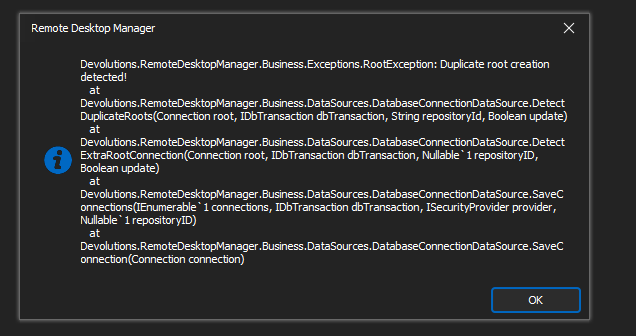
Thanks
Iain
Version 2026.2.13.0 64-bit
Data Source SQL
RemoteDesktopManager_40GMFtlvUQ.png
The same, after updating to 2022.3.15.0, I have a similar message.
Same issue here - any reached out to Devolutions yet? I see their Live chat is offline...
TJ
Hello,
We are currently looking into the issue; we will update the thread as soon as we have more information.
Best regards,
Richard Boisvert
TJ, yes I have an open ticket. However, we restored the DB and downgraded our clients to get access back.
Richard thanks for the update.
Thanks
Iain
Version 2026.2.13.0 64-bit
Data Source SQL
For reference, what is the latest client version works without this issue?
TJ
Hello,
The problem was introduced with 2022.3.14, you would need to revert to 2022.2.29 or prior: https://devolutions.net/remote-desktop-manager/home/previousversions
I will send you a PM with a SQL query, if you can send us the result to service@devolutions.net, or reply back in a PM.
Best regards,
Richard Boisvert
Hello,
The query I sent did not return anything of interest after all.
If you still have the issue in your current environment, could you go to Help > Application Logs and send us an export to service@devolutions.net? Our engineering team would need the complete stack to be able to work on the issue.
Best regards,
Richard Boisvert
Hi,
We have rolled back so am unable to provide any detail.
I will see if we can get it a restored to our POC, then it set up and test it again.
Iain
Thanks
Iain
Version 2026.2.13.0 64-bit
Data Source SQL
Any update on this on this issue?
Holding off on perfroming the update cureently.
Thanks
Iain
Version 2026.2.13.0 64-bit
Data Source SQL
Hello,
The engineering looking at the issue is still trying to replicate the issue with our QA team; we will post an update as soon as we have more details.
Best regards,
Richard Boisvert
Afternoon.
I restored our DB to our POC and download the portable versions. I noticed when dowloading these that a new update was availble form the 3rd (2022.3.16.0).
I connected the orgianl client 2022.2.29.0 to the datasource and confirmed I was able to access correctly.
I then loaded the new client 2022.3.16.0 to datasource and was requested to upgrade the database.
Performend the upgrade and was able to connect to the datasource with out any issues.
I am not sure whats changed between .15 & .16 that has allowed me to upgrade with out issue. I am now planning on upgrading prod next week.
Thanks
Iain
Version 2026.2.13.0 64-bit
Data Source SQL
An update to 2022.3.16.0 doesn't help.
I restored DB and reinstalled the client to 2022.2.29.0.
Now is working
An update to 2022.3.16.0 doesn't help.
I restored DB and reinstalled the client to 2022.2.29.0.
Now is working
Was the DB already updated from client .15 or did you do the the DB update with client .16?
Thanks
Iain
Version 2026.2.13.0 64-bit
Data Source SQL
@iaing80 .15 & .16 has the exact same DB update scripts so as long as you ran the DB update it doesn't matter from which version they ran.
Are you still having issues? If so, I can get the support team to contact you on Monday and we could have a remote session to investigate. The QA team and I have yet to reproduce your issue so it makes it somewhat difficult to resolve.
Best regards,
Stéfane Lavergne
@iaing80 .15 & .16 has the exact same DB update scripts so as long as you ran the DB update it doesn't matter from which version they ran.
Are you still having issues? If so, I can get the support team to contact you on Monday and we could have a remote session to investigate. The QA team and I have yet to reproduce your issue so it makes it somewhat difficult to resolve.
Best regards,
Thanks, I have a support ticket open already and have been waiting for engineering to come back to support and provide a reason for the issue.
I appear to have been able to upgrade a restore of Production in POC without issue. However, before I attempt production again, I need to wait on a response from support and for an internal change to complete in order to help with a speeding up the restore if needed.
I have 15 users that will be affected if it was to go wrong again.
Thanks
Iain
Version 2026.2.13.0 64-bit
Data Source SQL
Hello,
A small summary for those that may be looking at this case at a later date,
When reattempting the upgrade with iaing80 we did not encounter the issue, before performing a database upgrade we always recommend creating a backup of your database so that it can be restored if an issue is encountered.
We have the following knowledge base article regarding this: https://help.remotedesktopmanager.com/database_upgrade.html
That being said, I'm glad the second attempt worked as expected.
Best regards,
Samuel Dery
Thanks Samuel for the assistance in getting the upgrade done.
The KB has been bookmarked for future updates!
I can confirm no errors have been since and all users are running the latest client.
Thanks
Iain
Version 2026.2.13.0 64-bit
Data Source SQL