No Favorites showing in new 12.4.6.0 BETA

Saw the new beta of RDM out this morning (12.4.6.0). I updated directly from RDM (didn't see the download on your website - I normally download it and install it). But after I installed the new RDM beta, I launched it and noticed that my Favorites were missing. I can select the Favorites pane, but there is nothing there. The Dashboard and Overview show the entry that I would expect to be first in the Favorites pane (which is normal), so I think the entries are there but they aren't displaying in the pane. I've check both x86 and x64 flavors, same results. The entries exist in the correct folders still (under All Entries) and when I click one of the sub-folders, it shows the list of entries with the star next to the ones that would be shown in the Favorites pane. Deselecting and selecting the entry as a Favorites doesn't change the behavior.
Thanks
RDM 12_4_6_0 no Favorites entries shown.jpg
All Comments (7)
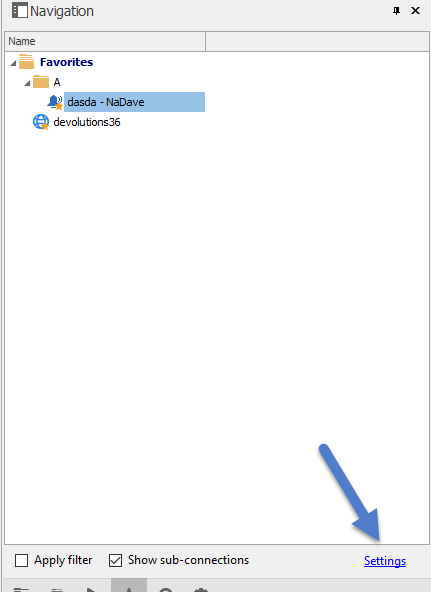
This is strange, I'm unable to reproduce it. Could you try to switch to the Tree View mode by clicking the link label button "Settings"
Regards
David Hervieux
Or try the Reset Layout if you can't see the button
David Hervieux
FavList.png
David Hervieux
Yeah, I had "Use legacy navigation bar (top)" checked. I unchecked it and restarted RDM and the Favorites returned. I noticed that when it is checked, it doesn't show Tools, Most Recently Used, etc. With it unchecked, it works now. Also, it seems slower than recent versions (loading). Yesterday was patch Tuesday and I updated my desktop so I don't known if the performance is an RDM issue or a new MS patch issue. Other apps seem to be OK.
So after unchecking it, I went back and checked the legacy option again and restarted. Same results (nothing in the navigation pane except for the All Entries tab). Other ones are all blank. I'll uncheck it for now and should be OK.
Reset layout didn't help. I wasn't able to click on the "Settings" like you had originally asked (it wasn't visible).
Thanks
This is now fixed internally.
Regards
David Hervieux
Thanks for the update and for finding the issue so quickly!!
Just updated to RDM 12.4.7.0 and the issue is resolved for me. Thanks again for the quick response and resolution.
Happy Easter!!