"One click VPN" with Sophos don't work

Hello,
I have several VPN's to different customers via Sophos VPN. One of them don't work since a week or so if I want to use automatic authentication (so I must not fill in user and password). It doesn't work. But if i use Sophos VPN manually for that customer - it works. Another Sophos VPN's are working well too, with automatic authentication.
With automatic authentication I become for this one VPN connection the following error:
Unable to send the credetials.
Can't find the window Name: SophosVPN - User Authentification
The window "SSL VPN..." stay empty...
I have already Reimport the VPN-configuration file, but error is still comming.
Do you have any ideas? Many Thanks...
Regards
Eugen Hellhorn
All Comments (8)
Hello,
Maurice
Hello,
- This VPN Connection worked already with this Version of RDM. It seems to be the last Version of RDM. I don't know what upgrade should make Problems for exactly this one VPN Connection... All other VPN's over Sophos - are working...
- I use Sophos SSL VPN Client 2.1
- Version of RDM is 12.0.8.0
Regards
Eugen Hellhorn
Hello,
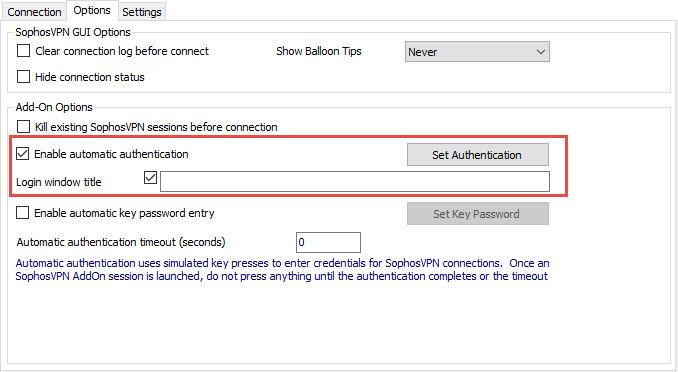
Is it possible that your Login window title is different of the one in your error message? If it's the case, could you go in the Options tab and check the Enable automatic authentication option and enter the appropriate login window title.
Are you using a password or a Key password to authenticate?
Best regards,
Jeff Dagenais
2017-01-24_08-59-42.jpg
Hello,
sorry but I don't know what is the title of "my Login window", where can I see it?
What means "Login window title"? I have never filled it before.
My Settings for this VPN Connection are in uploaded jpg file, i use Password...
Regards
Eugen Hellhorn
2017-01-24_16-24_Screenshot.jpg
Hello,
In your first thread, you mentioned that the window SSL VPN is empty. What is the title of that window? Is it SophosVPN - User Authentication?
Maybe you can record a small video of the issue and post it here. There's a recorder in RDM via the Help -> Record menu.
Please include in your video the steps outside RDM and the steps inside RDM.
Best regards,
Jeff Dagenais
Hello,
i made a small Video with size over 18MB (Windows Video). How can i upload it to you? And it should not can be seen from everybody...
Regards
Eugen Hellhorn
Hello,
You can send your video via the https://wetransfer.com website to our support mailbox at support@devolutions.net
Best regards,
Jeff Dagenais
Hello,
Thank you for the video.
The issue seems to be related to a configuration issue. Could you try to import your VPN settings via the Import button at the bottom.
The extension of the VPN setting saved on your computer shoudl be *.openvpn or *.ovpn.
Best regards,
Jeff Dagenais