KeePass and name filtering method

Hello dear developers,
I encounter a little "bug" when I tried to get a credential list from KeePass 2.34.
I created a keepass-credential session and wanted to filter a list of users, lets say "VPN connections". When the dialog opens, the list is empty I have to click the refresh icon for the credentials to appear. Is it possible for this list to display automatically?
Thank you for this great tool and your support!
Best regards,
Andreas
All Comments (17)
Hello,
Could you post a print screen of the properties of your KeePass entry in RDM.
I would need a print screen of the General and Credential Selection tab.
Best regards,
Jeff Dagenais
Here you go:
https://postimg.org/image/vh91icmnn/
I remember that it worked with v11.7 of RDM. That was the version I evaluated. Now everyone has 12.0.2.0 - 12.0.5.0 installed.
Hello,
I am not able to reproduce your issue. The KeePass entries appear on the first opening of the window.
If you select Always prompt with list instead of Name Filtering, do you need to press the refresh button to see the entries from KeePass?
Best regards,
Jeff Dagenais
Hello,
Yes this also happens when setting "always prompt with list". And regardles on which computer I try...
Do you need any more details?
Best regards,
Andreas
Hello,
This is very strange that you need to do a refresh to display the keepass entries.
Does KeePass is already opened when you try to get the list of entries?
Do you have something relevant in Help -> View Application Log?
Best regards,
Jeff Dagenais
Hello,
Back from my holidays. It does not affect the behaviour if KeePass is already running or not.
And no, there is nothing related to these KeePass entries in the Application Log...
Thank you and best regards,
Andreas
Hello,
What type of data source are you using?
Best regards,
Jeff Dagenais
I use mariadb (5.5.52-MariaDB) on centos 7.
Hello,
If you create a new SQLite or XML data source and create a KeePass entry in this new data source, do you have to hit refresh to see your entries?
Best regards,
Jeff Dagenais
Hello,
I just tried it with a SQLite data source and unfortunately yes, I do have to hit refresh to get the entry list...
I also tried to open the keepass file from another location, no luck. Changing compression of the kdbx file from gzip to none - no change.
Also when opening credentials from KeePass the opening procedure takes unusualy long (before we are able to enter the password). It's just 4 to 7 seconds therefore no big deal but maybe worth mentioning.
Best regards,
Andreas
Hello,
Could you try to create a new KeePass database and see if you are experimenting the same issue with this new database.
Best regards,
Jeff Dagenais
Hello,
I tried it with a new KeePass file. Everything with default settings.
Unfortunately I still have to press refresh.
Wouldn't it be possible to change this dialogue so that after half a second the dialogue pops up the refresh-button-click-event is triggered automatically?
Another thing that came to my attention:
When I unlock my computer after standby (or sleep) RDM is not visible but the process is running.
I then open RDM with the dekstop shortcut. After that it asks me to enter my credentials to unlock. (We use Windows-Credentials and it does not matter if currently logged in user is forced or not).
After I enter my credentials RDM asks me for the MySQL (MariaDB) password. But this should be saved in the data source. RDM does not ask me for the MySQL password after a reboot. Is there a setting for this behaviour?
Thank you again
Best regards,
Andreas
Hello,
For the auto-refresh at the opening of the window for KeePass, I would need to verify with our engineering department and get back to you.
I would like you to try to delete the 2 following files in the C:\Program Files (x86)\KeePass Password Safe 2 folder:
Restart your computer, download them again from https://remotedesktopmanager.com/Home/KeePassAddOn and deploy again the DLL in the KeePass installation folder.
For your question about the MySQL, yes it's possible to disable the second prompt on the unlock of the application. To do so, edit your data source configuration via the File -> Data Sources menu -> Advanced tab and check the Disable lock option. This should do the trick.
Best regards,
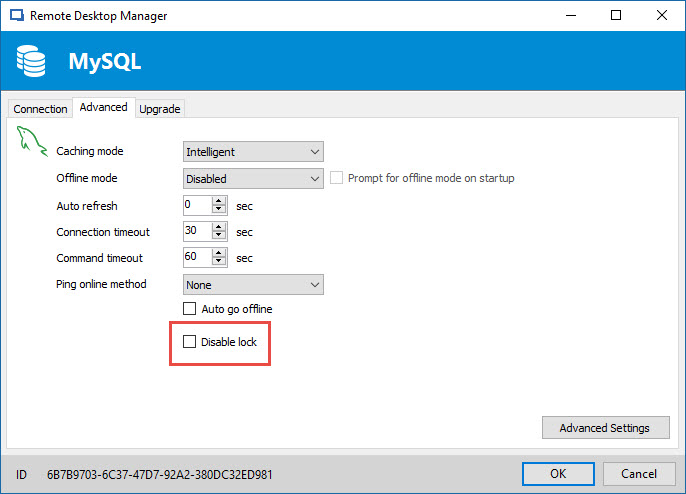
Jeff Dagenais
2017-01-06_08-17-44.jpg
Hello,
Thank you very much! the datasource lock was annoying. That setting did the trick.
Unfortunately reinstalling the KeePass plugin manually changed nothing...
Best regards,
Andreas
Hello,
Since you are using a MariaDB data source, I assume that you are probably not the only one using RDM in your organization.
Does your colleagues also using KeePass?
Do they encounter the same issue?
If you connect yourself on another computer, do you encounter the same issue?
Best regards,
Jeff Dagenais
Hello,
Yes all of my colleagues experience this issue and it does not matter on which computer I work.
Hello,
You mentioned that with a new KeePass database, the issue was also present. Could you send me this test database at support@devolutions.net so that I can test it in our environment to see if I can reproduce your issue.
Best regards,
Jeff Dagenais