Supermicro IPMIView plugin
Dear Devolutions,
Almost all our servers include the IPMI interface. You already have an add-on that covers sending commands to the IPMI interface for reboots and such. However, the primary use case we have with the IPMI technology is the ability to control the console and manipulate the boot process through wat is called IPMIView. It's sort of a remote desktop with remote mount support that enables you to control the server even when it's booting into a bios.
Example picture:
https://bstncdn.net/i/1376
Publically available documentation:
https://www.supermicro.nl/products/nfo/SMS_IPMI.cfm
Could support for IPMIView become a reality?
Kind regards,
Jori Huisman
All Comments (9)
I can't see the command line for IPMIView. Do you have more information?
Regards
David Hervieux
Hi.
I know this is an old thread but still relevant.
I would also love to see a way to administrate computers over the ipmi interface.
Here is a quick config how to kick off ipmiview from commandline
"C:\Program Files (x86)\SUPERMICRO\IPMIView\jre\bin\java.exe" -Djava.library.path=. -jar iKVM.jar <IP> <USERNAME> <PASSWORD> null 5900 623 2 0
make sure working directory is C:\Program Files (x86)\SUPERMICRO\IPMIView
I do not know what all parameters are but 5900 and 623 are ports according to netstat.
Above info was found using process explorer.
Great thank you. This is really helpful. In the meantime you can create a command line session with your parameters.
Regards
David Hervieux

I would also like to cast my vote for an IPMIView plugin
Hi,
I'll vote also for an plugin.
@niclas
iKVM is nice and working, but it's not the managing interface of this board itself!
@jori
The Supermicro IPMI Utilities is working well, but these are the shell commands without the gui interface. But for me the webinterface is working really well and autologin from RDM is possibile. There, you can show and administrate same things like via ipmiview java-tool.
Username ID = name
Password ID = pwd
Login Button ID = login_word
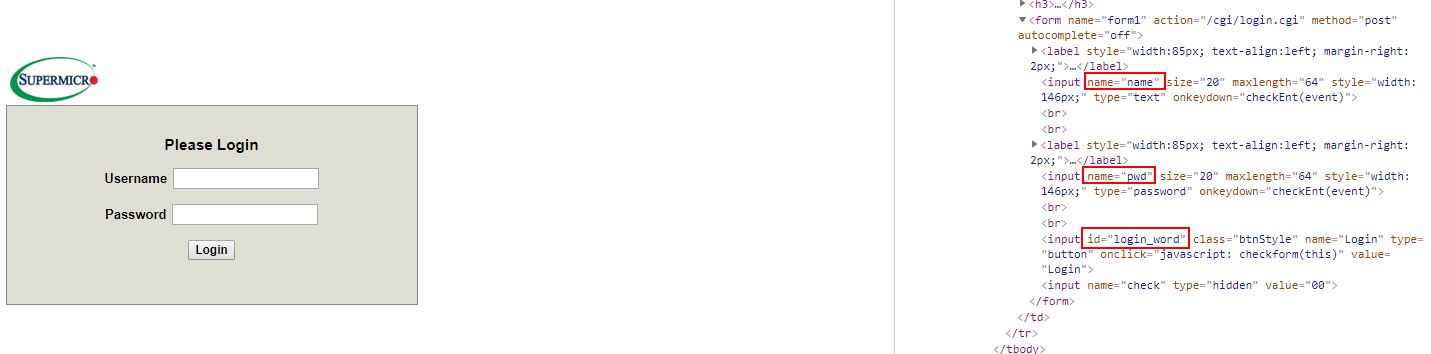
ipmi-inspection.jpg
Please check/try:
SMCIPMITool <IP> <username> <password>
will show a list of available commands
if we find
ukvm General KVM launcher
kvm SIM KVM console (graphic mode)
kvmw SIM(W) KVM console (graphic mode)
kvmwa SIM(WA) KVM console (graphic mode)
kvmwx9 SIM(X9) KVM console (graphic mode)
All Ok
SMCIPMITool <IP> <username> <password> ukvm
Other OS:
java -jar SMCIPMITool.jar <IP> <username> <password> ukvm
I too would like to see this integrated with RDM.
Hi there,
any news on this?
it would be really cool to get a plugin for this :)
br
thorsten
Hello Thorsten,
At the moment we haven't done anything regarding further integration with SuperMicro products. Could you describe what tool you would like us to integrate and if they have a documented command line interface for it? There's a lot of different information in this thread (accessing through web UI, talk of IPMIView, workarounds with IPMI Utilities which we already support in RDM from what I know, etc).
Regards,
Hubert Mireault