RDP Client to be able to paste file
0 vote
The ability to copy and paste files through client
Copy and paste of text currently works great but would like to be able to copy and paste files
All Comments (15)
Hi,
This is already on our Todo list.
In the mean time you could always use the drive redirection features to move files to your Mac and then to another RDP session. It's more of an hassle, but it will do the trick.
Best regards,
Xavier Fortin
Hello,
This help page will help;
http://helpmac.remotedesktopmanager.com/troubleshooting_rdp.htm
If there is anything else we can help you with, please let us know.
Best regards,
Marc Beauséjour
It looks like it's been 2 years. Has this made it from the todo list to the done list yet?
Hi,
This is kind of a big features and it depends more on FreeRDP than RDM itself. We would like to see this come, but it partially depends on things that are out of our hands. I'll increase the priority and try to get in touch with the people that could see this made. But I can't guarantee anything.
I'll post back in this thread if there is any progress made.
Best regards,
Xavier Fortin
Local to remote support has been added to FreeRDP, merged to master on June 7 - https://github.com/FreeRDP/FreeRDP/pull/3905
Interesting. We'll look into it.
Just be aware that if it gets added to RDM Mac, it'll only be available with the RDP Engine V5 as the Engine V4 is no longer updated to the latest FreeRDP.
Best regards,
Xavier Fortin
Did this get added to RDM?
For RDP Engine would it be correct assume V4 is "Legacy" and V5 is "Modern"
Hi,
Unfortunately, no. This as not gone up in the priority chain (since there is alternate way to do file transfer between local and remote host).
You're right in your assumption though, V4 as recently been renamed to Legacy and V5 to Modern.
Best regards,
Xavier Fortin
That's a shame. could you direct me to the information about this alternate method?
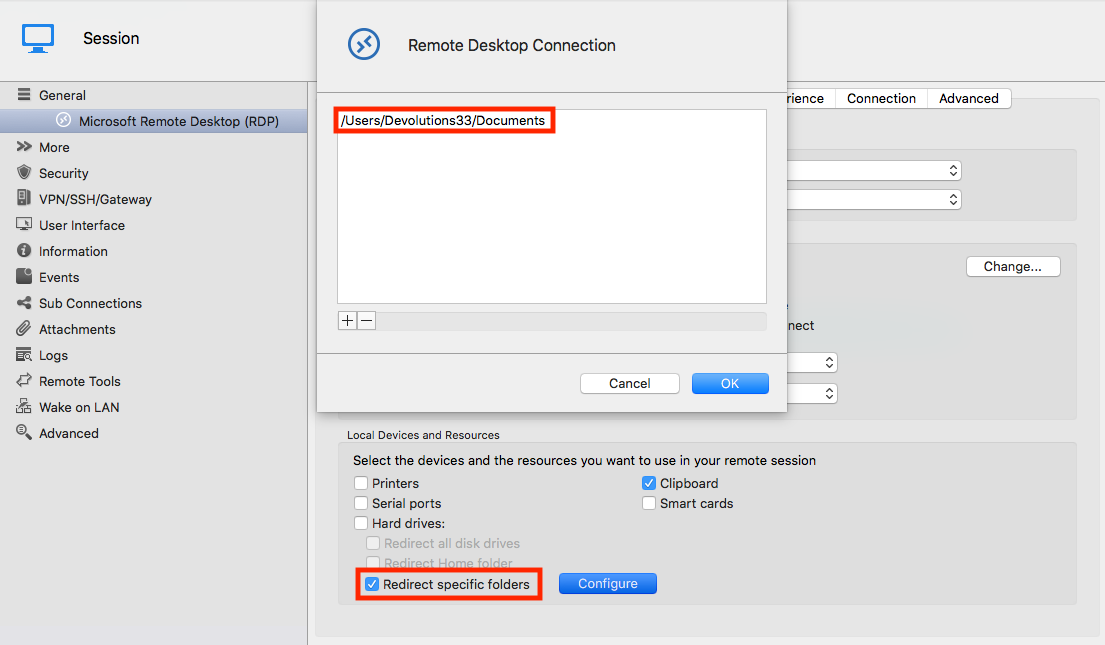
It implies setting up a redirected drive (Microsoft Remote Desktop (RDP) -> Local Resources -> Local Devices and Resources -> Redirect specific folder).
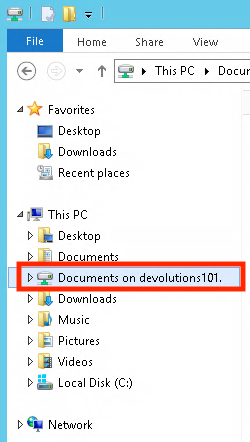
After checking the "Recirect specific folder", setting a local path (with the "Configure" button) and launching your session, you should find the redirected folder in the Windows file explorer:
You can move files between the remote and local host by copying them into this folder.
Best regards,
Xavier Fortin
WindowsFileExplorer.png
RDPSettings.png
Thanks.
I was afraid that's where you were going to go.
Unfortunately most servers I need to connect to have policy applied disallowing client drive mapping. However copy/paste does work.

What is the latest on this? It has been two years...
Hi,
It's not quite a simple thing to implement and has never risen in the priority list. That being said I'll raise the priority and check it out again.
Best regards,
Xavier Fortin
Thanks Xavier, we currently have enterprise license for a small subset of our IT team. We may not roll out to larger group because of this lack of a feature. It seems silly, but its a major pain.
The workaround of setting up folder redirection doesn't work because we manage over 200 servers, so our inventory is populated by a script and you can't reliably set up folder redirection specific to the end user with an import. This means manually setting it up on hundreds of servers, potentially every time we have an inventory update.
Hi,
I've spoken to our FreeRDP specialist and it seems unlikely to be implemented in any forseable future in FreeRDP. There is the "Redirect all disk Drives" and "Redirect Home folder" options though, that should work no matter by which users the session is launched without having to specify specific folders.
Best regards,
Xavier Fortin