Execute Powershell Scripts on remote Machines with individual Credentials (from C. repository)
Execute Powershell Scripts on remote Machines with individual Credentials (from C. repository)

Hi,
we use already successfully "PowerShell (Local)" scripts to start/stop services on remote Windows machines with the command:
Get-Service "spooler" -ComputerName $IP$ | stop service; Get-Service "spooler" -ComputerName $IP$ | start-service
We use the menu Macros/Script/Tools by rightclick on an entry and to do this, the user of RDM must have permissions on the remote machine (e.g. domain administrator).
How is it possible to run a PowerShell script with other credentials, optimally directly with reference to the RDM credentials repository ?
This script should be also called directly via a right click on an entry (e.g. Macros/Script/Tools).
When I create a Powershell/Powershell Remote Console Script in RDM, I can't select it directly on an entry to execute it.
With this thing, it should then be possible to execute other powershell scripts with predefined credentials (e.g. shutdown/restart remote clients etc.)
Thanks for your great Support.
Regards
Adriano
All Comments (3)
Hello,
This is a feature that we've just added in RDM beta. You could give it a try here:
http://remotedesktopmanager.com/Home/ThankYou?f=RDMsetupBeta
David Hervieux
Hi David,
sorry, I've installed the RDM Beta (v11.5.8.0) but I can't find the new feature. Where I can find it exactly ?
OT: The new/changed Design looks fine!
Regards
Adriano
Hello,
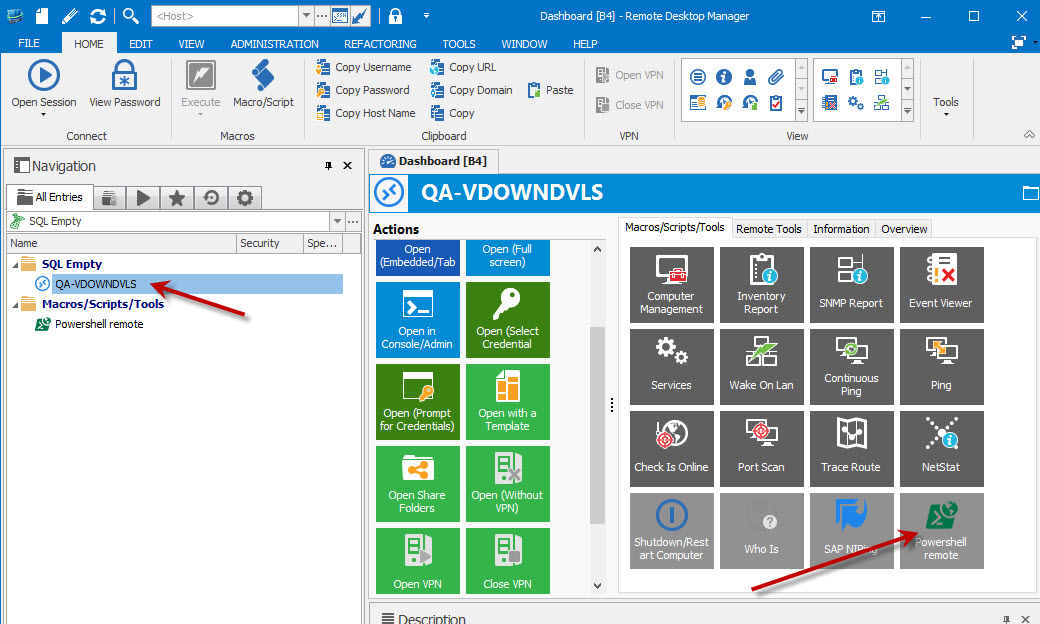
When selecting your entry to execute the remote powershell on, you should see the powershell entry in the dashboard:
You can also access the remote powershell in the context menu of the entry > Macro / script / Tools, then select your remote powershell.
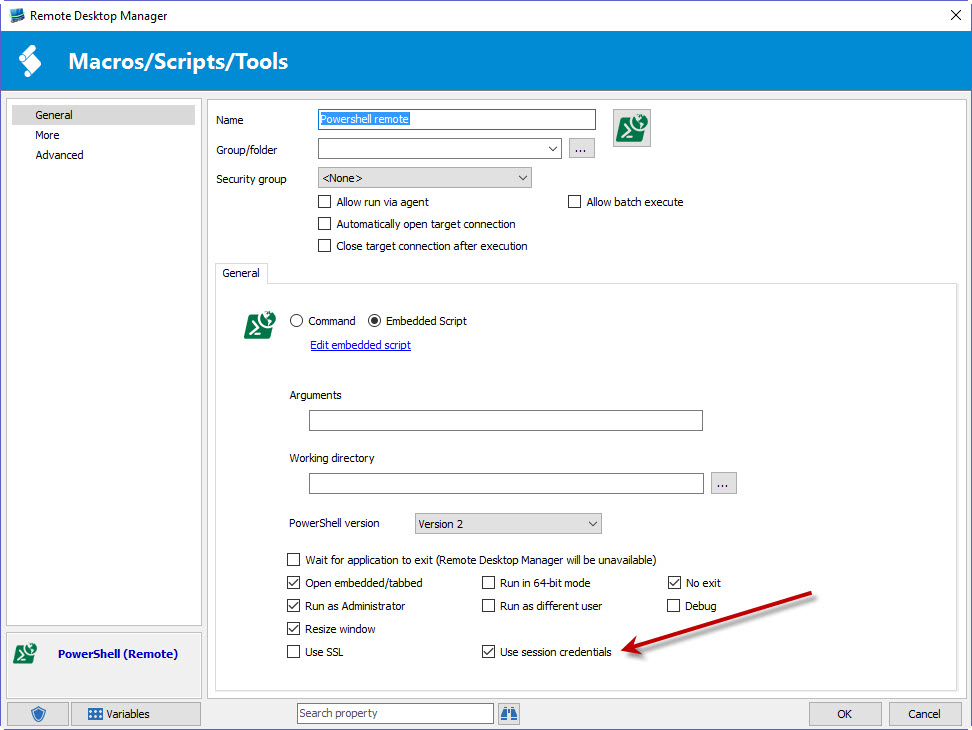
In the remote powershell you must specify the "use session credentials" option:
When executing the remote powershell on the entry, it should use its host, username, domain and password.
Is this what you are trying to do? If not, we might require a few screenshots or a small video of your issue. Thank you!
Regards,
Hubert Mireault
2016-06-16 13-19-24.jpg
2016-06-16 13-18-45.jpg
