RDM 11.1.15 Beta error in database upgrade

Hello.
I've upgraded to 11.1.15 Beta version. When I start RDM again, it tells me that it needs to do a database upgrade, but this upgrade crash with an error: "Incorrect syntax near the keyword 'where'".
Fortunately, I've ran RDM from another machine with an older version installed and everything is OK in the database.
Solution: Uninstall last beta version and install an older version? Or are you working on a "fast fix"?
Thanks in advance.
Regards,
Héctor
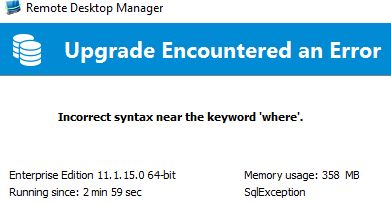
RDM_Upgrade_Database_Error.jpg
All Comments (9)
Hello,
From that version latest version, could you go in File - Data Sources - edit your data source - Advanced tab and click the button to send the schema to support please.
Let us know when it's done.
Best regards,
Jeff Dagenais
Hello,
I just saw that you have send us your schema.
I will foward it to our engineering department and get back to you.
Best regards,
Jeff Dagenais
Hi,
What version exactly were using before?
David Hervieux
Hi,
Sorry, I don't remember the version exactly... oh, yes, I had not have "beta versions" checked to upgrades, so I think I would have the latest "stable version".
Regards,
Héctor
What version of SQL Server are you using?
Regards,
Stéfane Lavergne
You can get around the issue by un-checking "Allow beta database upgrade" from File -> Data Source -> Edit -> Advanced (tab).
The issue will be resolved in the next build.
Best regards,
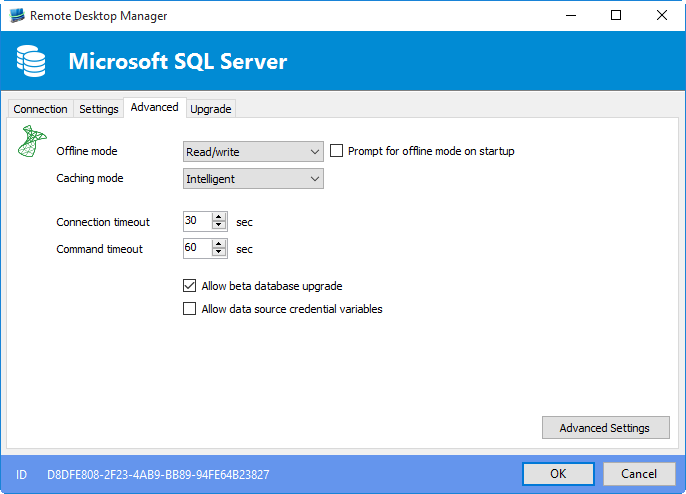
Stéfane Lavergne
4-27-2016 8-16-39 AM.png
We are using SQL Server 2005 Enterprise Edition.
I've tried to apply the workaround but all options are greyed out; perhaps because RDM disconnects the session from the database when it can't apply the upgrade?
Regards,
Héctor
If you edit the datasource you will be able to un-check it.
Regards,
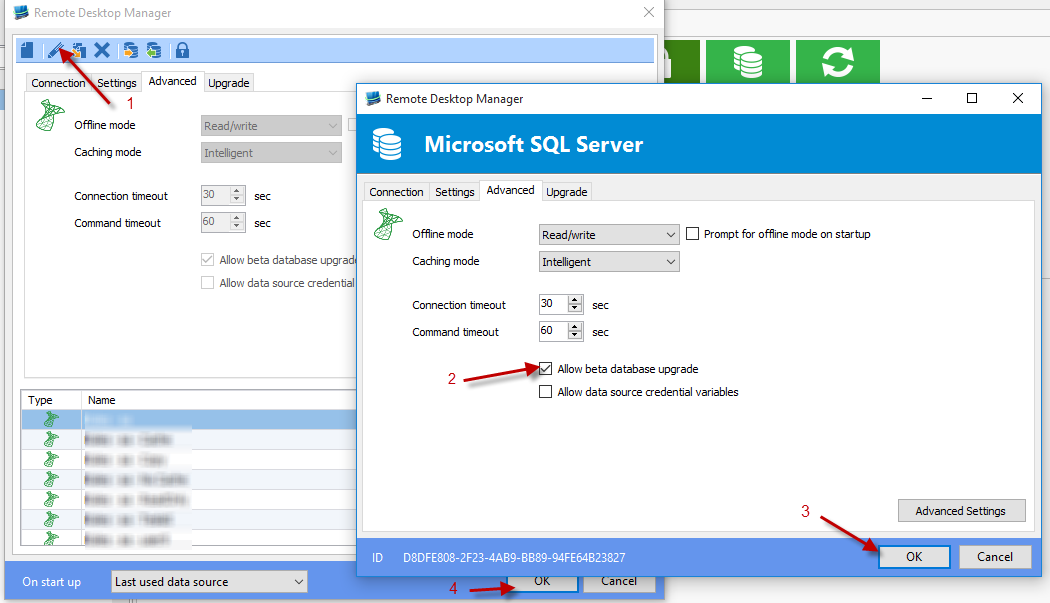
Stéfane Lavergne
4-27-2016 8-58-07 AM.png
Jajaja, ejem ejem... sorry, sorry, it is so obvious that I blush for that question.
Thanks!