Access-Rights Problem

Hello,
I have setup RDM (11.1.14.0) in combination with Devolutios Server 3.1.0.0.
I have defined several roles with the AD groups and want to manage them outside DVLS with the AD groups.
ADGroup1 <> User1
ADGroup1 <> Role1
Role1 <> SecurityGroup1 <> FolderGroup1 (means, Role1 and Foldergroup1 are in the same Security group).
ADGroup1 has read, write, delete permissions in the SecurityGroup1, but not at the top level of the structure.
Now my problem: If I login with User1, I cannot see the folders that I associated with the security group.
If I assign administrator priviledges to the ADGroup1, the user can see everything.
Did I miss something in my configuration?
Regards,
Georg
All Comments (3)
Have sent some screenshots to Stefane Lavergne.
Thanks for the help!
Another thing I've seen: When I log in with Devolutions Server, I see everything I expect. So my config cannot be so wrong...
Hello,
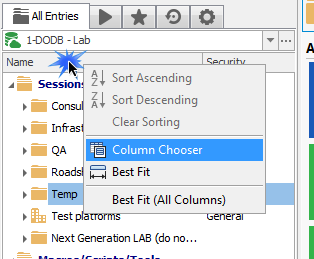
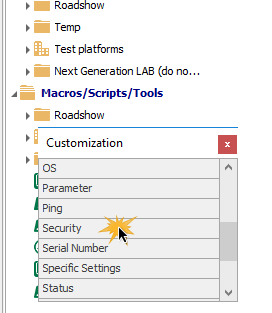
First a trick, add the Security column in your tree view by right-clicking in the Name header, then use Column Chooser, then double-click on the Security
Please use the File - My data source information report, in it there is an envelope button to send us the report.
I have gotten your screen shots but I need that information to go further.
Best regards,
Maurice
col2.png
col1.png