RDM hangs when opening sesson with Cisco Anyconnect

I'm running a fresh install of RDM ver 11.1.0.0, Cisco Anyconnect add-on version 3.0.23.0, and version 4.2.02075 of Anyconnect. After I click Open Session to create a vpn connection, RDM hangs, says not responding, and after about 30 seconds, the command prompt finally appears then immediately disappears and the connection seems to never even start. I've reinstalled both the add-in and the anyconnect client. I've confirmed the install path C:\Program Files (x86)\Cisco\Cisco AnyConnect Secure Mobility Client and it says "Application is Ready". What could be the issue?
All Comments (9)
Hello,
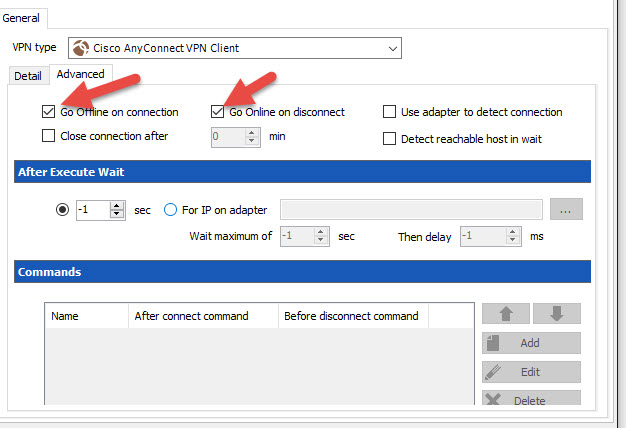
Could you try to check the Go offline on connection and Go online on disconnect options in the Advanced tab of the properties of the VPN entry
Best regards,
Jeff Dagenais
2016-03-31_15-52-00.jpg
Hi Jean-François. Thanks for helping! Unfortunately, after making these changes, I'm experiencing the same result.
Hello,
Could you give a try to RDM 11.1.11.0. You can download this version here
http://remotedesktopmanager.com/Home/Download#beta
Best regards,
Jeff Dagenais
Thanks again, Jean-François! However, I'm still experiencing the same issue with 11.1.11.0....
Hello,
Could you post a small video of the issue. You can click on Help -> Record to record your video.
Best regards,
Jeff Dagenais

RDMissue.mp4
Hello,
Could you export your session in a Local Data Source like SQLite or XML and try it from that data source please.
I would like to see if it's related to your Devolutions Server data source or not.
Best regards,
Jeff Dagenais
One thing to point out Jean-François, is that other members of our team are not having this issue... Only Travis.
Looks like it was having permissions issues killing processes. Even though I'm a local admin, I still have to run it as administrator for this to work...
Thanks for your help Jean-François!