Error installing 11.1.1.0 BETA

I've downloaded the 11.1.1.0 BETA multiple times. I receive an invalid signature error with the download (see attached image). I've received that error with previous downloads and run the install without issue. However, this time (with 11.1.1.0), I am not able to install it. I receive an error that the file is corrupt (see other attached image).
The error in the log is:
MSI (s) (B8:60) [10:16:27:301]: SECREPAIR: Failed to open the file:C:\Users\<username>\AppData\Roaming\Devolutions inc\Remote Desktop Manager\install\disk1.cab for computing its hash. Error:2
MSI (s) (B8:60) [10:16:27:301]: SECUREREPAIR: Failed to CreateContentHash of the file: disk1.cab: for computing its hash. Error: 2

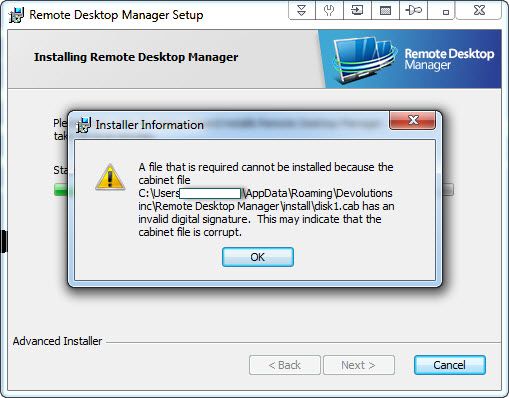
RDM 11.1.1.0 install issue.jpg
RDM 11.1.1.0 idownload issue.jpg
All Comments (13)
I know that Microsoft has changed the way application are signed. We are waiting for a new code signing. This use to work but seems that it no longer is the case. Could you try the zip file? I'm working on it right now.
Regards
David Hervieux
Sure, can you send me the link? Would the MSI work also?
Thanks
Hello,
Here the link to download the zip of RDM 11.1.1.0
http://cdn2.devolutions.net/download/Devolutions.RemoteDesktopManager.Bin.11.1.1.0.zip
Best regards,
Jeff Dagenais
Downloaded and installed. Launches OK (haven't tried it yet). Noticed that the Favorites isn't shown in groups any longer. Guess I need to find how to put it back into groups (i.e., organized by folders)?
But I copied 11.1.1.0 over and it seems OK. Not sure if that will impact future upgrades or not (since I didn't use the Windows Installer this time)?
Thanks for your help and quick response (as always)!!
I will verify the problem with the group in favourite. For the installer we requested a new certificate 2 weeks ago and it seems that they decided to revoke our current one before sending us the new code signing certificate. I'm waiting for the new one right now.
David Hervieux
Hello,
You can now install RDM 11.1.2.0 properly from our website
http://remotedesktopmanager.com/Home/Download#beta
Best regards,
Jeff Dagenais
RDM BETA 11.1.2.0 downloaded without an issue and installed successfully. Good work and thank you!!
All I have to figure out now is the Favorites issue. They still appear as a "List" and ungrouped. Previously (pre-11.1.1.0), they were much smaller icons and they were grouped based on their group folder. Now, they are larger (and scroll off the screen) and even though they are still sorted based on group folder, the group folder name doesn't show.
Thanks again
Hello,
I know how to fix it. It's simple property in the UI but this crash the application. I'm working with the third party to find the problem.
David Hervieux
Thanks for the update (11.1.3.0 BETA). Downloaded and installed OK and the Favorites now show the group folder name, but it shows the name for each favorite entry (so the list is much larger now - before it grouped them together and only showed the group folder name once). Plus (for me), selecting "list" doesn't place them in a list (up and down) but in a list (across). I have to scroll left/right to select entries now. If I select tile, details or large icons, the favorites show vertically. Selecting "list" shows the favorites horizontally.
Thanks
Hi,
I was able to fix the issue with the group but I'm not sure that I will be able to fix the List mode problem. Could you verify if the detail view is ok for you in the next beta with the group fixes.
David Hervieux
Much better, larger font than it was originally, but I like it. Works for me - thank you!!
Thank you for you feedback. I will verify what I can do for the font size.
David Hervieux
Thanks - if you can, that is great otherwise no worries. The larger font is OK.