Colors and Themes

Hi,
i have Green as color for a specific group of Servers, i switched to "Office 2016 (Dark)" theme
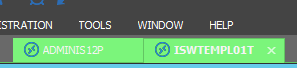
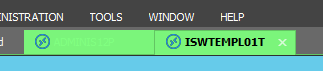
The checkbox "Use entry Color as Tab Text" has two funcionalities:
Unchecked - white on Light green:
checked - light green on light green:
Version 11.0.20.0
Capture_2016-01-18_15-08-08.png
Capture_2016-01-18_15-06-21.png
All Comments (12)
I have entered a bug. Thank you
David Hervieux
Version 11.5.4.0
is not MUCH better
Capture_2016-05-31_14-47-48.png
Capture_2016-05-31_10-36-04.png
Capture_2016-05-31_10-56-58.png
Hello Peter,
Just to be sure do you use the default colors?
David Hervieux
Well, we use custom Sesstion type colors (green,...)
How do i change other colors?
Dark Office Theme: Dashboard Tab Backgroupd is light grey, Text is white.
Hello Peter,
You will be happy to learn that the next version will have fix for that.
David Hervieux
Just a quick note, this is not included in RDM 11.5.5.0 but the next one
Regards
David Hervieux
Looking forward...
Not much better...
Capture_2016-08-22_14-09-42.png
Capture_2016-08-22_14-06-02.png
Just to be sure in the first screen shot it's when the dash board is selected? The second one is ok, isn't?
Regards
David Hervieux
Yes.
No - the Closing X should be visible (green on green, white on light gray). The second connection is totally white without green - which would be the session color.
Capture_2016-08-22_14-23-24.png
You're right for X. I'm not sure if I can change this in the Third Party we use. I haven't seen a property for that. I will double check.
Regards
David Hervieux
Hello Peter,
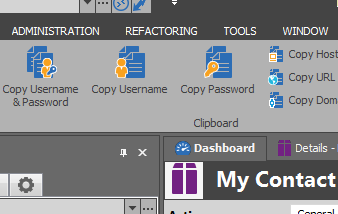
I'm unable to reproduce the issue with the Dashboard. It's dark for me
David Hervieux
DashboardColor.png