Rebex SSH - XML error - not working

Since some weeks, when starting a ssh connection (type SSH rebex) I receive an error:
Unable to connect verify your settings
There is an error in XML document (7,26)
This is for all my SSH connection with Rebex.
This impact also new connection.
As workaround I've to change the connection back to Putty ssh and then it work
Can you help me to solve that ?
All Comments (8)
Hello Jacques,
Is it possible to send us a sample of a connection that fails?
David Hervieux
Hello,
I'm unsure the format of the connection you expect or the way to share connection information.
export csv:
ConnectionType,ConnectionSubType,SubMode,Name,Group,Description,Expiration,Parent,Host,Port,CredentialUserName,CredentialDomain,CredentialPassword
Putty (Telnet, SSH, RAW, rLogin),,2,myhostname,MyNetwork,,,,myhostname,22,,,
export xml:
<?xml version="1.0"?>
<ArrayOfConnection>
<Connection>
<Events />
<MetaInformation />
<Putty>
<ColorScheme>Custom</ColorScheme>
<FontName>Consolas</FontName>
<HistoryMaxLength>2560</HistoryMaxLength>
<Host>myhostname</Host>
<LoginIdString>Username: </LoginIdString>
<PasswordIdString>Password: </PasswordIdString>
<Port>22</Port>
<PortFowardingArray />
<ProtocolType>Telnet</ProtocolType>
<Scripting />
<TelnetEncoding>IBM437</TelnetEncoding>
<UseSession>false</UseSession>
</Putty>
<ConnectionType>Putty</ConnectionType>
<Group>MyNetwork</Group>
<ID>bc4b6f90-15d4-4d7c-aaf0-238f58dbf7c7</ID>
<Name>myhostname</Name>
<OpenEmbedded>true</OpenEmbedded>
<PinEmbeddedMode>False</PinEmbeddedMode>
<Stamp>7e839ab9-da77-4b2f-82b0-df5c50ed09e5</Stamp>
<SubMode>2</SubMode>
</Connection>
</ArrayOfConnection>
I'm not sure if this will help. Could you post a print screen of the error message? I want to see the context around it.
Regards
David Hervieux
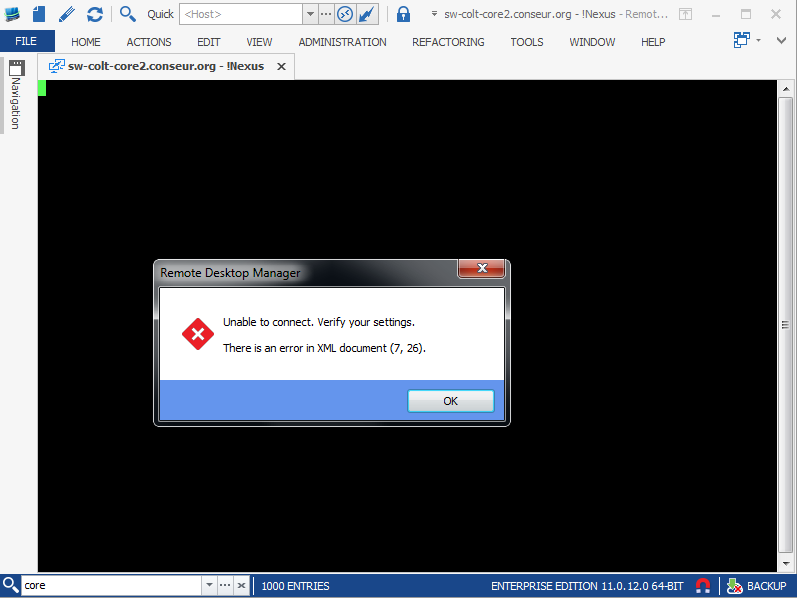
2015-12-01 14_32_59-Remote Desktop Manager.png
This is strange. Do you see anything in the application log Help->View Application Logs
David Hervieux
Hello David,
Here is the application log.
regards,
Jacques
Devolutions.RemoteDesktopManager.Business.XmlDeserializationException: There is an error in XML document (7, 26). ---> System.InvalidOperationException: There is an error in XML document (7, 26). ---> System.Xml.XmlException: There are multiple root elements. Line 7, position 26.
at System.Xml.XmlTextReaderImpl.Throw(String res, String arg)
at System.Xml.XmlTextReaderImpl.ParseDocumentContent()
at System.Xml.XmlReader.ReadEndElement()
at Microsoft.Xml.Serialization.GeneratedAssembly.XmlSerializationReaderSSHFingerprintArray.Read3_ArrayOfSSHFingerprint()
--- End of inner exception stack trace ---
at System.Xml.Serialization.XmlSerializer.Deserialize(XmlReader xmlReader, String encodingStyle, XmlDeserializationEvents events)
at System.Xml.Serialization.XmlSerializer.Deserialize(XmlReader xmlReader, String encodingStyle)
at Devolutions.RemoteDesktopManager.Managers.SerializationManager.LoadObjectFromString(String str, Type type, Boolean createAnInstanceIfNotExists, String nameSpace)
--- End of inner exception stack trace ---
at Devolutions.RemoteDesktopManager.Managers.SerializationManager.LoadObjectFromString(String str, Type type, Boolean createAnInstanceIfNotExists, String nameSpace)
at Devolutions.RemoteDesktopManager.Managers.SerializationManager.LoadObjectFromFile(String fileName, Type type, Boolean createAnInstanceIfNotExists)
at Devolutions.RemoteDesktopManager.Business.RebexHelper.c6fda85441cd1372033696c24d4a98a53()
at Devolutions.RemoteDesktopManager.Business.RebexHelper.c3ea102ae3fd59066073b49ea4da11ce7(String c6c6ee05d65df4107fd526f602a4a781c)
at Devolutions.RemoteDesktopManager.Business.RebexHelper.CheckFingerprint(String host, String fingerprint)
at Devolutions.RemoteDesktopManager.Frames.Embedded.FreEmbeddedSshShell.Connect()
Thanks the SSH fingerprints file was indeed the blocking factor.
Now it's working back.
Thanks for the feedback! I'm not sure why it happened but we'll keep an eye out.
For anyone who is looking for a fix to this, I told Jacques to delete his SSHFingerprints.xml file located in %LocalAppData%\Devolutions\RemoteDesktopManager since it seemed to be corrupted and causing the issue, and it worked.
Regards,
Hubert Mireault