Script with an interactive input variable

Hi%2C%20is%20there%20a%20way%20to%20create%20a%20script%20that%20can%20take%20a%20variable%20from%20the%20user%20input%20during%20the%20script%20execution%3F%3Cdiv%3EI%20mean%20something%20like%20the%20script%20below%2C%20where%20%25SoftwareName%25%20is%20the%26nbsp%3Binteractive%20input%20of%20the%20RDM%27s%20user.%3C/div%3E%3Cdiv%3ELet%27s%20assume%20the%20working%20directory%20contains%20several%20subfolders%20and%20every%20subfolder%20contains%20an%20install%20script%20named%20%22install.cmd%22%20and%20all%20the%20stuff%20for%20the%20installation%20%28exe%2C%20ini%2C%20inf%2C%20and%20other%20files%29%3C/div%3E%3Cdiv%3E%3Cbr%3E%3C/div%3E%3Cdiv%3E%5Bquote%3D%5D%25comspec%25%20/q%20/c%20color%20f5%20%26amp%3B%20prompt%20%23%20%26amp%3B%20echo.%20%26amp%3B%20dir%20/B%20%26amp%3B%20echo.%20%26amp%3B%20echo%20Which%20software%20you%20want%20to%20install%3F%20%26amp%3B%20echo%20set%20/p%20SoftwareName%3D%20%26amp%3B%20xcopy%20/I%20/Y%20%25SoftwareName%25%5C*.*%20%5C%5C%24HOST%24%5Cc%24%5Clog%5C%25SoftwareName%25%20%26amp%3B%20cmd%20/k%20psexec%20%5C%5C%24HOST%24%20-c%20-f%20install.cmd%20%26amp%3B%20cmd%20/k%20exit%5B/quote%5D%3C/div%3E%3Cdiv%3E%3Cbr%3E%3C/div%3E%3Cdiv%3EThank%20you%3C/div%3E%3Cdiv%3EGiuseppe%3C/div%3E
All Comments (11)
Hi, is there a way to create a script that can take a variable from the user input during the script execution?
I mean something like the script below, where %SoftwareName% is the interactive input of the RDM's user.
Let's assume the working directory contains several subfolders and every subfolder contains an install script named "install.cmd" and all the stuff for the installation (exe, ini, inf, and other files)
Hello,
You must use the Command Line entry type. The third tab is called parameters. You define a parameter and use it in the command line by putting its position number in Ampersands -> {1}
At run time you will be prompted for its value, you can even set a default value.
Best regards,
Maurice
Hi, I'm sorry, I don't see the tab "parameters"
I use the Command Line entry type but I see three tabs: General, More, Advanced
None contains the field parameters.
In the tab "General", I only see Name, Group/Folder, Run, Set Working Dir, Execution Mode, ...
In the tab "More", description, miscellaneous
In the tab "Advanced", Miscellaneous (sort priority) and IDs.
i'm using version 10.0.4.0
doesn't it look like this?
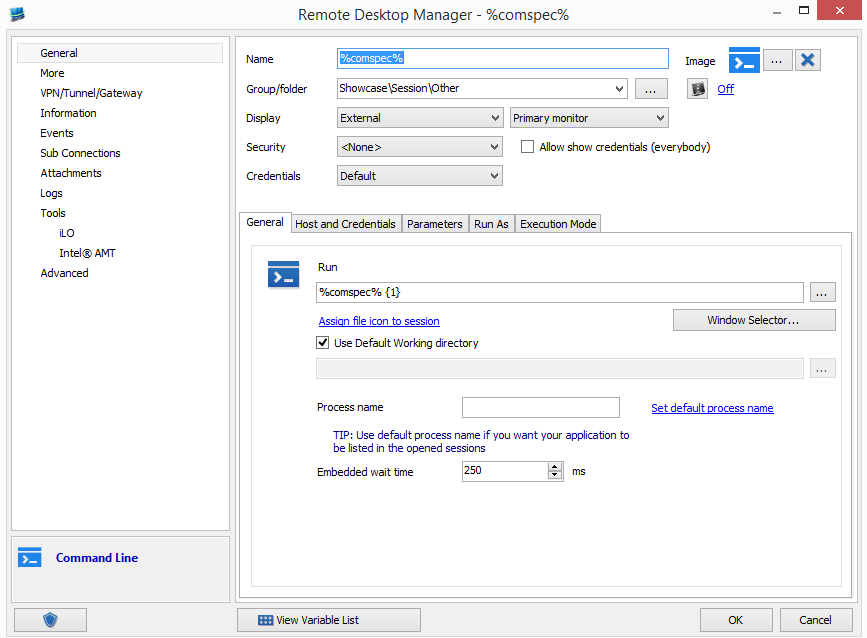
Maurice
2014-11-10_11-34-22.png
i think that you are using the Command line from the Macros/Scripts/Tools section, that is not the proper choice for your scenario.
Macros/Scripts/Tools are meant to be run against a host that is already defined in a session.
Maurice
OK I see that but I'm trying to add a script valid for EVERY already defined session, not just a command line session on a specified host
I'm in the path: Add > Macro/Script/Tool > Command Line
Thank you Maurice for the quick replies!
Unfortunately, the better choice for me would be adding a script to be run against an already defined host.
I hope you could take into consideration adding the tab "parameters" to "Macros/Scripts/Tools" section too in a future release....
Bye,
Giuseppe
This is exactly what you will get. The macro script tool are listed in the dashboard and you will be able to execute it on an existing session. Just make sure to use the variable $HOST$ in the command line if you need the name. You can find some example in Tools->Macro Script Tool Manager
David Hervieux
Hi David, I don't need a "hostname" variable, I need to be PROMPTED by the script for an INPUT variable.
In my case the input variable is the name of a software, %SoftwareName%, to be remotely installed, taken from a list of possible choices.
As Maurice says, at the moment this is only possibile by creating a "session" script, because a script created in "Macro/Script/Tools" section has no "parameters" field.
But I want to do that from a script from the "Marco/Script/Tools" section, because such type of script is more immediate to use and to manage (1 script instead of many duplicated subsession scripts).
In my case, I solved the problem with a workaround:
1) I created a Command Line script from the "Marco/Script/Tools" section
2) in the "Run" field, i put this string:
%comspec% /q /c set REMOTEHOST=$HOST$ & rdm.cmd & ... etc etc
3) in this way i export the $HOST$ variable to variable that will be used into my bacth (rdm.cmd), then my batch makes the job by prompting me for the input variable (set /p SoftwareName=)
Thanks.
Bye,
Giuseppe
I will enter a feature request to add the parameters for the Command line in the macro script tools.
David Hervieux