Retrieving credentials for Session Tool Addon

Is there a way I can get the credentials for an RDP connection in a session tool addon?
I can get the password with session.GetProperty("RDP", "SafePassword") however this is encrypted, is there a way I can decrypt this?
All Comments (15)
session.GetPassword() should do the trick. Password, UserName & domain are special, you can't access them with GetProperty(...)
Stéfane Lavergne
There doesn't seem to be a GetPassword for ISession?
There is SetPassword, but not Get.
They were introduced in ISessionAddOn4. Try casting it as such
Stéfane Lavergne
That would work for a session addon but I am trying to create a session tool addon using BaseSessionToolAddon2.
I will have to double check with David
Stéfane Lavergne
After discussion with David, we have a solution but it will need to be implement.
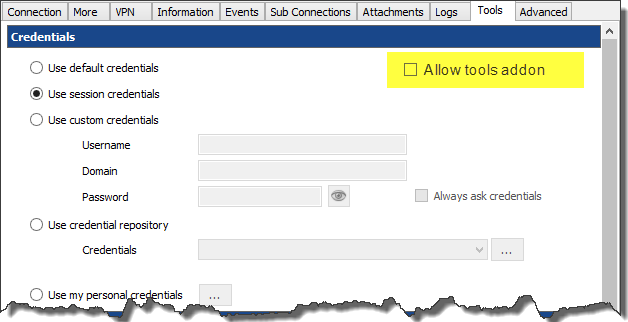
Since sending the credentials to a tools addon might be a security risk we will added an "Allow tools addon" check box on session's "Tools" tab, something like this:
We will then define the ISession3 interface that will introduce a method called "GetToolsCredentials", this will return the username/password/domain of the session.
ETA end of the week.
Regards,
Stéfane Lavergne
6-2-2014 8-16-20 AM.png
Sounds good to me, thanks for your help and the quick response.
The code is done, it will be in the next beta build.
new interface (version 3), you can cast any ISession to ISession3public interface ISession3 : ISession2 { SessionToolsCredential GetSessionToolsCredential(); }
The result looks like thispublic class SessionToolsCredential { public string UserName { get; set; } public string Password { get; set; } public string Domain { get; set; } }
What we are actually returning here are the resolved tools credentials. (see here for more info)
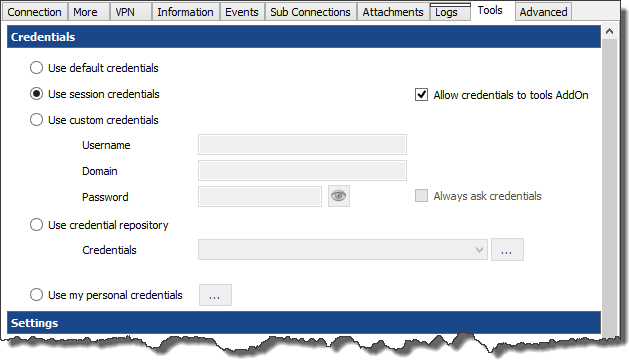
Note: the result can/will be null. If the "Allow addon" isn't checked for example or if the session is set to use the default tools credentials.
Example, use the same credentials as the session, with "allow addon"
Regards,
Stéfane Lavergne
6-3-2014 2-47-59 PM.png
The build is ready download from here:
http://remotedesktopmanager.com/Home/Download#beta
Regards,
Stéfane Lavergne
Thanks, I will try it out and let you know if I have any issues.
I have tested this out and it seems to be working, thanks again.
I have ran into another issue when turning on SupportMultiSelect, the controls I return do not show up in embedded tabs.
Here is the code:
If I set it back to false then it works without issue, I have checked and it definitely is returning an array with ToolExecuteResults in it.
I am doing something wrong here?
I will ask André to test it on Monday. It's not working today
David Hervieux
Hi,
I have checked and it seem to work only for non-visual result. I will work on that.
David Hervieux
This is now fixed in the latest beta 9.4.6.0
David Hervieux
I have tested the beta and it is working, thanks for your help.