RDM 2019.1 bugs

Hello,
A couple small bugs I noticed in the latest beta:

All Comments (116)
This is a know issue. Thank you
Regards
David Hervieux
Hello,
About your ticket, I'm not fully sure why it was closed, I will have a new ticket open for that a notify you on where the bug is directly on the ticket, sorry about the inconvenience.
Best Regards,
Etienne Lord
Thanks!
Is this a bug or expected behavior? When using the advanced search within the navigation tree, WaykNow is missing as a connection type. I have a number of WaykNow connections in the database, however they are all child entries of RDP connections.
@glaza That's a bug, Good catch!
Indeed if a type are only subconnection, the advance search won't be able to find it. Adding a wayk connection ( not as sub-connection ) should reveal all the wayk connection type in the advance search for a temporary workaround.
Thanks for reporting this, it should be easy to fix.
Best regards,
Alexandre Roy
Adding another possible bug...
The colored borders around an open session appear to be stuck at 1 pixel, despite being set to 5, or anything else. I'm using the black theme.

However, when the session is opening and it 'flickers' I can briefly see the desired border width. I've closed / re-opened RDM several times, and changed the border thickness multiple times.
Thank you. I have fixed the border issue.
Regards
David Hervieux
nevermind my last post (2.6.19). user error...
How can I activate session recording in beta version? I want to record only active *.rdp session not the whole window of application.
The recording is included in the beta but only with SQL Server data source. The next beta will enable it for all data sources.
Regards
David Hervieux
Thanks for your answer. How can I configure it to record only window of active *.rpd session and not the whole app window?
Is this a graphical artefact or intended?:


Yes indeed, these are graphic artifacts. One has already been fixed and will be available in the next version. But there is one that went unnoticed until now. I'll fix this right away and it should be available in the next version too.
Regards.
Denis Vincent
Thank you Denis.
Hello Martin,
The issue where entry types only found as sub connections in your tree wouldn't appear in the "Connection type" combobox of an advanced search should be fixed starting from the next version of RDM.
Regards,
Michaël Beaudin
Thank you!
Hello @Martin-GLAZE,
The advance search issue is now fixed internally and will be available in the next release.
Regards,
Alexandre Roy
Thanks Alexandre.
Two new bugs in 2019.1.6.0:

ArgumentException - The path is not of a legal form.
at System.IO.Path.NormalizePath(String path, Boolean fullCheck, Int32 maxPathLength, Boolean expandShortPaths)
at System.IO.Path.InternalGetDirectoryName(String path)
at Devolutions.RemoteDesktopManager.Managers.WaykManager.InitLog()
at Devolutions.RemoteDesktopManager.Business.Connectors.EmbeddedWaykConnector.CreateFrame(EmbededConnectionResult result)
at Devolutions.RemoteDesktopManager.Business.Connectors.EmbeddedConnector.Connect(Connection connection, OpenConnectionMode openConnectionMode)
at Devolutions.RemoteDesktopManager.Managers.ConnectionManager.OpenConnection(Connection connection, OpenConnectionParameter parameter)
at Devolutions.RemoteDesktopManager.Managers.ConnectionManager.OpenConnections(Connection[] connectionList, OpenConnectionParameter parameter)
at Devolutions.RemoteDesktopManager.Managers.ActionManager.c2d3a897d165d9e56a0d53f388986ac51(Connection[] cfabc0254f46d7d8ae5a71db9e5a0b5b5, OpenConnectionMode c602973c05c2f5870e41c508b048b13c5, IConnectionSource c5b7a41272702648f46cf77ee6b3a92cb)
at Devolutions.RemoteDesktopManager.Managers.ActionManager.OpenConnections(OpenConnectionMode openConnectionMode, IConnectionSource source, Boolean checkOpenedConnection)
at Devolutions.RemoteDesktopManager.Managers.SessionMenuManager.c552f6de7933b91b08a4107f7410f30d0(Object c19f185fd70cefc696ba148af1c4faf54, EventArgs cf1018bb83ec7debd818319fd3cb4844e)
at System.Windows.Forms.ToolStripItem.RaiseEvent(Object key, EventArgs e)
at System.Windows.Forms.ToolStripMenuItem.OnClick(EventArgs e)
at System.Windows.Forms.ToolStripItem.HandleClick(EventArgs e)
at System.Windows.Forms.ToolStripItem.HandleMouseUp(MouseEventArgs e)
at System.Windows.Forms.ToolStrip.OnMouseUp(MouseEventArgs mea)
at System.Windows.Forms.ToolStripDropDown.OnMouseUp(MouseEventArgs mea)
at System.Windows.Forms.Control.WmMouseUp(Message& m, MouseButtons button, Int32 clicks)
at System.Windows.Forms.Control.WndProc(Message& m)
at System.Windows.Forms.ToolStrip.WndProc(Message& m)
at System.Windows.Forms.ToolStripDropDown.WndProc(Message& m)
at System.Windows.Forms.NativeWindow.Callback(IntPtr hWnd, Int32 msg, IntPtr wparam, IntPtr lparam)
The second error is a small visual bug:

Additionally, attempting a Wayk Now connection from the quick-connect title bar item results in this error, for any connection:
Hi, we made some changes, the wayk now issue should be fixed in the next patch.
Regards,
Samuel Baker
Thanks Samuel!
I've been able to do something for the arrows:
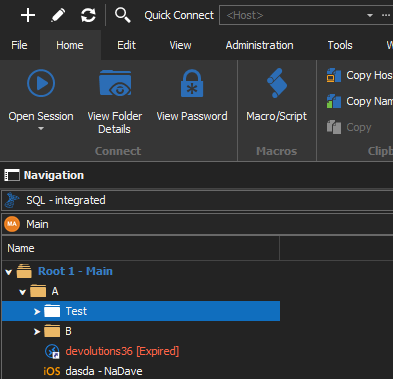
David Hervieux
ArrowBlack.png
Hi,
About your quick connect issue. Do you use a Wayk Now template? If so make sure the Power On Mode is set to "None" in the Events/Before Connect tab or that the MAC Address is correct in the Information tab.
Regards,
Samuel Baker
@David - thank you.
@Samuel - I am using a template. Since I am getting that error when I launch the connection from the 'Quick Connect' object, does that mean by default it uses the relevant template if one exists? How does it prioritize?
The upper templates are empty templates with default empty values. If you only need an IP and password to connect you can use this. If you really need the template you can remove the Wake on LAN option from the template.
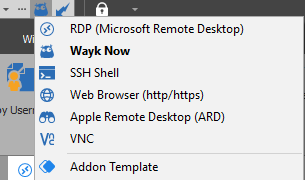
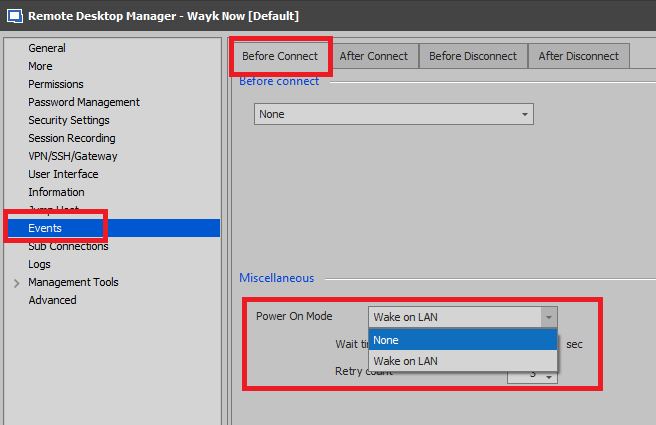
Samuel Baker
WOL.png
QuickConnect.png
When I am using the Wayk Now quickconnect feature, how do I choose which template it uses? I am using a template to build new Wayk Now entries, but am not deliberately using a template when I use quickconnect, so I don't know why or how it is choosing one of the two templates I have.
Nonetheless, I changed the Power On Mode option as you suggested and the error persists.
You may be aware of this already, but a number of entries appear like so while using the black theme:
@Martin
This is an add-on? We have to rework the add-on UI to support the black theme.
Regards
David Hervieux
It is - sorry for not mentioning that. Thanks David.
some weird graphical artifacts in 2019.1.9.0 / text getting cut off.
Hello,
I've made some fixes for that.
Thank you.
Regards
David Hervieux
I'm having an issue in 2019.1.9.0 where the entire interface locks. I can still work within the RDP session with the current focus, but nothing else works. I have to open Task Manager and force Remote Desktop Manager closed and open it new. I've had this happen 3 times in the last 30 minutes.
@zim2323,
Do you have something relevant in Help -> Application Logs?
Do you have something in Event Viewer regarding those locks?
Best regards,
Jeff Dagenais
Yes!
I have the following in 6 separate events from today. Listed as type "Error Silent".
System.Reflection.ReflectionTypeLoadException: Unable to load one or more of the requested types. Retrieve the LoaderExceptions property for more information.
at System.Reflection.RuntimeModule.GetTypes(RuntimeModule module)
at System.Reflection.Assembly.GetTypes()
at Devolutions.RemoteDesktopManager.Managers.AddOnManager.Load()
I've also noted that I only seem to get these locks when opening more than 1 RDP session. I've had a single session open for several hours without issue so far.
Thanks!
Chris
@zim2323,
Are your RDP session embedded or Undocked in a separate window?
Regards,
Alexandre Roy
Always embedded.
@Zim2323
Just a quick question, which version did you update RDM from and which theme were you using before?
regards,
Alexandre Roy
Upgraded from 14.1.3.
Theme is same I've used for the last 3-4 years. Default - Light
@zim2323,
I've reproduced the issue you have but in a different scenario, if you uncheck the option *Use Manual tab activation* in File > Option > Advance, It might just solve your issue.
Regards,
Alexandre Roy
This change seems to have worked. I'll continue to test and if there are any additional issues I will report back.
the message box is to small at least for the german text.
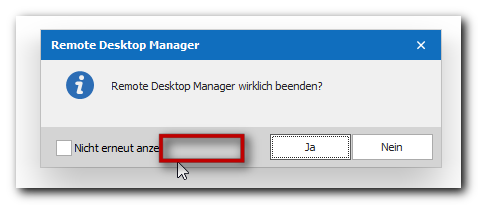
gs01327.png
Thank you. This is now fixed internally.
David Hervieux
Here's the About screen on 2019.1.11.0:
This is strange. It was supposed to be fixed. I will double check what could be the problem.
Regards
David Hervieux
Really strange - here is everything fine:
Regards,
Min
@Min
I pushed a fix in the meantime :)
David Hervieux
@Alexandre Roy
I have had another hard lockup of RDM this morning. I upgraded to 2019.1.11.0 prior to this issue. I have been working fine with multiple embedded RDP sessions open until this mornings update. I verified that Manual Tab Creation is still checked in Advanced settings.
Chris
@Zim2323
So the option reactivated after the update ? if so we're gonna correct that for the next update.
Regards,
Alexandre Roy
@Alexandre
No, options stayed activated through upgrade. You had me enable that option, which seemed to help until the latest update. I have had 2 more lockups since my last msg.
@Zim2323
I think we misunderstood each other, I assumed the option was *Checked*, so I asked you to uncheck it. I guess that did not fixed the issue after all...
Sorry I should have been more clear.
I'll keep investigating.
Regards,
Alexandre Roy
@Alexandre
Ah, sorry I misunderstood. I'll uncheck and see if that helps in this newer version.
The issues with the 'About' screen appear to be resolved in 2019.1.12.0 and the UI issues with the add-ons interface.
Hi,
i have many issues with all 2019.1 Beta Versions:
- SSH is very slow every Keystroke have 1 second delay ( can only use putty as SSH Session without issues).
- active Agent-Key / Agent Forwarding and Setting Repository Credentials in a SSH Shell Sessions i got an error and i cant connect (unknown Error Disconnecting). If i remove Agent Settings in the Session, Login is possible
- In Rebex SSH every Key-Stroke will show 2 times ( Type "htop" on the terminal i see "hhttoopp" but with ENTER htop is running), and is also slow..
The most Settings are default
in 14.X all is working.
Done:
- reset RDM
- create new sessions
- Test on another computer
same behavior
Regards,
Sebastian Mendyka
@systemadministration,
Could you test an option for us please. If you go in File -> Options -> Types -> Terminal and check the Use Legacy Terminal option, is it like in RDM 14?
Best regards,
Jeff Dagenais
@Alexandre
I am now seeing intermittent lockups with only a single embedded RDP session open. I have tested on 2019.1.11 and 2019.1.12. I've tried with manual tab activation both on and off. Definitely worse with it CHECKED.
Chris
@Zim2323
I'm sorry to hear that, I personally did not encounter the issue yet. Could you send me your remotedesktopmanager.cfg file at aroy@devolutions.net?
Follow these instruction before sending it to me. https://help.remotedesktopmanager.com/howto_configurationfile.htm
I want to reproduce this issue as fast as possible to get it fixed.
Regards,
Alexandre Roy
Thanks, yes all is working now like RDM 14
@systemadministration,
I had a chat with our engineering department and we would like to test something for us if possible.
Please note that you would need to unchecked the Use Legacy Terminal option in File -> Options to accomplish this.
Firstly, we would like you to enable the Verbose option and Enable Logging option in the Advanced tab of your SSH Shell session.
When this is done, could you reproduce the slowness connection issue. Then, send us the logs please.
Secondly, could you enable the same settings for the ssh session that is falling with the agent settings and for the connection that is working without agent setting.
Then, send us the logs please.
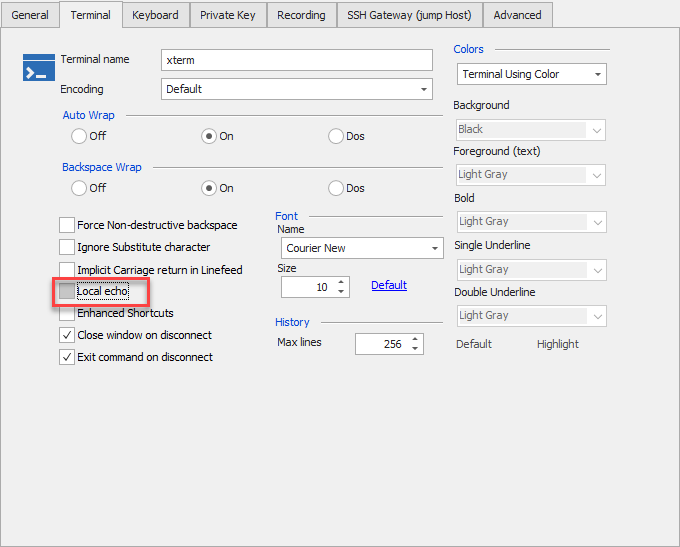
In conclusion, for SSH Shell Rebex issue, is it possible that the Local Echo option is set to On? Could you uncheck it?
Best regards,
Jeff Dagenais
2019-04-02_11-22-03.png
@Jeff
okay i think i have found the Problem. The new Terminal reacts differently to the old one:
- New Terminal: SSH Agent Setting + Agent Forwarding setting active, but selected valid Repository Credentials = SSH disconnect error
- Old Terminal: SSH Agent Setting + Agent Forwarding setting active, but selected valid Repository Credentials = RDM use Repository Credentials
I must say: The Agent have one invalid Key, that can not work with the Testserver. All my Sessions have the Agent Settings active:
SSH Shell Rebex issue:
THanks after disable Local Echo, all is working now. Local Echo is active after convert SSH-Shell to SSH Rebex Shell.
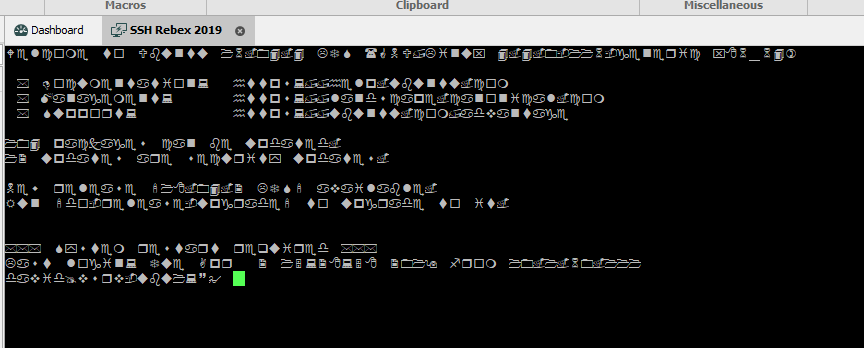
A Second Problem: in Rebex SSH i cant change Font or Font-Size in the Session Settings. I can save it, but the Session use only a unknown Font:
Screenshot: Close Session, set Windings as Font and open new Session, Font is not "Windings" 
connect.zip
Not sure if this is by design or a bug, but column settings aren't retained with the Active Directory dashboard entry. I add additional columns but if the entry is closed and re-opened, it defaults back to the two column view.
@systemadministration, thank you for the detailed post. I will analyze this with our engineering department.
@Martin_, could you post a screenshot of the issue please.
Jeff Dagenais
Here's what it looks like by default:
And here's what it looks like after adding all the columns:
It will revert back to the first example upon closing and re-opening.
@systemadministration,
Our engineering department will analyze the logs that you have attached to your post.
Regarding the SSH shell font issue, on my side, when I select Wingdings for the font name and start my SSH Shell Rebex session, I see the following:
Best regards,
Jeff Dagenais
2019-04-02_15-34-20.png
@Martin_,
I am not able to reproduce your issue on RDM 2019.1.11.0 and 2019.1.12.0.
What version of the beta are you running?
Best regards,
Jeff Dagenais
Thank your for the reply. Sorry my bad: I have set a Font In global Settings.
But what are the priority? I thought first come Session Settings, if default so global Settings?
Summary: I have only Agent / SSH Connect / sSpeed issues with the new Terminal. The old one fixed the Problem
Disregard - user error.
@systemadministration,
The settings configured in the global settings will have priority to the settings configured inside the session.
Best regards,
Jeff Dagenais
Some more text cut off in the add-on update dialog box on version 2019.1.13.0:
Receiving this error when going to 'Help>About', however it appears I am able to connect to the data source (error report sent):
Lastly, every time I open RDM, the add-on manager opens up, seemingly prompting updates to add-ons, but even after selecting everything and restarting, it asks again:
Additional note: going into the Add-On manager after RDM is opened presents a number of issues. Already installed add-ons are blue, but do not have the green checkmark, and present the option to install. If I select install, I am presented with the option to uninstall, then it repeats indefinitely. It doesn't seem to be parsing what is or is not actually installed. Selecting the 'Check for Updates' button also forces the Add-On manager window to open.
Hello Martin,
the wordwrap issue is already reported here ;)
I guess for a better overview it would be better to create seperate threads for new issues - slowly it's a bit confusing because of the many mixed / different issues in this one thread :)
Regards,
Min
OK, moving forward I'll create new threads.
Using 2019.1.13.0 64bit seeing same. SSH very very very slow. full screen repaints can take a long time, tabbing between boxes unusable.
Putty sessions work fine.
Rebex gives double characters.
Hi @pgordemer
For the Rebex double characters, just turn off the "local echo" check box in the "terminal" tab.
For the 1 second delay on key strokes, I would like it if you could send me the logs (with verbose enabled) of the connection to the server. "Advanced" tab, check "verbose", check "enable logging", "log mode" set to "event".
I also have a few questions:
If you write a command that generates lots of output, does this output appear slowly?
What is the value of the "Max scrollback lines" field in the "terminal" tab, "general" sub-tab?
I never experienced performance problems in our test environments, so it will be hard to figure out what is going wrong. But I will do my best.
Regards
Denis Vincent
Max scroll back was 2000, have been that way as long as I can remember. Just set it to 200 and tried it again. Still no go.
In this example I am using SSH to a Centos 7 server in terminal mode. If I run something like top, it has to paint down the lines, will take almost 3 seconds to fill the screen, usually it is instant. When it refreshes in 2 seconds, it has to redraw the page again. Single letter commands like ENTER, need to be pressed 3 or 4 times in order to take.
Here is a quick log, I just logged in, did a TOP, HTOP and MC, logout
[4/8/2019 2:29:33 PM] Setting up connection
[4/8/2019 2:29:33 PM] Connecting as root
[4/8/2019 2:29:33 PM] SSH banner: SSH-2.0-OpenSSH_7.4
[4/8/2019 2:29:33 PM] Sending kex init
[4/8/2019 2:29:33 PM] Received kex init
[4/8/2019 2:29:33 PM] Selected algorithms: curve25519-sha256, ssh-ed25519, chacha20-poly1305@openssh.com, chacha20-poly1305@openssh.com, implicit by cipher, implicit by cipher, none, none
[4/8/2019 2:29:33 PM] Sending Ed25519 kex init
[4/8/2019 2:29:33 PM] Received Ed25519 kex reply
[4/8/2019 2:29:33 PM] Successfully authentified server
[4/8/2019 2:29:33 PM] Sending new keys message
[4/8/2019 2:29:33 PM] Sending userauth service request
[4/8/2019 2:29:33 PM] Received new keys message
[4/8/2019 2:29:33 PM] Received service accepted message
[4/8/2019 2:29:33 PM] Sending userauth init request
[4/8/2019 2:29:33 PM] Received userauth failure: publickey,gssapi-keyex,gssapi-with-mic,password
[4/8/2019 2:29:33 PM] Starting password authentication
[4/8/2019 2:29:33 PM] Sending userauth password request
[4/8/2019 2:29:33 PM] Received userauth success
[4/8/2019 2:29:33 PM] User authenticated successfuly by password
[4/8/2019 2:29:33 PM] Sending session channel open request: 0/-
[4/8/2019 2:29:33 PM] Received global request: hostkeys-00@openssh.com , no need to reply
[4/8/2019 2:29:33 PM] Received channel open confirmation: 0/0 WS 200000/0 MPS 32000/32768
[4/8/2019 2:29:33 PM] Sending pty request: 0/0 xterm
[4/8/2019 2:29:33 PM] Received channel success: 0/0
[4/8/2019 2:29:33 PM] Sending environment variable request: 0/0
[4/8/2019 2:29:33 PM] Received channel success: 0/0
[4/8/2019 2:29:33 PM] Sending shell request: 0/0
[4/8/2019 2:29:33 PM] Received channel success: 0/0
[4/8/2019 2:30:14 PM] Received channel exit status: 0
[4/8/2019 2:30:14 PM] Sending channel close request: 0/0
[4/8/2019 2:30:14 PM] Received channel EOF: 0/0
[4/8/2019 2:30:14 PM] Received channel close request: 0/0
[4/8/2019 2:30:14 PM] Channel is closed: 0/0
[4/8/2019 2:30:14 PM] Disconnecting
Hi @pgordemer and @systemadministration
I am working on the performance problem, just to weed out some potential problems: do you use syntax highlighting? If yes, how many keywords and do you use regex?
Thanks for your time.
Denis Vincent
I do not use syntax highlighting.
Added what I have tested.
1. Tried on 3 different computers all running Windows 10 64 bit, SSH very slow and mostly unusable.
2. Putty in RDM sessions work correctly.
3. Tried my existing entries and created new entry with default SSH and no setting/session changes other than adding up, login name and password.
2019.1.13.0
2019.1.12.0
Not sure at what point it started, but I have loaded every beta as it came down, some I am thinking it started around 2019.1.10? and I probably didn't notice since SSH us only used a few times a week.
Thanks @pgordemer for the infos. I have made improvements to the graphic rendering of the terminal. Although it was totally usable here, I still was able to measure significant speed improvement, so I hope it will fix this problem for you. Right now I am fixing other minor bugs, but all these fixes should be available in the next beta version.
Regards
Denis Vincent
Not sure if it made it into 2019.1.14.0 64bit - but I am not noticing an improvement.
@pgordemer
The changes did not make it in the 2019.1.14 version. It will be available in the .15 version, in 1 week more or less.
Regards
Denis Vincent
2019.1.15.0 64 bit has restored most of the speed, full screen refreshes are almost as fast as before. One still lingering issue is if an application with uses full screen display (Using MC in Linux), puts up a popup box to select and response (In this case F10 to Exit pops up a Yes / No box that can be tabbed) - pressing enter or tab is ignored for at least 8 seconds. Wait it out, then can tab back and force as much as you want.
We can do a remote session if you want to see it in action.
OK, I have figured out the problem with F10 / Fkeys in general the hangup and it is reproducible. Just try this, jump in to Linux SSH session, enter a command at the command line, something like top or ls -al. Then press the F10 key. At the point if you try to press enter to anything, it looks like its hung. What has happened is it has lost focus (although the session doesn't show that), Click your mouse back in the screen and push enter and you are back.
Hi @pgordemer
Thanks for the feedback. Almost as fast as before... Darn, I guess I will have to pull a few more tricks out of my sleeves :) But I will check out before for the other bugs you just reported.
Best regards
Denis Vincent
Black border when run as a RemoteApp
This appears to have been introduced in the 2019.1.x code. When running RDM as a RemoteApp, it shows a large black border around the main screen and the dialogs. The black border is non-interactive (cannot move window by clicking within it) and maximizing the main window fills the screen without border.


Hello,
Under File -- Options -- User Interface could you try to change the Theme to Legacy, if the black border is still.
Best regards,
David Grandolfo
Changing the theme to legacy reduces the black border to about three pixels wide. Much better, but slightly saddened we can't use the cool new dark theme in RemoteApp without the large border. 
Thanks,
Paul
I will investigate on my side but it seems that the shadow of the new theme is unable to apply the transparency.
Regards
David Hervieux
Hello,
Could you try the latest (2019.1.17) and verify if it makes a difference?
Regards
David Hervieux
Screen performance is good - that seemed to be fixed in .16. The loss of focus when press F10 or F keys is still there.
Hi @pgordemer
I just fixed the F10 focus bug. It will be available in the next version.
Best regards
Denis Vincent
Conformed....
congrats on final release :buddies:
Hello,
After updating from 2019.1.25.0 to *.29.0 ssh login is not possible anymore.
I attached screenshots from a simple test connection.
Any idea to get it working again?
BR
Tobias
3.jpg
2.jpg
1.jpg
Hello Tobi,
Please apologies for the issue, as a work around you can enable the legacy terminal under File > Options > Type > Terminal > Advanced.
That being said, I was not able to reproduce the issue and I would like your logs for further investigation. Please refer to this SSH Log and Verbose help topic for details on how to export logs and verbose.
You can send these logs by email at ticket@devolutions.net .
Regards,
David Grandolfo
Hi David,
Thanks for the workaround, it works!
Unfortunately I'm not able to create the needed logs, because of "UnauthorizedAccessException".
I've tried different folders with write permission for all users, but I'm local admin with all rights.
Restarted RDM, but every time the same error message.
Any idea?
Thanks!
BR,
Tobias
Hi,
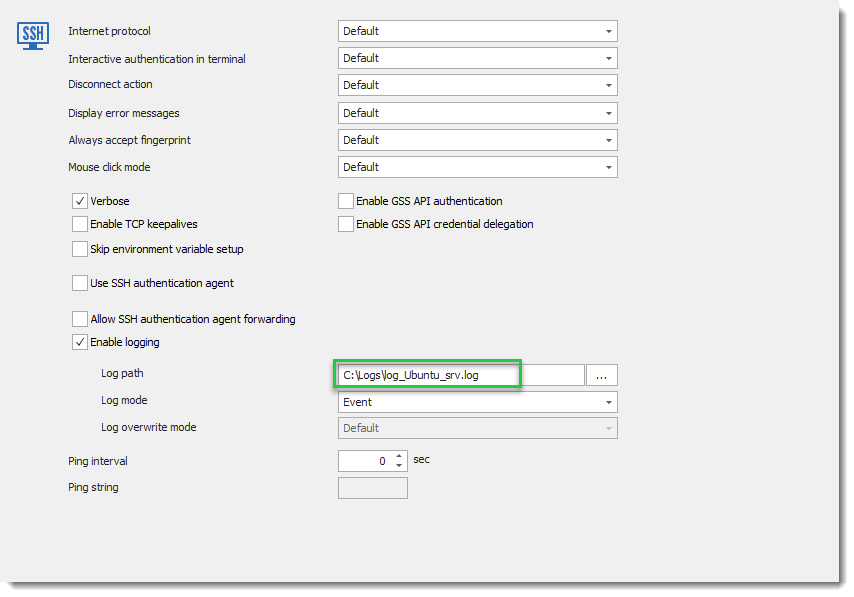
Could you confirm if under the Advanced tab, log path has a file name with extension. Example : log_ubuntu_srv.log in the print screen below.
Regards,
David Grandolfo
SSH_Log.png
Hi David,
My fault, took the name "path" directly.. :banghead:
Send the logs via email.
Thanks!
BR
Tobias
Hi Tobi,
Thanks for the logs, after reviewing it with the engineering department they found the issue. It will be fixed in the next beta version of RDM 2019.1.31.0.
Best regards,
David Grandolfo
Hello,
With the new *.34 version and the new ssh terminal, I have a "new?" problem.
Open a config file with "view" "vim" and go down the line, the terminal is going into some strange (write) mode which I cannot exit. So "ESC : q" to quit is not possible. It seems to hang also, because CTRL+C is even not working.
After activating the old terminal, everything is fine.
Do you have it on you list?
BR
Tobi
Hello Tobi,
I tried with Vi, Vim and Nano (CTRL + X, for nano) and the keyboard and the ESC seems to work. Have you any Keyboard or Terminal configuration in the session?
Also, could you send us a print screen of the issue?
Best regards,
David Grandolfo
Hi David,
Normaly no, but I found that my colleague set "linux" as terminal, because of codepage problems with MC/YAST (display of frame etc.). I guess in pre-releases we had some problems with that and "linux" as terminal worked.
With activated "linux" terminal, VIM is jumping through all modes and I don't can use "ESC > :q". With CTRL+q I can exit the mode and are able to enter :q.
I tried without "linux" and the new termial, MC and YAST is looking good and no problems with VIM.
BR
Tobi
vim3.png
vim2.png
vim1.png
Hi Tobi,
Thank you for the follow-up, we are glad that the default terminal mode (xterm) is working fine.
Thanks also for the print screen, I'm I understand that the issue is solved by using the default terminal mode?
Best regards,
David Grandolfo
Hi David,
Yes and no :)
Yes, the strange issue comes with switching the terminal to "linux". But just with the new terminal, with the old one "linux" terminal is working.
With the new terminal, POS1 and END is not working in the shell.
Do you have some deeper information about the new terminal what should work and not?
If I use "linux" POS1 and END is working, without not.
Bug or feature?
Best regards,
Tobi
Hi Tobi,
We will investigate why POS1 and END are not working in the new SSH Shell integration. I opened a ticket (RDMW-3198) with the engineering department.
Best regards,
David Grandolfo
@Tobi
I would like to clarify some things: are POS1 and END keys or commands? If they are keys, is POS1 another name for HOME? And if they are commands, what kind of host support them and where could I get them?
Regards
Denis Vincent
Hi Denis,
Yes, they are keys of the keyboard.
Sorry, POS1 and ENDE are german layout, HOME and END are the english layout.
BR
Tobi
Hi Tobi,
Thanks for the info. I think I will need some more: I assume that when you say "switching the terminal to linux", you mean setting the "Function keys mode" (Funktionstaten Modus) in the "Keyboard" (Tastatur) tab to "Linux". I also assume that, when you are not using linux, you set the same field to "Default" (Standard).
If so, it is very strange because both the legacy and the new terminal will send the exact same sequence whether this field is set to Default or Linux. The only other field that could interfere I guess is "Override terminal type" (Terminaltyp überschreiben) in the "Terminal" tab. In what context can you confirm that the Home and End keys do not work?
Regards
Denis Vincent
Hi Denis,
Yes it's the second one, overwriting the terminal type to "linux". (activated HOME and END works)
I tried now the first one, but activating "Function keys mode" doesn't help.
Best regards,
Tobi
Hello,
Is there a way to see what's going on in ticket RDMW-3198?
Thank you.
Best regards,
Tobias
Hello,
The ticket is still on our todo list. The expert assign to this ticket is on holiday. We will update you as soon as we have news.
Best regards,
David Grandolfo
Hello Tobi,
We improve a lot out SSH Shell integration and as we are not able to reproduce the issue. I would like to know if it's possible for you to test our latest version RDM 2019.2.19.0 and tell us if the issue is still?
Best regards,
David Grandolfo
Hi David,
Thank you for asking!
I've installed the new version yesterday, but the keys "HOME" and "END" are still not working. (CTRL+A / CTRL+E working)
• Installed new version 2019.2.19.0
• activated new terminal
Test1:
SSH login > writing "sdffkkfgkj" > trying jump to the beginning with key "HOME" >doesn't work > going back with arrow key > key "END" >doesn't work
Test2:
• overwrite terminal with "linux"
SSH login > writing "sdffkkfgkj" > trying jump to the beginning with key "HOME" > works
» but with termnial "linux" and "RDM new terminal" using VIM and a bigger file (*profile.sh/*.csh) > doesn't work
OK, after writing this, I checked a CentOS installation (new sandbox) and here we go, it's a SLES problem.
On CentOS in /etc/inputrc:
On SLES12/15 in /etc/inputrc and /etc/inputrc.keys:
But in XTERM HOME and END are \e[1~ & \e[4~ and not \e[H & \e[F.
And that's why it's working with terminal set to linux, also /etc/inputrc + *.key
Best regards,
Tobias
Hello Tobias,
Thanks for the detailed test. I transferred the information to the engineering department.
Regards,
David Grandolfo
Hi Tobias,
Thanks for the info. I can suggest another solution: set "Keyboard->Function keys mode" to "SCO" or "Xterm R6", and leave "Terminal->Override terminal type" empty. This should make the POS1 and END key work as expected, but it will also change what is sent for function keys (F1 to F12).
There is still the issue where the POS1 and END keys would not work for certain applications, this will be fixed in the next version.
Regards!
Denis Vincent
Hi Tobias,
We just release RDM 2019.1.21.0, could you test it, please?
You can download it here.
Regards,
David Grandolfo
Hi Denis and David,
Thank you for your feedback.
I've tested the new version, but just with Denis suggestion using "Xterm R6" I've got functional POS1 and END keys!
But I'll keep an eye on the function keys.
Thank you.
Best regards,
Tobi
