RDM 14 Beta
Hello guys,
We are really happy to release RDM 14 beta. This version requires .NET 4.7.2 and backup your database before installing this beta for a maximum of safety.
The initial release is 13.9.0.0 and the final version will be labelled 14.0.0.0. This is major update and it requires a database update. This update is backward compatible with our current stable version (13.6.X) for SQL Server and Devolutions Password Server.
This update is NOT COMPATIBLE with the latest stable database of mySQL and it's not recommended to use it in production if you plan to keep the last stable version during the beta.
Post any issue in a separate thread since it's much easier for us to answer you and keep track of it.
=== What's new ===
* 1Password opvault support
* Execute security right
* Repository manager right
* FTP/SFTP live edit
* Google Drive data source
* Documentation search
* I've Been Pwned integration
* mySQL improvements (Repository, Documentation, Favorites and more)
* Many UI improvements
http://cdn.devolutions.net/download/Devolutions.RemoteDesktopManager.Bin.13.9.8.0.zip
http://cdn.devolutions.net/download/Setup.RemoteDesktopManager.13.9.8.0.exe
David Hervieux
All Comments (96)
Is it possible, that 13.9.1.0 beta cannot be used with Devolutions password server?
It's always complaining that my password is wrong, but it's definitely entered correct.
@Rene,
I am able to reproduce your issue with RDM 13.9.1.0 and DPS 5.1.1.0.
Let me verify with our engineering department and get back to you.
Best regards,
Jeff Dagenais

Any hope for multiple OTP key support in RDM 14? I believe right now it supports one key, but if that key is lost then access is lost as well. I have two Yubikeys, one as a backup.
Do you mean in Devolutions Password Server or directly in RDM?
Regards
David Hervieux
Capture.PNG
In RDM 13.9.1.0 selecting Help>About brings up this pop-up before going to the proper 'About' window.
Capture.PNG
This should not be there. Thank you.
Regards
David Hervieux
I have uploaded an updated version with the fixes for DPS
David Hervieux
Perfect, thank you very much. I can confirm, 13.9.2.0 is working with DPS.
One bug report I have, which is present since many versions. Maybe this could be fixed in RDM 14.
If I have already one RDP session openend withing RDM and do a quick connect with password prompt, the new session does not get the focus, instead it's switching back the focus to the already openend RDP session instead.
It's not a huge thing, but it's annoying.
13.9.2.0
I confirm Rene Zimmermann issue with focus switching with Quick Connect session.
Also, I'm getting a certificate error when opening RDM.
Also the extremely annoying double click bug is back in 13.9.2.0. Double clicking an entry, does not open it. Even with multiple times closing and reopening RDM, it's not working.
Btw. I'm using the "portable" installation.
@Rene Zimmermannm
Hello,
For the double click issue!
We have not been able to reproduce this issue once or even had someone experience it internally. In the past it has been mentionned that restarting RDM fix the issue up until it shows up again. Are you saying that even after restarting the application, you're getting the issue right away ?
Regards,
Alexandre Roy
That‘s correct. I have closed and re-opened RDM several times and it does not work ar all.
If you need any additional logs or anything, just let me know. Maybe I can help you in analysis.
Unfortunately I no longer remember, with which version it happened first time. With the latest version 13.6.7.0 I no longer had this issue.
@Rene Zimmermann
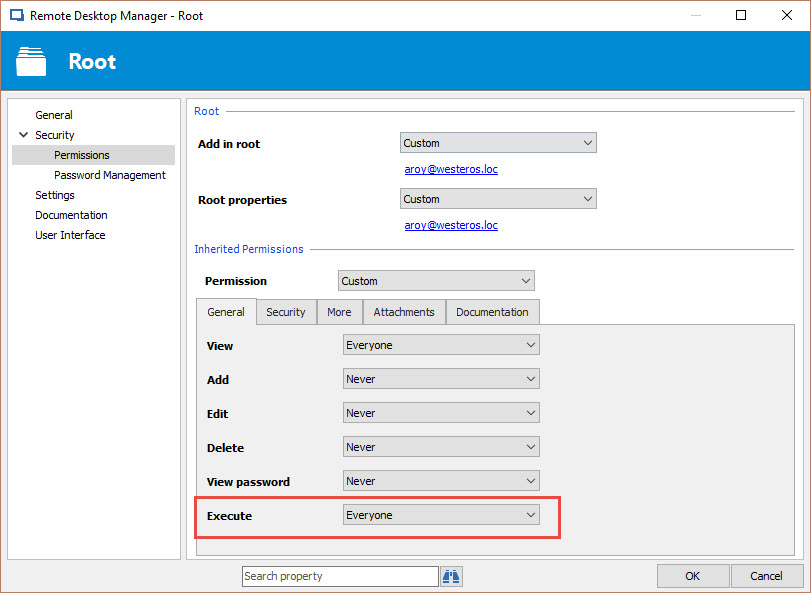
There was a new permission implimented in 13.9, the permission "Execute", and it prevents you to open session.
Can you confirm that in the root this permission "Execute" is allowed for the user that is currently experiencing the issue?
If your root permissions are set to never, the double click might not be working because of this new permission.
Best regards,
Alexandre Roy
New permission Execute.jpg
@zim2323 and Rene Zimmermann,
We have been able to reproduce the Quick Connect focus issue.
A ticket has been opened to our engineering department regarding this.
Thank you for reporting.
Best regards,
Jeff Dagenais
Some broken iconography in the ribbon. Also, can the items pinned to the ribbon be made moveable / able to drag?
Capture.PNG
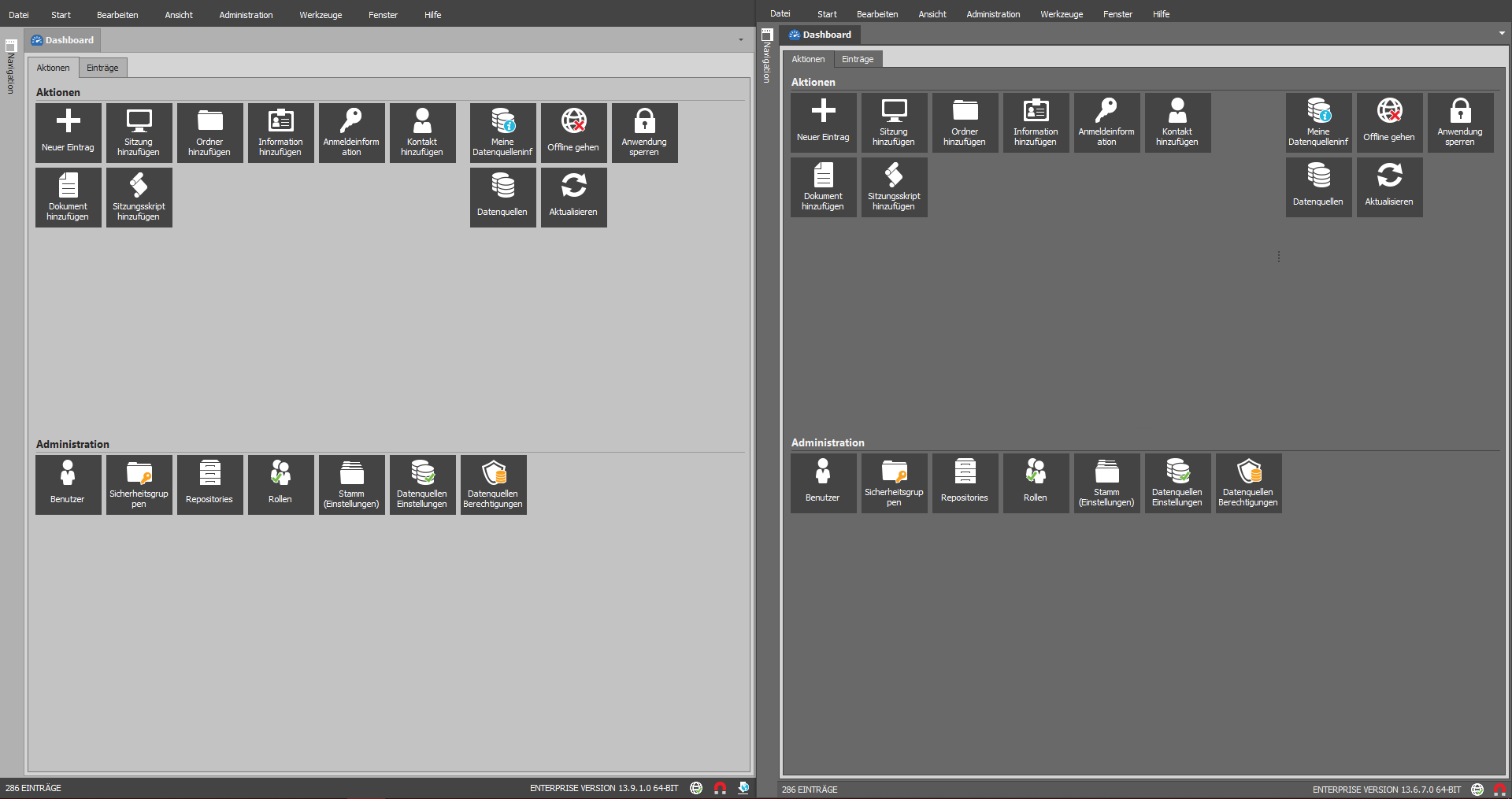
I think this is not so important to create an extra thread but I have one question about the UI improvement - I noticed that you made a heavy change regarding the dark theme - Anyone other use the Office 2016 (Dark) theme?
Honestly I think the dark theme from the latest beta is too bright - I know Office use the same color, but RDM use it in larger areas.. So if you work at the evening without additional light your screen is really (heavy) light now. :\: :)
Regards,
Min
@Min
Do you have a compare for the two different Dark mode?
Regards
David Hervieux
Yes, here you are: ;)
Regards,
Min
2018-09-06 20_56_32-.png
The execute permission is on "Default". However, I can open sessions, but only by pressing "Enter" instead of double clicking it.
On strage thing I've just seen. I have multiple data sources. Some local databases and a DPS account.
If I startup RDM with a local database, double clicking works, as soon as I switch over to the DPS datasource, it's no longer working. Switching back to the local datasource, double click is also no longer working on the local data source.
As I told, if you wanna see the problem or do some trouble shooting on my device, please just let me know.
I just deleted my "config" folder and re-created a complete new configuration from scratch.
Starting with the new config, double click seems to work. But as soon as I do make some UI changes in the options, regarding the tree view, it sometimes stops working again. I'm not completely sure, but it may have something to do with showing the data source in navigation pane.
Thank you for those information @Rene Zimmermann, I'll be investigating to see if I could reproduce the issue with what you provided us.
Regards,
Alexandre Roy
So, 2 things,
1) As of 13.9.3.0 I now have the double-click issue. I'll restart the app and also try installing 13.9.4.0 later today to see if either resolves the issue.
2) I opened a help desk quite a while ago about issues with screen paint/redraw issues. I tried several suggestions for "similar" issues that you received calls on, but I want to bring this up here to see if it can get a little more attention to fix. When I have 1 or more sessions (RDP) open within RDM, I will randomly have issues where the underlying windows on my desktop will take focus. Sometimes those windows come forward in whole and I'm now "in that window", and other times I have a half "painted" RDP session where the RDP session windows are either not there or partially drawn. Help Desk requested a video but this is a business PC and I cannot take videos, though I could do a remote session. I have confirmed that other vendors when I'm sharing my screen with them also see this, as well as when mirroring my screen to a monitor. I do not have this issue when using RDM on my home PC. Any help, thoughts, etc. would be greatly appreciated. I have grown increasingly frustrated with this issue.
@zim2323
Could you try RDM 13.9.4 to see if your issues are still there. I've made a two really interesting potential fix for the focus issues.
Regards
David Hervieux
I closed and reopened 13.9.3 and the problem "went away". It was the first time I had experienced this in a LONG time. I think early v10 or v11 was the last time I saw it. I'm installing 13.9.4 now.
Yesterday afternoon I used RDM quite a bit and didn't notice any specific focus issues. I'll report back if they are still present.
Thanks!
Ok, so I've had enough time already this morning with 13.9.4.0 to tell you that the focus/screen redraw issues are actually "worse". That is, mouse clicks are far less responsive, and instead of being able to click to any other TAB and then back to fix the issue, now I have to flip back and forth several times before the screen updates properly.
@zim2323
That is odd, is it possible for you to make a short video of the issue and give us some information to reproduce the issue ?
1- The operating system version?
2- are you using the 64 or 32 bit version of RDM ?
3- if you are on windows 7, did you update the RDP activeX to have RDP 8.1 working?
Also I would like to obtain your RDM configuration file by email to aroy@devolutions.net.
Please follow these steps here before sending it https://help.remotedesktopmanager.com/howto_configurationfile.htm.
With all those info I should have a good start to reproduce the issue so we can have a look at it.
Thank you for reporting this.
Best regards,
Alexandre Roy
@Alexandre
As I stated before, unfortunately I am not allowed to video my desktop, however I can get you on for a remote session (go figure).
It's been this way for several RDM versions from Windows 64bit version 7 through all builds of Windows 10. Currently we're still on build 1703. 1803 is slated to roll out later next month.
Email sent.
for what its worth i noticed this issue as well. the tabs weren't updating upon switching. i'll see if i can predictably reproduce and upload clip.
@M M
Hello, yes sure that would help, more video would provide us more info on the matter.
1 question on the side, do you use a laptop with an integrated graphic card ?
If so, what are the specs of the device?
Best regards,
Alexandre Roy
I'll see if I can reproduce. I do have a laptop with both integrated graphics and a dedicated chip but I believe I am defaulting to the dedicated.
It is one of 3 machines I use RDM on, one of which has a 1080ti (desktop) and the third having integrated graphics (also desktop). So far I have only seen the aforementioned issue on the desktop with integrated graphics as it is my primary workstation.
We do not know yet if this issue is related to hardware but from the test I have been conducting, with exact same settings from the RDM config and Session provided being by a customer having the issue, I have not been able to reproduce it.
It sure looks very possible.
Hardware with the known issue so far is from a Dell laptop with Intel(R) HD Graphics 4400.
We'll see if this lead gets us anywhere.
Thank you for reporting this.
Best regards,
Alexandre Roy
I am on a Dell Laptop (17 7000) but with an Intel HD 620 chip.
I found something related to this issue investigating over the web.
Disabling Data compression, Direct X, Bitmap Caching, Visual Styles and Desktop Composition in the experience tab could potentially fix this issue.
It is also possible that some network devices which optimize the RDP bandwidth usage can cause those issues.
Would you mind trying these new settings and see if it fixes anything ?
Best regards,
Alexandre Roy
The bug where I am being prompted for my devolutions login every time is still occurring - on one machine it was fixed by deselection 'use default devolutions credentials', but on the others that did not work.
Might be unrelated to the beta.
@Alexandere
Thanks for your time yesterday for our troubleshooting session. Per your email and the subsequent post here, I have disabled compression. I set all other settings (smart reconnect,etc) back to where they were to test from "baseline". I have a heavy amount of work in RDP sessions scheduled today, so I should be able to give some good feedback.
@M M
Do you have a private vault set to a DOD file on one of your datasource ?
What kind of datasource are you using ?
In the ribbon > File > Cloud Account > Sign in, is automatically sign-in at startup is checked up with the right password ?
Best regards,
Alexandre Roy
@Alexandre
To this point I've tried all combinations of smart connect, no compression, no bitmap, full color(32bit), etc and none of them have improved the issue. When I get some time today/Monday, I'll reinstall RDM on my Surface Pro 3 laptop again and make sure that the issue still isn't there.
zim2323
Hi again,
Sorry this did not work for you :/.
We came across another option that might change the outcome.
If you set the option to true, File > Options > Types > RDP in the advanced section (Enable RDP hardware mode). Does it have any impact on the quality?
Regards,
Alexandre Roy
@Alexandre
I changed this setting and this has not resolved the issue either.
I think I realized / resolved what was creating this issue. I had all the options selected properly as you mention above - however, I had two data sources; one DOD file and one local datasource. The DOD file had all the proper settings, but the local file was not using DOD credentials. Even though RDM was defaulting to the DOD datasource, I think this conflict was triggering a prompt for my credentials.
I removed the local datasource and it disappeared.
Edit: spoke too soon - it's back.
Just upgraded to 13.9.5.0 (BETA) from 13.9.4.0 (BETA) this morning and it crashes on me when I launch RDM (32-bit or 64-bit). Windows 10, 1803 and patched up-to-date. I've tried running RDM as a regular user and as an Administrator and same results. It crashes so fast that I can't even send an error report (the crash screen pops up and then disappears instantly). Nothing in Event Viewer. I managed to get a screen capture of it:
RDMerror.jpg
Sorry, tried to edit my post but wasn't able to save the changes with the image in the forum:

Could you send me the error report or show the details? Do you have .NET 4.7.2 installed?
Regards
David Hervieux
I wish that I could. The popup screen image that I captured disappears before I can click on anything. I then have to kill the Remote Desktop Manager process. I've tried launching it several times and clicking on "Details" or "Send error report" but I am never able to. The popup disappears too quickly. Is there a command-line with debug that I can run?
Yes, I am using .NET Framework 4.7.2 - Windows 10 April 2018 Update (461808)
You could try to re-install the last working version and go in the Application Logs. The error should be logged.
Regards
David Hervieux
What is your data source?
Regards
David Hervieux
MSSQL datasource and a local datasource. MSSQL is the default
I rolled back to 13.9.4.0 (BETA) and RDM runs fine now. I got into the RDM application log:
9/19/2018 6:39:53 AM 13.9.5.0 - 64-bit Error System.Reflection.TargetInvocationException: Exception has been thrown by the target of an invocation. ---> System.NullReferenceException: Object reference not set to an instance of an object.
at Devolutions.RemoteDesktopManager.Managers.ThemeManager.ApplyDocumentManagerSkinElement(DefaultLookAndFeel lookAndFeel)
at Devolutions.RemoteDesktopManager.Forms.FrmMainDocumentManager.cd3ab56e6b166f4ed742b184d2b9b7aa1()
at Devolutions.RemoteDesktopManager.Forms.FrmMainDocumentManager.DoInitializeComponent()
at Devolutions.RemoteDesktopManager.Forms.FrmBaseRibbon.c2003f33b05659ffe7ea3546ebd6ce300()
at Devolutions.RemoteDesktopManager.Forms.FrmBaseRibbon..ctor()
at Devolutions.RemoteDesktopManager.Forms.FrmMainDocumentManager..ctor()
--- End of inner exception stack trace ---
at System.RuntimeTypeHandle.CreateInstance(RuntimeType type, Boolean publicOnly, Boolean noCheck, Boolean& canBeCached, RuntimeMethodHandleInternal& ctor, Boolean& bNeedSecurityCheck)
at System.RuntimeType.CreateInstanceSlow(Boolean publicOnly, Boolean skipCheckThis, Boolean fillCache, StackCrawlMark& stackMark)
at System.Activator.CreateInstance(Type type, Boolean nonPublic)
at System.Activator.CreateInstance(Type type)
at Devolutions.RemoteDesktopManager.Managers.UIManager.cd1336d51f5967743cc970d8c549f61e3()
at Devolutions.RemoteDesktopManager.Managers.UIManager.get_FrmMain()
at Devolutions.RemoteDesktopManager.Program.Main(String[] args)
9/19/2018 6:39:54 AM 13.9.5.0 - 64-bit Error Silent System.InvalidOperationException: Splash Form is not displayed
at DevExpress.XtraSplashScreen.SplashScreenManager.CloseForm(Boolean throwExceptionIfAlreadyClosed, Int32 closingDelay, Form parent, Boolean waitForSplashFormClose, Boolean allowUseInDT)
at Devolutions.RemoteDesktopManager.Managers.ApplicationManager.cb94ee7d02a7220c32d7ca1b34efcaafa()
at System.Threading.ExecutionContext.RunInternal(ExecutionContext executionContext, ContextCallback callback, Object state, Boolean preserveSyncCtx)
at System.Threading.ExecutionContext.Run(ExecutionContext executionContext, ContextCallback callback, Object state, Boolean preserveSyncCtx)
at System.Threading.ExecutionContext.Run(ExecutionContext executionContext, ContextCallback callback, Object state)
at System.Threading.ThreadHelper.ThreadStart()
Hello,
@STGdb
Could you send me your remotedesktopmanager.cfg file via email to aroy@devolutions.net. We'll try to reproduce the issue from there.
Please follow these steps here if you are unsure how to. https://help.remotedesktopmanager.com/howto_configurationfile.htm
Best regards,
Alexandre Roy
@STGdb
Thank you, we found that the theme office 2013 along with the ribbon was causing this crash. Were working on the fix and should come up with a new beta release soon.
Thank you for the bug report!
Best regards,
Alexandre Roy
Downloaded and installed 13.9.6.0 (BETA) and confirming that the new release resolves my issue. RDM isn't crashing any longer. Thanks for the quick fix!!
@Alexandre
Any update on the screen redraw issue? I've played with a gazillion settings and nothing resolves the issue.
Hello,
Do you use the default theme?
Regards
David Hervieux
@David, If you're asking me, then yes. I typically don't change anything but tool locations and the individual session configs.
I will be on vacation next week but I will try to find some workaround. Alex was able to reproduce something with the Office 2013 theme but not the default.
Regards
David Hervieux
Another question, is it only with the RDP connection that you have the refresh problem?
Regards
David Hervieux
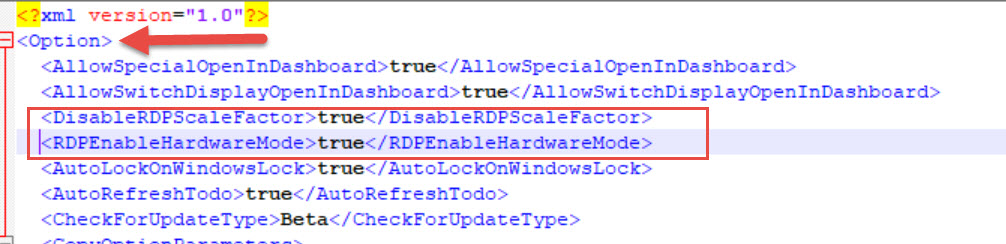
There is also two settings that you could try in remotedesktopmanager.cfg:
<DisableRDPScaleFactor>true</DisableRDPScaleFactor>
<RDPEnableHardwareMode>true</RDPEnableHardwareMode>
David Hervieux
The only thing I really do is RDP related, so I couldn't tell you whether or not anything else is affected.
As for the 2 settings, I can't find them in the file already so I'm assuming I need to add them. Where do I add them?
@zim2323,
Indeed, if you don't find the 2 settings in the RemoteDesktopManager.cfg file, you would need to add them manually.
The options are saved in alphabetic order, so this can add them in the appropriate area or save them at the bottom. This should do the trick as well.
Best regards,
Jeff Dagenais
Hello @Zim
I just got back from my vacations, we've had a couple email back and forth about the artifact, as to know what is causing the issue I have no lead of what it could be yet other than your theory where it would be related to Dell laptops using integrated GPU, and I did found one forum post related to it on the web regarding latitude dell laptop but I cannot be sure what causes it yet or if it could be fix. I'll keep investigating.
One thing That I would like you to test is setting the engine to RDPFree 7.0. It's our developped Remote Desktop Protocol that doesn't use the ActiveX. Maybe this could be a solutions for you as a work around until we find what causes these artifacts to show up.
To activate this RDP engine you just have to go File > Options > Types > RDP > RDP dropdown menu at the top then switch it to RDPFree 7.0.
As for the cfg options David wanted you to try, you can just add them on a new line as displayed on the screenshot below.
*Make sure RDM is closed before you do this modification.*
Best regards,
Alexandre Roy
Modif cfg value.jpg
Thanks for all your help! I'll continue to work through the suggestions today. I've added the above settings to the config. I'll test regular RDP for a bit before changing to FreeRDP.
zim2323
So far, making those 2 changes in the CFG file, I am no longer seeing focus and refresh artifact issues. I'll continue to beat it up and if I see anything I'll try the other RDP type. So far, it's looking promising.
I had 1 focus issue where an app behind RDM popped over when continuing activity inside an active RDP session, but other than that, no more issues with screen repaint. I'll continue to monitor and give status.
Thank you for your feedback :).
Regards,
Alexandre Roy
So far 99% better then it was before with ONLY the 2 additional settings added to the CFG file. I had 1 focus issues yesterday and 1 very small screen repaint issue this morning. So far though, overall, the issues I was having is nearly non-existent.
Is there anything else you need me to test or change to try and narrow this down more?
Chris Miller
@Zim,
No really that fixed your issue so were glad this finally worked out for you :).
Gave us knowledge too to deal with that issue in the future, so we thank you :D.
Best regards,
Alexandre Roy
I'm not sure if this has been reported, but I have noticed that the "Copy Username & Password" button no longer appears to be working anymore?
I am able to use the "Copy Username" and "Copy Password" buttons which work fine but the combined one doesn't seem to work anymore.
I have tried switching between legacy and Paste once (secure) and extending the delays but nothing seems to get that function to work anymore.
@Ordyss SysAdmin
I tried it on 13.9.10.0 without any issues. What's the behaviour on your side? Does it only copies the username?
Regards,
Min
@Ordyss SysAdmin,
I think I was able to reproduce the issue, could you confirm if the new Windows Clipboard history is enable? (Windows key + V)
If so, could you test RDM 13.9.10.0 if the issue still occurs?
Regards,
David Grandolfo
Hi David and Min,
I'm currently running 13.9.10.0, and you are correct David about Windows Clipboard history.
It appears to be pushing it to the Win + V method rather than Ctrl + V, and just tested and confirmed that's what it is doing.
I will try turning off Windows Clipboard and test, but other than that, is there another workaround?
Yup, Windows Clipboard seems to be the cause of the problem.
I turned it off and it started working straight away correctly straight away.
Thanks for this information, we are currently investigating the issue.
David Grandolfo
How does one get involved with your BETA program?
Thanks
Robert
@Robert,
What would like to know exactly?
Would you like to download RDM Beta? If yes, you can download it here
https://remotedesktopmanager.com/home/download#Beta
Best regards,
Jeff Dagenais
Using 13.9.10.0 now I'm having RDM hang frequently when I close a continue ping tab. Can't do anything, except close RDM completely. Does not happen when closing (RDP) session.
Anyone else?
@Raymond
Hi, I've reproduce the issue and reported it to the engineering team.
Thanks for letting us know.
Regards,
Alexandre Roy
Thanks Alexandre!
Have a nice day.
I keep getting the following every time I open RDM and Tools Manager to update plugins. <attached>
rdmcerterror.jpg
@zim2323
Can you please click "view certificate" and post the result?
Stéfane Lavergne
@Jeff,
I was just wondering if there was some kind of formal program I needed to sign up for. Thanks for the download link.
Thanks,
Robert
@Stefane
Attached screenshot of 'Vew Certificate'.
rdmcerterror2.jpg
@zim2323
As per screenshot, the certificate is issued by an authority controlled by Zscaler Intermediate Root CA (zscaler.net) which is definitely not ours. Please have a look with your network or security department regarding SSL Interception or proxy solution that is provoking the issue.
The certificate should look like the following (attached screen shots)
Stéfane Lavergne
2018-10-11_7-42-58.png
@Robert,
You just need to download the Beta edition and install it on your workstation.
You can report us any issue by creating a new topic in the support section
https://forum.devolutions.net/forum1-remote-desktop-manager--support.aspx
Best regards,
Jeff Dagenais
I just updated to 13.9.12.0 today and was hoping it would fix an issue I've been having the past few updates, but nope. If I double click on an entry, the tab appears for the session, but I am not able to click on it to get to the session. If I double click a second entry, and then click on its tab, and then the first tab, I can see the session. It is the same for any new entries I connect to after that. I have to click on an existing tab, and then the new one to get it to respond. Any ideas?
Hello Scott,
What Windows version do you use?
Regards
David Hervieux
Windows 8.1 and I'm running the 64bit version of RDM.
Thank you. I did the fix for Windows 7 and I was not able to reproduce it with Windows 10. I will create another update this week end for with a fix for Windows 8.1
Regards
David Hervieux
Thank you. I will look for it.
That update (v13.9.13.0) did indeed fix the tab problem I was having in Windows 8.1. Thank you!!
@Scott,
Great thank you.
Regards
David Hervieux
I've noticed that when I am away from my PC and possibly when RDM locks after a given time, the ability to edit any entry in my list no longer functions.
For instance, the pencil icon at the top left of the application is visible, but doesn't result in any response. Right clicking an entry and attempting to edit displays a greyed out menu. Not sure when this started..
Hello, @M M
Yeah the quick connect toobar does not react to mouse overring and does not highlight anymore or animate anything since a couple release. We're going to investigate why it is so but they do function correctly.
If you are unable to do anything after a lock, that might be due to a lost of connection. Try to force refresh (CTRL+F5) when this happen and you should be able to gain back your rights properly.
Regards,
Alexandre Roy
Sorry if this has been covered before, could not find anything. Can beta be "trialed" forever or does it expire like the release version in 30 days?
The beta versions are limited exactly like the production version but you can request another trial. We can extend it without any problem.
Regards
David Hervieux