Installer/updater annoyances

The recent betas have in my opinion introduced a new annoyance to the updater, but it also reminds me of another that's been around for quite some time.
All Comments (17)
Hello,
I will aks Hubert to check for the second point. For the first one, I can't script the installer to remember or let you select which version you want. We plan to eventually change the tool we use to build the application. Sorry about that.
Regards
David Hervieux
Hi thanks, but for the first point it's more that it keeps pinning a shortcut I don't want - it never used to pin anything before.
Hello,
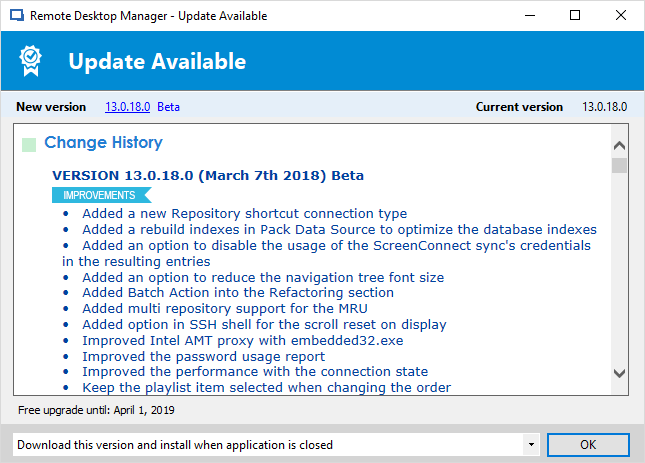
I've been looking at the second point but I'm not sure what you mean by it. Which version of RDM are you using? When we recently reworked the update screen, we made it a combobox with a few choices, like this:
What option is giving you issues?
Regards,
Hubert Mireault
2018-03-13_11-46-08.png
The option you are showing, "Download this version and install....". Here's the scenario:
The old behaviour would start the update after it downloaded then prompt to close down RDM. Saying OK would close RDM without losing the sessions and automatically resume the update.
Thank you, I understand what you mean now. We'll take a look at what we can do to not lose the "last opened" entries in that scenario.
Regards,
Hubert Mireault
Hello,
We'll add in the choices "download this version and install now" which will mimic the behavior that happened in the past. If you choose this option, as long as you don't open an entry, it will keep the "opened entries" playlist for the next time you open RDM (doesn't matter if you press Cancel or the X).
This will be available in the next RDM beta, when it's out it would be appreciated if you could give us some feedback so we know if this works as you expect.
Regards,
Hubert Mireault
That's great news, thanks - I'll be sure to feed back my experience.
I just updated and can see from the changelog that the new option when updating should be present for the next update - will let you know how that works out.
I did however notice that the installer once again pinned the 32bit shortcut to my taskbar.
@Taomyn,
Regarding the shortcut issue, this has been addessed last week to our engineering department and they are currently looking at the issue.
Best regards,
Jeff Dagenais
We don't have a solution. We need to change completely our installer tool. I planned to change soon the default pinned shortcut to the 64bit version.
David Hervieux
Well it never used to do it until a few months ago (I think as I never got around to reporting it until recently), plus it's not optional. Sorry, you either don't do it or you ask the user first. I don't have a single other application that forces any icons to my task bar, the desktop maybe (as annoying as that is, but is usually an option), but nothing else forces itself onto my task bar.
FYI, I just performed the latest update and confirm the new option "Download this version and install now" worked perfectly. Many thanks.
Has the installer 32bit shortcut issue been resolved yet? I'm on the latest 13.9.0 beta and it's still creating shortcuts in my quick launch and pinned to my taskbar.
--------------------------------------------------------------------------------------------------------------------
I'm always using the latest beta RDM x64 version.
Local data source.
The shortcut now seems to be the 64bit one which is an improvement, but it's still being pinned to my taskbar each and every update which continues to annoys me.
Latest beta still creating shortcut under Quick Launch....
%appdata%\Microsoft\Internet Explorer\Quick Launch
--------------------------------------------------------------------------------------------------------------------
I'm always using the latest beta RDM x64 version.
Local data source.
It's really strange. I've just checked and the setting is unchecked by default. I will investigate more.
Regards
David Hervieux
I just updated to the latest beta and lo-and-behold this time the Quick Launch option ticked again. Last update it was unticked and next update it will also be unticked, but the time after that it will get ticked again. It's constantly flip flopping between releases.
Annotation 2019-07-17 175818.png