Beta 13.08 (64) bad_module_info

On all my entries that are using http/https embedded I am getting an "bad_module_info error". If I close the error it continues on.
badmodule.JPG
All Comments (21)
Does it use IE or Chrome?
David Hervieux
Chrome
Could you try RDM 64 bit?
Regards
David Hervieux
That is from the 64 bit version (in the title)
Ok, could you try the 32 bit version. I just want to check if it's for both edition.
Regards
David Hervieux
No error in the 32 bit version. I tried the EXACT same data file on another machine and there was no error on the 64 bit version on that one, so looks like it is something specific to this machine.
I just tried an uninstall/reinstall of 13.08, still broken on 64 bit. Will experiment a bit more. Since it works on another computer, I think it is safe to assume its not a problem with the data file.
Here is the third party we use for embedded Chrome:
https://www.essentialobjects.com/Products/WebBrowser/Default.aspx
David Hervieux
Bringing this back up again, running 13.9.7.0 64 bit.
Using a clean/new data source, if I configure a simple Web Session embedded with IE or Firefox, I have no problems. If I chance the embedded session to Chrome, I get the bad_module_info twice, click past them and it opens in the embedded session.
Change nothing and open the RDP 32 bit version, no error at all with Chrome embedded.
I am out of ideas. Uninstalled, cleared registry, clear all APPDATA locations, fresh install. There is a conflict somewhere, but I don't know where to find it.
Hello,
Previously, you mentioned that the error was specific to one computer, is it still the case?
Do you have something relevant in Help -> Application Logs?
Best regards,
Jeff Dagenais
The application logs only show when I change it from Chrome to IE embedded, no other errors. Yes, I tried my laptop and I get the same thing.
No I have almost identical applications on both the desktop and laptop, so I need to find a way to figure out what the conflict is.
Hello,
Does the 32bit edtion works properly?
Do you have something in Event Viewer concerning this error?
Best regards,
Jeff Dagenais
32 bit works perfectly.
Hello,
Is there something relevant in Event Viewer regarding this error?
Best regards,
Jeff Dagenais
Faulting application name: bad_module_info, version: 0.0.0.0, time stamp: 0x00000000
Faulting module name: unknown, version: 0.0.0.0, time stamp: 0x00000000
Exception code: 0xc0000005
Fault offset: 0x778818be
Faulting process id: 0x4d4
Faulting application start time: 0x01d45a6ab01f2c68
Faulting application path: bad_module_info
Faulting module path: unknown
Report Id: 8aba8587-9873-401e-a1b0-c083d6d71c5b
Faulting package full name:
Faulting package-relative application ID:
Hello,
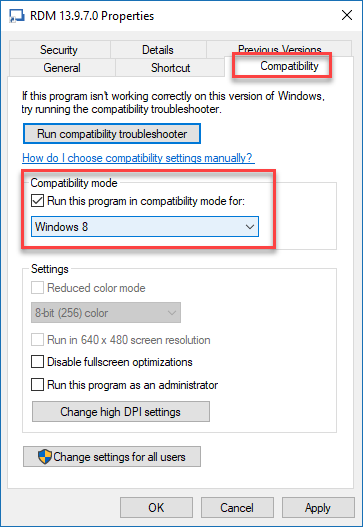
Could you try the following solution:
Let me know if that help or not.
Best regards,
Jeff Dagenais
2018-10-03_13-02-16.png
No luck, and the strange part is if you click away the error message twice, it comes up in the embedded window.
Doing some research online sees to point to this issues as specific to Windows 1709 and some graphics drivers. I am going to do an in place upgrade to Windows 10 1809 right now. Let you know in a few hours if that helped.
Minor progress - updating to WIndows 10 1809, the Bad_module_info error does NOT display, but the session will hang.
So the issue is definitely in the 3rd party chrome module (at least at 64 bit).
Hello,
I have been able to reproduce the hang issue on my side as well.
A ticket has been opened to our engineering department. The ticket number is DEVO-612.
Best regards,
Jeff Dagenais
Hello,
RDM Beta 13.9.11.0 has been released and this version contain a workaround regarding the google chrome slowness issue in embedded mode on Windows 10 1809.
This latest beta release can be downloaded here
https://remotedesktopmanager.com/home/download#Beta
Once installed, go in File -> Options -> Types -> Web and check the Disable RunDLL32.exe usage option in that area.
Best regards,
Jeff Dagenais
I confirm the above workaround does allow CHROME to work Embedded. Tested in Windows 10 1809 and Windows 10 1803