RDM Screen redraw issue

Hi,
This is going to be a tuff one to explain properly, but here it goes.
Updated to the latest build 9.10.0 today and have started using the tabbed option.
I'm not sure how to reproduce the issue, but every so often the RDP sessions appears to have frozen. If I go over to the machine list and expand a folder, the screen redraws correctly, but I can't interact with it again till I force the redraw.
Closing and reopening RDM resolves the issue for a while. Another staff member I work with using this same beta has experienced this issue also.
Daniel
All Comments (53)
Hi,
I have seen a similar report from another user. Are you using smart sizing in the display options?
Thanks, Richard
Richard Markievicz
I did have smart sizing on initially, but have tested again today with that option disabled and am having the same issue.
This is connecting to Windows Server 2008 R2 servers.
Daniel
I also noticed same issue in tabbed mode.
Regards,
Darko Bazulj
https://triton-grupa.hr
Smart sizing off, same problem here with Windows 2008 R2
There is another thread talking about this too.. I'm also having the issue
I am actually now seeing this when using the undocked option in full screen. This was previously working.
We have a test environment for this now. I will work on this issue.
Thanks, Richard
Richard Markievicz
I would be interested to hear what options you guys have set under display settings, for the "Remote Desktop Size" (e.g. are you using 'Default', a fixed resolution, or some combination of options?)
Thanks for the continued feedback :),
Richard
Richard Markievicz
I have experienced the issue with undocked / full screen and embedded (tabbed) / default.
This is still occurring in 0.9.13
Appreciate you guys' patience with this, please be assured that we are working on it.
I'm having a problem - as OP noted - figuring out a specific reproduction for this. I had thought it was related to smart sizing / scaling of the remote session; but if it occurs in full screen mode as well then I doubt that is the issue.
It seems there are a couple of underlying issues with FreeRDP and Windows Server 2003 / 2008 instances - we have report of another problem (that I can reliably reproduce) where logging off such a machine never actually disconnects the session.
I've raised this with the team at FreeRDP and once we have a fix for that, I will post here. We can see if this improves the problem.
Otherwise, if someone has a specific set of steps or a specific connection where they can reliably reproduce the issue, please let me know. Or perhaps if you notice it occurring just under specific circumstances (or on machines other than Windows Server 2003 / 2008). And of course, we will continue working on if from our end - just wanted to issue an update.
Thanks! :)
Richard
Richard Markievicz
I have tested 5 undocked sessions at the same time: win 2003, win 2008, win 2008 R2, win 2012 TS and win 2012 standard server during half an hour: no problem at all. Looking good :)
edited by tonvanboven on 11/14/2013
That is really great, and I appreciate the feedback :D
Thanks, Richard
Richard Markievicz
Tomorrow I will use the internal client only and let you know if it works fine. Now its time to sleep ;)
Bad news: session frozen. This time I was doing something, e.g. working remotely. The difference with yesterday was that those 5 sessions were running idle. I hope this feedback helps a bit ...
Hi tonvanboven
What was the OS of the remote session?
Thanks, Richard
Richard Markievicz
Windows 2012 TS
There is an additional step that would help me debug this, if you are able to help.
Instead of launching RDM by double clicking, can you run it from the terminal? Basically:
1. Open Terminal.app
2. CD into the application bundle, e.g.
cd "Applications/Remote Desktop Manager.app/Contents/MacOS"
3. Launch the application, e.g.
"./Remote Desktop Manager"
This should direct stdout to the console - you will see a bunch of warnings/errors from LoadLibrary, and then the application will launch.
Then run your sessions as normal. Once you get a freeze, send me the output on the console. There should be nothing sensitive in the output, but you can send it to me in a PM if you prefer.
Thanks! Richard
edited by Richard Markiewicz on 11/15/2013
Richard Markievicz
@Richard: PM sent
I want to share that my sessions got frozen today multiple times, I'm running 0.9.15.0 and was connecting to a single Windows 2008 R2 server. RDM worked well for about 30 minutes and then started having issues drawing the windows. Please find the content of the terminal output below.
mac-eduardom:~ eduardom$ cd "/Applications/Remote Desktop Manager.app/Contents/MacOS"
mac-eduardom:MacOS eduardom$ ls
Remote Desktop Manager
mac-eduardom:MacOS eduardom$ "./Remote Desktop Manager"
LoadLibraryA: dlopen(kernel32.dll, 5): image not found
GetProcAddress: could not find procedure IsDebuggerPresent: invalid handle passed to dlsym()
GetProcAddress: could not find procedure CheckRemoteDebuggerPresent: invalid handle passed to dlsym()
LoadLibraryA: dlopen(user32.dll, 5): image not found
GetProcAddress: could not find procedure EnumWindows: invalid handle passed to dlsym()
LoadLibraryA: dlopen(kernel32.dll, 5): image not found
GetProcAddress: could not find procedure IsDebuggerPresent: invalid handle passed to dlsym()
GetProcAddress: could not find procedure CheckRemoteDebuggerPresent: invalid handle passed to dlsym()
LoadLibraryA: dlopen(user32.dll, 5): image not found
GetProcAddress: could not find procedure EnumWindows: invalid handle passed to dlsym()
LoadLibraryA: dlopen(kernel32.dll, 5): image not found
GetProcAddress: could not find procedure IsDebuggerPresent: invalid handle passed to dlsym()
GetProcAddress: could not find procedure CheckRemoteDebuggerPresent: invalid handle passed to dlsym()
LoadLibraryA: dlopen(user32.dll, 5): image not found
GetProcAddress: could not find procedure EnumWindows: invalid handle passed to dlsym()
2013-11-18 15:11:46.730 Remote Desktop Manager[82963:507] configure
2013-11-18 15:11:46.784 Remote Desktop Manager[82963:507] start
loading channel cliprdr
connected to SERVER_2008R2:3389
creating directory /Users/eduardom/.config/freerdp
creating directory /Users/eduardom/.config/freerdp/certs
creating directory /Users/eduardom/.config/freerdp/server
certificate_store_open: error opening [/Users/eduardom/.config/freerdp/known_hosts] for writing
@@@@@@@@@@@@@@@@@@@@@@@@@@@@@@@@@@@@@@@@@@@@@@@@@@@@@@@@@@@
@ WARNING: CERTIFICATE NAME MISMATCH! @
@@@@@@@@@@@@@@@@@@@@@@@@@@@@@@@@@@@@@@@@@@@@@@@@@@@@@@@@@@@
The hostname used for this connection (SERVER_2008R2)
does not match the name given in the certificate:
Common Name (CN):
SERVER_2008R2.domain.name
A valid certificate for the wrong name should NOT be trusted!
2013-11-18 15:11:46.859 Remote Desktop Manager[82963:1220b] mac_authenticate
channel_activity_cb: message 1441797
2013-11-18 15:12:02.257 Remote Desktop Manager[82963:1220b] process_cliprdr_event
process_cliprdr_event: unknown event type 5
2013-11-18 15:26:21.592 Remote Desktop Manager[82963:507] cliprdr_send_supported_format_list
channel_activity_cb: message 1441793
2013-11-18 15:26:21.593 Remote Desktop Manager[82963:1220b] process_cliprdr_event
2013-11-18 15:26:21.593 Remote Desktop Manager[82963:1220b] cliprdr_process_cb_monitor_ready_event
Hi molikop
Is that the complete output from your terminal?
Thanks, Richard
Richard Markievicz
Hello Richard, yes... that is the complete output all the way to when I had to close the app (command + q) because the RDP session was not longer responsive.
I have updated to 0.9.16.0 and I'm still seeing both issues, the redraw issue and RDM being completely frozen. In this case I was seeing the issue while connecting to Windows 2003
mac-eduardom:MacOS eduardom$ "./Remote Desktop Manager"
LoadLibraryA: dlopen(kernel32.dll, 5): image not found
GetProcAddress: could not find procedure IsDebuggerPresent: invalid handle passed to dlsym()
GetProcAddress: could not find procedure CheckRemoteDebuggerPresent: invalid handle passed to dlsym()
LoadLibraryA: dlopen(user32.dll, 5): image not found
GetProcAddress: could not find procedure EnumWindows: invalid handle passed to dlsym()
LoadLibraryA: dlopen(kernel32.dll, 5): image not found
GetProcAddress: could not find procedure IsDebuggerPresent: invalid handle passed to dlsym()
GetProcAddress: could not find procedure CheckRemoteDebuggerPresent: invalid handle passed to dlsym()
LoadLibraryA: dlopen(user32.dll, 5): image not found
GetProcAddress: could not find procedure EnumWindows: invalid handle passed to dlsym()
LoadLibraryA: dlopen(kernel32.dll, 5): image not found
GetProcAddress: could not find procedure IsDebuggerPresent: invalid handle passed to dlsym()
GetProcAddress: could not find procedure CheckRemoteDebuggerPresent: invalid handle passed to dlsym()
LoadLibraryA: dlopen(user32.dll, 5): image not found
GetProcAddress: could not find procedure EnumWindows: invalid handle passed to dlsym()
2013-11-19 15:11:30.435 Remote Desktop Manager[2422:507] configure
2013-11-19 15:11:30.495 Remote Desktop Manager[2422:507] start
loading channel cliprdr
connected to server1:3389
creating directory /Users/eduardom/.config/freerdp
creating directory /Users/eduardom/.config/freerdp/certs
creating directory /Users/eduardom/.config/freerdp/server
certificate_store_open: error opening [/Users/eduardom/.config/freerdp/known_hosts] for writing
@@@@@@@@@@@@@@@@@@@@@@@@@@@@@@@@@@@@@@@@@@@@@@@@@@@@@@@@@@@
@ WARNING: CERTIFICATE NAME MISMATCH! @
@@@@@@@@@@@@@@@@@@@@@@@@@@@@@@@@@@@@@@@@@@@@@@@@@@@@@@@@@@@
The hostname used for this connection (server1)
does not match the name given in the certificate:
Common Name (CN):
server1.domain.name
A valid certificate for the wrong name should NOT be trusted!
2013-11-19 15:11:30.591 Remote Desktop Manager[2422:1250b] mac_authenticate
channel_activity_cb: message 1441797
2013-11-19 15:11:38.628 Remote Desktop Manager[2422:1250b] process_cliprdr_event
process_cliprdr_event: unknown event type 5
2013-11-19 15:14:05.155 Remote Desktop Manager[2422:507] configure
2013-11-19 15:14:05.186 Remote Desktop Manager[2422:507] start
loading channel cliprdr
connected to server2:3389
connected to server2:3389
connected to server2:3389
channel_activity_cb: message 1441797
2013-11-19 15:14:11.533 Remote Desktop Manager[2422:ae0b] process_cliprdr_event
process_cliprdr_event: unknown event type 5
2013-11-19 15:14:35.643 Remote Desktop Manager[2422:507] configure
2013-11-19 15:14:35.670 Remote Desktop Manager[2422:507] start
loading channel cliprdr
connected to server3:3389
connected to server3:3389
connected to server3:3389
channel_activity_cb: message 1441797
2013-11-19 15:14:41.147 Remote Desktop Manager[2422:17203] process_cliprdr_event
process_cliprdr_event: unknown event type 5
ERRINFO_LOGOFF_BY_USER (0x0000000C):
The disconnection was initiated by the user logging off his or her session on the server.
DisconnectProviderUltimatum: reason: 3
recv: Connection reset by peer
2013-11-19 15:15:00.819 Remote Desktop Manager[2422:507] stop
2013-11-19 15:15:00.819 Remote Desktop Manager[2422:507] dealloc
2013-11-19 15:15:07.740 Remote Desktop Manager[2422:507] configure
2013-11-19 15:15:07.767 Remote Desktop Manager[2422:507] start
loading channel cliprdr
connected to server3:3389
connected to server3:3389
connected to server3:3389
channel_activity_cb: message 1441797
2013-11-19 15:15:15.256 Remote Desktop Manager[2422:1730f] process_cliprdr_event
process_cliprdr_event: unknown event type 5
2013-11-19 15:16:12.087 Remote Desktop Manager[2422:507] cliprdr_send_supported_format_list
svc_plugin_send: VirtualChannelWrite failed 7
2013-11-19 15:16:12.332 Remote Desktop Manager[2422:507] cliprdr_send_supported_format_list
channel_activity_cb: message 1441793
2013-11-19 15:16:12.332 Remote Desktop Manager[2422:1730f] process_cliprdr_event
2013-11-19 15:16:12.332 Remote Desktop Manager[2422:1730f] cliprdr_process_cb_monitor_ready_event
2013-11-19 15:16:12.554 Remote Desktop Manager[2422:507] cliprdr_send_supported_format_list
svc_plugin_send: VirtualChannelWrite failed 7
2013-11-19 15:16:31.832 Remote Desktop Manager[2422:507] cliprdr_send_supported_format_list
2013-11-19 15:16:32.054 Remote Desktop Manager[2422:507] cliprdr_send_supported_format_list
svc_plugin_send: VirtualChannelWrite failed 7
2013-11-19 15:16:32.086 Remote Desktop Manager[2422:507] cliprdr_send_supported_format_list
svc_plugin_send: VirtualChannelWrite failed 7
channel_activity_cb: message 1441795
2013-11-19 15:16:34.435 Remote Desktop Manager[2422:1730f] process_cliprdr_event
2013-11-19 15:16:34.436 Remote Desktop Manager[2422:1730f] cliprdr_process_cb_data_request_event
channel_activity_cb: message 1441794
2013-11-19 15:17:11.269 Remote Desktop Manager[2422:1730f] process_cliprdr_event
2013-11-19 15:17:11.269 Remote Desktop Manager[2422:1730f] cliprdr_process_cb_format_list_event
2013-11-19 15:17:11.269 Remote Desktop Manager[2422:1730f] cliprdr_send_data_request
channel_activity_cb: message 1441796
2013-11-19 15:17:11.272 Remote Desktop Manager[2422:1730f] process_cliprdr_event
2013-11-19 15:17:11.272 Remote Desktop Manager[2422:1730f] cliprdr_process_cb_data_response_event
2013-11-19 15:17:11.331 Remote Desktop Manager[2422:507] cliprdr_send_supported_format_list
2013-11-19 15:17:11.553 Remote Desktop Manager[2422:507] cliprdr_send_supported_format_list
svc_plugin_send: VirtualChannelWrite failed 7
2013-11-19 15:17:11.585 Remote Desktop Manager[2422:507] cliprdr_send_supported_format_list
svc_plugin_send: VirtualChannelWrite failed 7
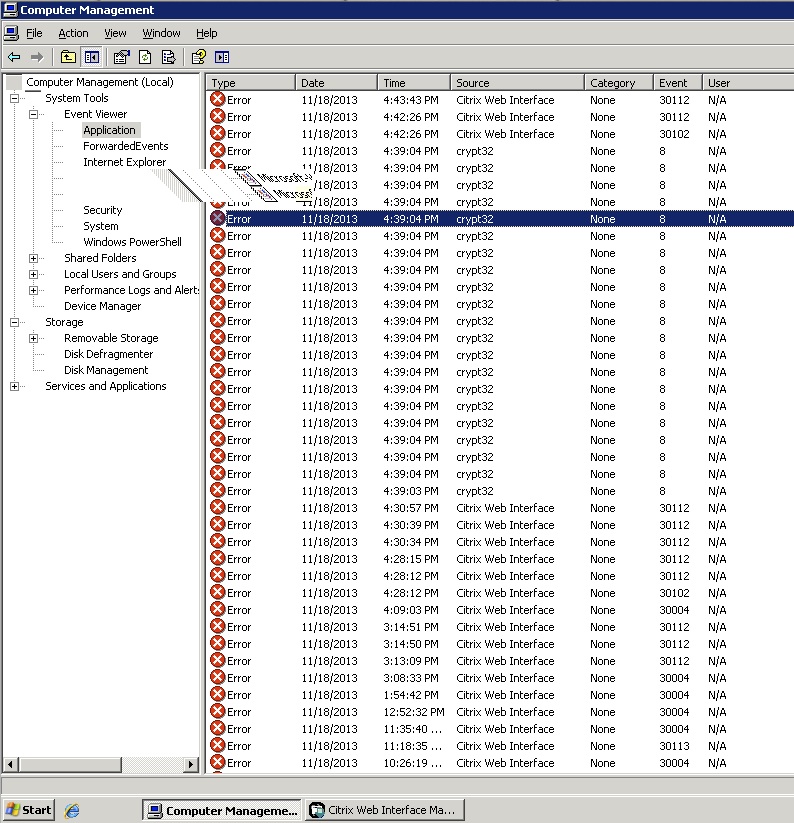
I wanted to also add a picture.
rdm_drawissue.jpg
Hi molikop
Can you check your version? Is it 0.9.16.0 or 0.9.17.0?
Thanks, Richard
Richard Markievicz
I was using 0.9.16.0 but I have now upgrade it to 0.9.17.0. Since then I'm running on a different issue that I'm going to report on another thread called "lldb command"
First, thank you both for the continued feedback on this screen freezing issue.
I found and isolated a case in FreeRDP today that could cause the behaviour described - basically, the RDP connection was visibly 'frozen' and didn't appear to accept any inputs. However, actually input was still being sent - for instance, if you had Notepad open in the remote machine, you could enter some text and of course you wouldn't see it, but next time you reconnect to the machine, your text was in fact there.
I have integrated a fix and released it as part of 0.9.18.0. I'm not 100% certain it's the problem that you are hitting, but certainly the behaviour of the bug seems to match.
I would be most grateful if you can let me know if you still experience this issue (or not) :)
Thanks, Richard
Richard Markievicz
Hi Richard,
Running 0.9.18.0 with tree Windows servers. This time 2008 R2 hang, both 2012 servers up and running. No specific terminal output to be sent, didn't change anything in RDM.
Hi,
Thanks for following up. We will continue working on this.
Richard
Richard Markievicz
Hello,
I am running 0.9.26.0 and am still receiving this error. It doesn't seem to happen when Microsoft Remote Desktop is used, just when the built-in FreeRDP is used.
Also, I typically use the undocked option rather than tabs. If I maximize, it will refresh the display and freeze there. I can then click/type something and un-maximize, and it will refresh and freeze again. I can repeat this process indefinitely, although my patience usually gives out first... I have had this happen with SBS 2003, Windows XP and Windows 7/2008 R2.
Thanks,
David
Hi,
This issue has my full attention however I'm having a very hard time reproducing it here, on multiple machines.
What kind of display options do you have for your connections (e.g. remote desktop size, smart sizing enabled, etc)?
Thanks, Richard
Richard Markievicz
I'm seeing the screen redraw issue on version 0.9.28.0. This is mainly happening on Windows 2003 R2, in terms of configuration I have Display as "Embedded (tabbed)", remote desktop size: "Default", fit embedded RDP window is selected, colors 16bits.
Are you using any of the following:
- Remote audio redirection
- Remote audio recording redirect
- Clipboard
- Remote devices (e.g. printers, serial ports, hard drives/folders, smart cards)?
If so, is it possible to try disabling these options and seeing if you can reproduce the problem?
Thanks, Richard
Richard Markievicz
Hello Richard, this is what I have configured. I will go ahead and remove audio and ports but keep the Clipboard checked.
Remote audio: "Bring to this computer"
Remote audio recording: "do not record"
Clipboard: it is checked
Serial ports: it is checked
Hard drives: it is checked
redirect all disk drives: not checked
redirect home folder: not checked.
Windows key passthrough: it is checked
I'm also including the performance section below
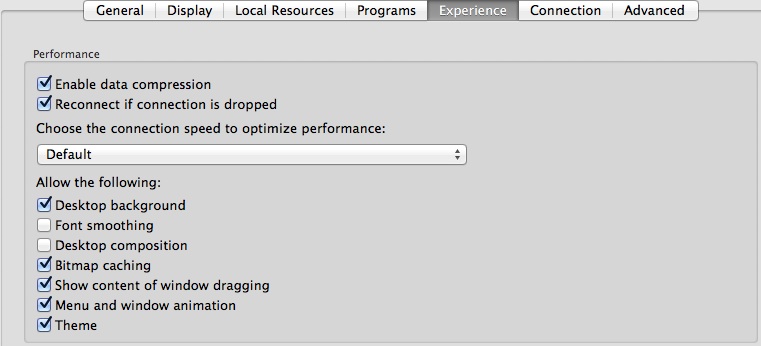
RDM issue[2].jpg
Please let me know if you still experience the issue with those revised options
Thanks, Richard
Richard Markievicz
I just changed the configuration the the below but I'm still experiencing the issue on Windows 2003 R2.
Something else to add here. After a few minutes working on the Windows 2003 R2 session with the redraw issue, I reached the point where I experienced the "freeze issue" and I had to start doing the "check for updates" just to logoff from the server.
Hi molikop
I can't see the image you posted, did you disable the clipboard redirection?
Thanks, Richard
Richard Markievicz
I have disabled clipboard redirection but I'm still seeing the redraw issue.
I wanted to provide an extra update, I have recently connected to one of my Windows 2003 sessions and I saw that I didn't have any drawing issues on the screen, when I compare the two sessions the one with issue was configured for 16bit colors while the one working was at 32bit.
I changed the not working session from 16bit to 32bits and everything looks good now. I then went and changed the session back to 16bits colors and everything continued working. This is on version 0.9.28.0, I do want to mention that I'm still seeing RDM freezing though.
@devolutions: Any progress?
Hi tonvanboven
Not yet, still working on it. We will update you when we have something.
Thanks, Richard
Richard Markievicz
If you download the latest version (0.9.32.0), you will see two additional options in Preferences > General > User Interface:
"Allow tabs to be rearranged"
"Allow tabs to leave the tab bar"
If would be very helpful if you could disable (uncheck) both of these checkboxes, and let me know if you experience issues with either the remote desktop session freezing or the application failing to paint properly (as described in the OP).
Please feel free to let me know the other way as well - that is, if you *don't* see the issue anymore smile
This is not a permanent fix (I realise this is useful functionality), but I'm just trying to isolate the root cause of the issue smile
Thanks, Richard
Richard Markievicz
I have tried disabling those options and the issue is still happening for me.
I'm connecting to a Windows Server 2008 R2 server. Display is embedded, size default, 16bit colour and the only option selected in display tab is fit embedded RDP Window
Hi brownie79
Are you referring to the issue in the OP (i.e. screen not redrawing properly, can use menu items to force a redraw) or to the second issue that we seem to be seeing (embedded RDP connection freezing, but the rest of the app remains responsive)?
Thanks, Richard
Richard Markievicz
Hi Richard,
I'm referring to the screen redraw issue where the menu forces a redraw.
Daniel
Hello Richard,
I have updated to version 0.9.34.0 but I'm still seeing the redraw issue on Windows 2003, I'm also seeing screen freeze for the whole application, the windows key getting stocked issue came back and now I just found a new issue. If I create a brand new RDP connection from scratch it is telling me "unable to find Microsoft Remote Desktop" when trying to open the connection, if I duplicate an existing (and working) connection, there are no problems connecting. I will update the other forums too.
Regards,
Eduardo.
Hi molikop
For the "unable to find Microsoft Remote Desktop" issue, please check this post:
http://forum.devolutions.net/topic8491-crash-when-quitting-rdp-and-saying-no.aspx#post36537
Let me know if that answers your question
Thanks, Richard
Richard Markievicz
Hello Richard,
thank you for getting back to me. I have replied to the other forum but in general it works following that posting.
Hi
What is your typical workflow when you see this behaviour (the screen fails to repaint properly, and can be forced to update by selecting a menu item e.g. "Check For Updates")?
For example, do you launch the app and start some sessions and just start working in them?
Or are you interacting with the different screens of RDM (configuring connections, adding and deleting entries, etc) at the same time?
Something else that might be helpful with any of you that are experiencing this issue, would be to send me a system report via PM (you can do this by choosing "About This Mac" from the Apple menu, and then choosing "More Info" > "System Report" and choosing "Save" to generate an .spx file).
Finally, when this particular scenario occurs, please check out Activity Monitor and look for any strange behaviour; for instance, perhaps RDM or another process (like WindowServer) has a sustained higher than normal CPU usage).
Thanks in advance,
Richard
Richard Markievicz
An additional question on top of my previous post:
Is it possible that when you see this issue, some or all of your connections are via an RDP gateway?
Thanks, Richard
Richard Markievicz
Hello Richard,
I just experienced this issue. I basically opened RDM, then open a connection to two Windows 2008 R2 servers and one Windows 7 workstations, I kept switching between the there sessions and all of the sudden the application stop responding, when I look into Activity monitor the application is not consuming much resources and it is not on "not responding" state, please see images below
In order to redraw/repaint the screen I basically click on the "check for updates" menu option and then I see the last actions I did with the mouse or the keyboard, so the session is still processing input, sometime check for updates will allow me to see the screen working normally again for 2 or 3 seconds but then the issue resumes.
I'm testing all this inside my companies network so I doubt i'm using the RDP gateway, but the entry is configured to "Automatically detect RD gateway server settings", how can I verify this.?
I'm also sending you a PM with the system report.
I decided to go ahead and change one of the entries to "do not use RD gateway", I was able to connect to it but then I wasn't able to click anywhere to have any input on the session. I had to disconnect, change it back to "Automatically detect RD Gateway server settings". When I tried to reconnect the RDM crashed, I reopened RDM and connect back to the session without any problems.