Citrix Unlock

Hi,
We have a few citrix servers, a mix between 2008 and 2003. The problem i'm having is when the machines lock i can't send a cntl alt del.
I there a special way to do this, the same happen when using normal RDP as well
All Comments (49)
Have you tried Ctrl-Alt-End ?
(Ctrl+F1 (ICA Client)
Try checking out this link as well!
//Brandur
Yes, Ctrl+F1 works with my RDM, one of my workmates told me it doesn´t with his ica client, but i havent tested it on his machine, yet.
Perhaps RDM can send Ctrl+F1 automatically when connecting with ICA?
Hi,
It's not always easy to send a key press, because sometime the session is not really ready, but I will take a look at it.
David Hervieux
Devolutions inc.
David Hervieux
I'm also having an issue not being able to send ctrl-alt-end. It just does nothing. When I try Ctrl+F1, it just closes that session window. I can log into that Citrix server using the normal Citrix client and it doesn't require that I send a ctrl-alt-end.
Any ideas?
Hi,
Maybe it's your client version, I'm not the best with Citrix, but maybe it's related to the version of the ActiveX, What version do you have ?
David Hervieux
Devolutions inc
David Hervieux
I have:
Remote Desktop Manager V 5.6.3.0
Citrix XenApp V. 11.0.0.5357
It seems good to me. Have you tried to set the credential to force the logon ?
David Hervieux
Devolutions inc.
David Hervieux
Do you mean within RDM or on the server?
Hi,
Yes directly from RDM, to force the login.
David Hervieux
Devolutions inc.
PS: Unfortunately, I'm more a software developer than an IT guy, if a Citrix expert is monitoring this thread, your help will be welcomed.
David Hervieux
Hi,
we still have trouble with RDM ans ICA Sessions, too.
I´ll open an incident ticket to our internal Citrix guys tomorrow, so they can support this problem, too.
Citrix Program Neighbourhood Version 10.2 and below don´t work with RDM (Tested with RDM 5.6.3)
I am running RDM 5.7.0.8 and Citrix Online Plugin Version 11.2 on my Windows 7 64bit Machine.
Launching an config file (.ica File) based ICA Session from RDM in embedded mode the "Welcome to Windows" Window appears, you have to press Ctrl-Alt-Del to logon.
Pressing Ctrl+F1 shows the login screen.
Starting a session with custom Configuration (only Servername entered, no UserName, Passwort or Domain) is the same result.
Starting both sessions in external Mode, the Citrox Server directly shows login screen.
When i enter Username, Domain and password, it is not uses. It´s the same result as decribed above. In embedded an in external mode. no login with this credentials.
What are the parameters server.ini an client.ini for?
David, why do you think the behavior is depends on the Active X Version? (of the client?)
Sebastian
edited by der_vitti on 1/18/2010
I tried looking for an option to force the login, but I couldn't find one. I have my username and domain entered in the saved session. I should mention that I don't have the Enterprise edition.
Hi,
@remotron5000
Can you try to request a trial and see if the login works when the password is specified. Also, if you have another machine and you can download the latest Citrx client, I think it's 11.2
@
I added the setting server.ini and client.ini when I implemented the import from Terminals session
server.ini
;** APPSRV.INI - Application Server Configuration File.
;**
;** This file contains user settings which define application
;** servers and other preferences.
client.ini
;** WFCLIENT.INI - CITRIX ICA Client Configuration File.
;**
;** This file contains initialization information for the
;** Citrix ICA Client program.
Hope this help
David Hervieux
I signed up for the trial version and entered my credentials, but it did the same thing. I couldn't upgrade to 11.2 due to company policies, so I'm stuck at 11.0 for now.
When I connect, it says "Checking your credentials…" with a partially filled progress bar and the dialog that asks me to CTRL-ALT-END over the top of it.
The odd thing is that I can RDP to the server without the need to do a CTRL-ALT-END and it all works fine. I would just use RDP, but they want us to connect via Citrix instead.
Hi,
Can you try something for me, include the domain name in your username:
devolutions\dhervieux
I already saw this type of problem with RDP, maybe it's also with Citrix.
David Hervieux
Devolutions inc.
David Hervieux
Just tried it. Unfortunately it didn't work. After that, I also tried username@domain.com, but that didn't work either. They both did the same thing. I'm stumped.
I will do a small application to test the connection, this will be allow us to do some test. I will send you an email as soon as it available (by the end of the week).
David Hervieux
Devolutions inc.
David Hervieux
it´s the same with our policies. we have no uptodate xenapp infrastructure, required from 11.2 ICA Client.
11.0 is the last client providing the "Program Neighbourhood" tha let create you your own ICA Connections. It would be great to get RDM working with it.
Hi,
Do you know where I can download this specific version, if somebody can send to me at support@devolutions.net if it's not too big.
David Hervieux
Devolutions inc.
David Hervieux
i searched it just yesterday to install it on my home machine, found it at http://www.e-know.net/assets/downloads/ica32pkg.msi
not original citrix link, but it´s hard to get the older versions at official websites...
Hi,
It's perfect. I will try to do some this and generate the ActiveX from this version.
David Hervieux
Devolutions inc.
David Hervieux
Hi,
Here is the small test, can you try it please ?
David Hervieux
Devolutions inc.
David Hervieux
CitrixConnector.zip
That worked both with and without Disable CTRL-ALT-DEL set!
Hi,
The tool is a basic version of RDM, I see one thing that might be different, can you set in your RDM Session the encryption to basic and retry ?
David Hervieux
Devolutions inc.
David Hervieux
I had already been set to basic. I tried it and also 128 bit, but it did the same thing.
Hi,
I uploaded a new test version:
http://remotedesktopmanager.com/download/Devolutions.RemoteDesktopManager.Bin.5.7.1.1.zip
In the option, set the debug level to 66 and retry to connect to your citrix server. This version ONLY contains the code from the connector I made this week end if the debug level is correctly set. I just want to see if it's related to a setting.
Let me know
David Hervieux
Devolutions inc.
PS: Thank you for your help
edited by dhervieux on 2/1/2010
David Hervieux
I tried to find where I could set the debug level, but I couldn't locate it. Can you describe how I can find this setting?
Also, thank you for your help. Your product helps make my job go much smoother.
Hi,
It's in the menu option (File-Options), in the Advanced tab at the left bottom of the panel
David Hervieux
Devolutions inc.
David Hervieux
I tried to set it to 66, but it ended up just defaulting back to 3. When I used the up and down buttons next to it, I only had the options 0-3. I tried it at 3, but the same issue occurred.
Doh,
My mistake, I forgot to change the UI. I updated the binaries with the UI fixed:
http://remotedesktopmanager.com/download/Devolutions.RemoteDesktopManager.Bin.5.7.1.1.zip
David Hervieux
Devolutions inc.
David Hervieux
Sorry, cannot run the test application on my Windows7 64bit. It crashes immediately after starting it: "Searching for a solutions for this problem"
In a Windows Server 2003 machine with installed Citrix Program Neighbourhood Version 10.00.52110 both (with and without Ctrl-Alt-Del) doesn´t work.
The Main Form shows:
"Click here to make a Connection to a Server"
When you press trhe Connect Button it shows:
"Initializing...."
"Connecting..."
and the again:
"Click here to make a Connection to a Server"
Tryed this on Win7 64bit with Citrix Online Plugin v11.2.
In embedded mode, no key-combination can unlock the login-screen. (Ctrl-Alt-F1, Ctrl-Alt-F4 etc)
I tested an ICA Session in RDM which is configured using a .ICA File (General Tab), All other options are greyed out. Its the same effect. When starting this session in external mode, it shows the login screen directly, no Ctrl-Alt-Del is necessary.
Trying this (opening in external mode) with a costom configured ica Session, it shows a "Connecting with %SERVERNAME%" from the ICA Client an then an error message;: "No XenApp-Server confugured at this adress"
Hi,
I recompiled the test program for the 64 bits.
David Hervieux
Devolutions inc.
David Hervieux
CitrixConnector[1].zip
Here my results:
Only Servername typed in, Login Screnn appears with and without "Disable Ctrl Alt Del" checked
Servername and Credentials entered: Successfully connects to the Server and direct log on with and without "Disable Ctrl Alt Del" checked
Conclusion: The "Ctrl Alt Del" Checkbox in the Test-Program is without effect.
Interestingly enough this test app shows a login screen.
My RDM doesn´t. Its a 5.7.1.1 with DebugLevel set to 66.
Unfortunately, it didn't work. I still have the password stored from the trial on the other version I have installed, although I ran this one as the standard edition.
Hi,
I tried something else. Can you download again it and let me know
http://remotedesktopmanager.com/download/Devolutions.RemoteDesktopManager.Bin.5.7.1.1.zip
David Hervieux
Devolutions inc.
David Hervieux
Tried it, but no luck.
Below is a screenshot of what I'm seeing, if that helps at all.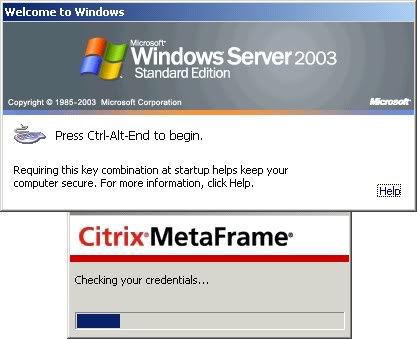
It´s exactly the same with me.
Hi
Can you try something, just click on the help and after that Ctrl-ALT-END
Why, to to be sure that the control has the focus.
Also, do you still have the debug level set to 66 ?
David Hervieux
Devolutions inc.
David Hervieux
In my case the debug level is still set to 66.
click on the help and after that Ctrl-ALT-END didn´t worked out.
still showing the "Welcome to Windows Screen" like postet by remotron.
I tried it, but it appears it has had the focus since I can click on the Citrix progress box and have it overlap the Welcome to Windows prompt. The Help screen appears as well when I click it.
I also have mine still set to 66.
Hi guys,
Sorry for the long delay. Is possible to try the small application in attachment and see if it works. There is an option Enable Enhanced Logon, can you try with and without this option and see if you can auto connect.
Let me know.
David Hervieux
CitrixConnector[1][2].zip
Can you try this version:
http://remotedesktopmanager.com/download/Devolutions.RemoteDesktopManager.Bin.5.7.3.3.zip
David Hervieux
The CitrixConnect program worked as long as I had "Disable Ctrl Alt Delete" checked. I had no luck with the new version you posted yesterday, however. Is there a way to add the "Disable Ctrl Alt Delete" option in the new version?
I will verify, it was supposed to be set to "Disable Ctrl Alt Delete" in this version, maybe it my next build. I will come back to you soon.
David Hervieux
Hi,
The "Disable Ctrl Alt Delete" is checked in this version, do you have a password set, just remove it and retry ?
Maybe you can try this one:
http://remotedesktopmanager.com/download/Devolutions.RemoteDesktopManager.Bin.5.7.3.4.zip
Let me know please
edited by dhervieux on 3/14/2010
David Hervieux
It worked!
Hi,
What do you mean ? What have you done to make it works ?
edited by dhervieux on 3/15/2010
David Hervieux
I just used the last build you wanted me to run (5.7.3.4) and I did nothing else differently. It just allowed me to log in without the ctrl+alt+del requirement. What ever you changed on this last version seems to have worked for me.
Good, maybe the change were not in the previous one.
David Hervieux
