Remote Desktop Manager 10.1 Beta
Hi guys,
We are really happy to release RDM 10.1 beta. The first version is 10.0.6.0 but the final version will be labelled 10.1.0.0. There is no database upgrade in this release and you can use it even with stable RDM version. Please post any issue in a separate thread if possible since it's much easier for us to answer
== Download ==
http://download.devolutions.net/Devolutions.RemoteDesktopManager.Bin.10.0.21.0.zip
http://download.devolutions.net/Setup.RemoteDesktopManager.10.0.21.0.exe
== Highlights ==
New type integrations
- Scorpion AuthAnvil credentials
- Spiceworks
- DeskRoll
- Remote Management
- Applications
- Events
- Printers
- Processes
- Services
- Intel AMT improvements
- Embedded web console
- TLS support
- Digest authentication
- UI improvements
Search setting in the option dialog
Enhanced session dashboard
Export to Excel in every grids
Updated the group icons
- Batch actions to migrate or update the selected entries
- PowerShell addhoc
- Putty session
- Web connection html field
- New duplicate report
- New importer
- RDCMan 2.7
- RDTabs
- Screen Connect 5 support
- Software group type
- Updated all the web browser extensions
- Internet Explorer
- Firefox
- Google Chrome
- Performance improvement and memory usage optimization
- Many fixes and minor improvements
edited by dhervieux on 12/9/2014
David Hervieux
All Comments (95)
Amazing work. Been waiting for a Apple Remote Desktop thing for RDM. Can't get it to work though (Comes up saying it cannot connect). Still getting the same issue with SSH to a Cisco Switch (Unsupported Packet 60). Good work thought :)
I will ask Joe to jump in the conversation next week as soon as he gets back. He is the one that is currently working on our own Apple Remote Desktop implementation.
David Hervieux
Hi Karl,
The setup I had while testing was :
Screen sharing activated under Preferences/Sharing.
In the advanced options, "Anyone may request permission to control screen" was checked. Any other options were left unchecked.
Does this match your current setup?
Jonathan Lafontaine
So glad to see OS X Screen Sharing! Thank you!
Were you able to test it lat?
Jonathan Lafontaine
Screen sharing activated under Preferences/Sharing.
In the advanced options, "Anyone may request permission to control screen" was checked. Any other options were left unchecked.
Does this match your current setup?
Yep, that matches my settings perfectly. We are using OSX 10.10 on the server.
We have a new version available:
http://download.devolutions.net/Devolutions.RemoteDesktopManager.Bin.10.0.7.0.zip
http://download.devolutions.net/Setup.RemoteDesktopManager.10.0.7.0.exe
== Change History ==
- Fixed an issue with the default TeamViewer executable name
- Improved the Roboform group import
- Minor UI fixes
David Hervieux

Been on a travel last days and I come back home to great news.
Keep up the good work guys.
Regards,
Ingvar Orn Ingolfsson
System Engineer
Axdata AS - Norway
Hi,
Looking for the new option "Added a default type path in the data source settings", but cannot find it. Is it available for SQL data source?
Thanks and regards
Michael
Yes it is in Adminstration->Data Source Settings
David Hervieux
Please ignore my last post. Just found it within administration menu.
I can't get the Apple Remote Desktop functionality to work, it just says "cannot connect to host" although I can ping it just fine.
lat and Karl,
Unfortunately, I have not been able to reproduce your particular connection issue so far.
I can successfully connect to a 10.9.5 and 10.10 host with ARD authentication.
Are you able to connect with other VNC clients?
Jonathan Lafontaine
The Apple Remote Desktop client isn't the same as VNC... I turned on Remote Management under sharing, clicked Anyone may request permission to control screen. Firewall is off. If I do a port scan of the Mac from my Windows PC, it sees that port 5900 is responding.
OS X version is 10.9.5.
We do not support guest connection through "ask permission" right now.
I have to add my user to the "only these users" list to be able to connect.
Jonathan Lafontaine
I added my user to those users and still "unable to connect to host". The OS X machine has an IP address registered on the network and like I said, I can see that port responds.
Just to make sure we have the same settings, have you granted permission to Observe and Control the screen in your user security options?
Jonathan Lafontaine
Yes, every checkbox possible for the user is checked off.
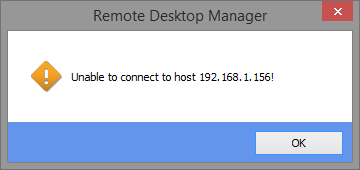
Is this the error message you have?
Jonathan Lafontaine
Yep, that is the error I am getting. If I use VNC, it works fine.
The beta version that will be released later tonight will contain more debug information for this particular error.
If possible, could you please attach RDM's log file after getting the error? You can also email it to jlafontaine@devolutions.net if you don't want to share it publicly.
The log should be located inside the application's folder.
Jonathan Lafontaine
That is exactly it Jonathan.
I can't find the log in C:\Program Files (x86)\Devolutions\Remote Desktop Manager, what's the file name?
We have a new version available:
http://download.devolutions.net/Devolutions.RemoteDesktopManager.Bin.10.0.8.0.zip
http://download.devolutions.net/Setup.RemoteDesktopManager.10.0.8.0.exe
== Change History ==
- Added a close tile in the session dashboard
- Added a custom VPN similar to the generic VPN add-on
- Added Digest authentication support for embedded Chrome
- Added full credential repository support for the Intel AMT Web Management
- Added the new Spiceworks session type
- Added the VPN specific image support in the tree
- Intel AMT digest authentication works embedded (auto login)
- Intl AMT Web Management now opens embedded by default (using Chrome)
- Minor UI tweaks
David Hervieux
Jonathan,
I updated to the latest version and noticed that this appears in the RemoteDesktopManager.log:
[5/11/2014 12:53:53 PM]ERROR SILENT System.IO.FileNotFoundException: Could not load file or assembly 'zlib.net, Version=1.0.3.0, Culture=neutral, PublicKeyToken=47d7877cb3620160' or one of its dependencies. The system cannot find the file specified.
File name: 'zlib.net, Version=1.0.3.0, Culture=neutral, PublicKeyToken=47d7877cb3620160'
at Devolutions.Vnc.ZRLECompressedReader..ctor(Stream uncompressedStream)
at Devolutions.Vnc.RfbProtocol.Connect(String host, Int32 port)
at Devolutions.Vnc.VncClient.Connect(String host, Int32 port)
at Devolutions.Vnc.VncCustomControl.Connect(String host, Int32 port)
at Devolutions.Vnc.VncCustomControl.Connect(String host)
at Devolutions.RemoteDesktopManager.Frames.Embedded.FreEmbeddedAppleRemoteDesktop.Connect()
Possibly related?
Thanks,
Karl