Remote Desktop Manager Jump Beta
Emails are going out to our Jump beta testers within the next few days. Follow this topic for all your Jump beta news.
Regards,
Stéfane Lavergne
All Comments (100)
And a blog post as well:
David Hervieux
The how to blog has been published.
Stéfane Lavergne
Which version of RDM did I have to install to get Jump working ?
X. Thomas.
The 9.5 beta available here (latest build is v9.4.3)
http://remotedesktopmanager.com/Home/Download#beta
You also require a Jump serial, if you've already registered for the Jump beta you will receive an email shortly, if not you can register here:
http://jump.remotedesktopmanager.com/
Regards,
Stéfane Lavergne
I THINK I'm interested, but I can't find a clear explanation of what it IS. As far as I can tell it's something to do with some central RDS Server being fully configured with RDM's VPN clients/addons and whatnots. And then you use your local RDM client to connect (the "Jump") to that server. The jumping effectively creates an RDS Session on the Jump Host. From then it's a bit fuzzy.
Jump is RDP-in-RDP made easy. If we take a few steps back, the good old solution of having RDP icons on your desktop with bunch more RDP icons on the RDS server's desktop. It work but it's not the easiest to manage.
Since RDM Jump is based on RDM you also get things like access control, logging and credential management on top of it.
Like, how is this better than a central RDM SQL Database? or simply RDP-ing to a Terminal Server with RDM installed? It may be vastly superior, but that's definately not clear (enough)...
That is exactly what it is.
So... I JUST found this post. Leaving it as a reference for other confused ones:
http://blog.devolutions.net/2014/04/remote-desktop-manager-jump-beta.html
Thank you for the link.
If I understand correctly: It's so your local RDM can have knowledge of the servers that are reachable from the Jump Host and connect to them without having to be too aware of the Jump Host itself.
Follow up questions then are:
- Can the local user (me) be as close as possible to being unaware of the Jump Host? Because I'm seeing double task bars in the screenshots there...
You can control what the session looks like, resolution and all just like you would to normally. There is however a few restrictions at the moment. For example the Jump host connection will always be an embedded session. Secondly the jump destination RDP could be an external but at the moment there is an issue with the logging and control of such session configuration. Most of the testing has been done using embedded sessions.
- Will this also work as a non-embedded session? I typically run my connections in Custom 1900x1000. This enables me to see my local taskbar AND my remote taskbar on a Full HD display.
For the moment you will need to run embedded but undocked.
Stéfane Lavergne
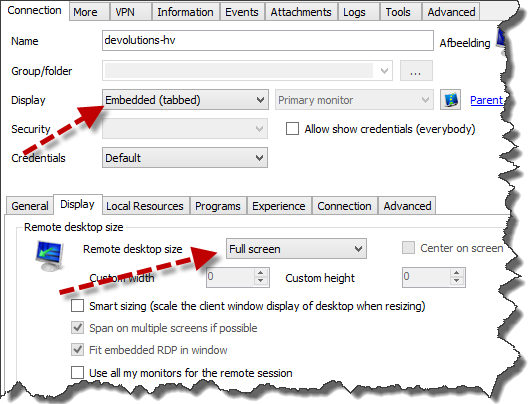
@Vincet - If you want the Jump destination RDP to be full screen, configure it as such:
Stéfane Lavergne

Hey,
is it possible to install only the RDM Agent on the Jump Host?
Greetings
Martin
Will the database update have any impact on my colleagues that are not participating in the beta?
- Using a shared SQL datasource
- Colleagues are using the most recent stable version
@Gydo
There is no database schema change in this update. The only issue you could have is if you use one of the newly created types like Password Manager Pro, Wallet or Gateway. Those types were not available in the previous version so RDM 9.2 will not know how to handle them.
David Hervieux