Run Aida32 Report

Hello everybody!
Being my first time and being Brazilian, I apologize for the mistakes!
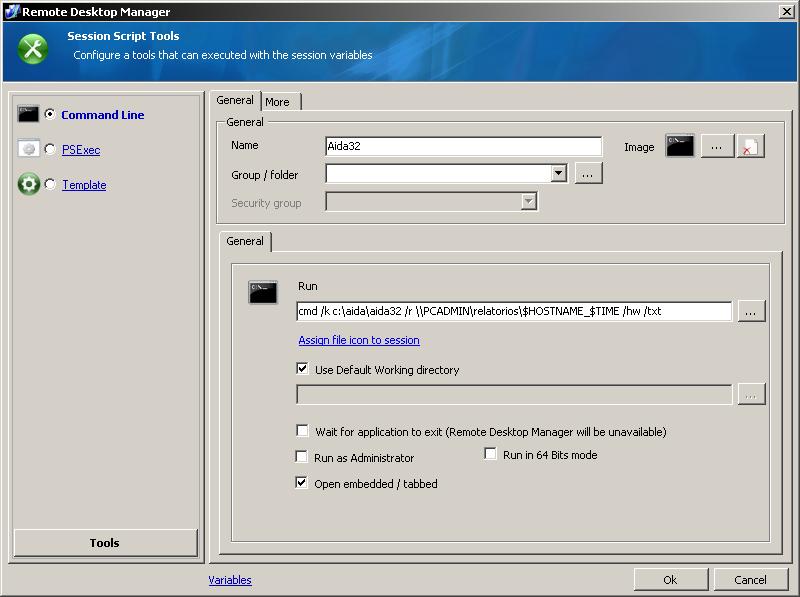
I have tried to run remotely by the RDM AIDA32, but when running the Script Tools "command line" or "PsExec" the report is generated from my machine.
Below is the print what I think is right.
________________________________
cmd /k c:\aida\aida32 /r \gti-11\relatorios\$HOSTNAME_$TIME /hw /txt
____________________________________
If possible, I would help.
The AIDA32 is installed on the remote machine in "c: \ Aida."
Thank you!
Tela.jpg
All Comments (6)
Hi,
I never used aida but are you sure that using PSExec does not write the report on the remote machine?
David Hervieux
Yes I have tried according to the following screen and after the implementation of the "C: \ Aida \ AIDA32 PCTESTE exited on with error code 0.", Which is run correctly, but can not verify that the file was saved in "c: \ "with the name" $ $ HOSTNAME_ TIME. "
Thank you!
tela1.jpg
tela2.jpg
Maybe you could create a batch file to copy file somewhere?
David Hervieux
I do not understand your idea! It would be a batch file to copy the report to a specific location?
The problem is that it creates the report anywhere. The most that happens is to create the report from the local machine and not the remote!
Thank you!
I thought that you wrote that the file was generated on the remote machine with psexec?
David Hervieux
Apparently! On the message type Aida, the "error 0" means completed successfully, but the file is not generated!
I think that will run quieter and then VNC Aida!
If you try something and find a solution, please share!
Thank you!
