Embedded FireFox Web Sessions Open Minimized

When opening an embedded web session using Firefox and either MozNET (R19.8) or geckofx engine, my sessions open minimized in the taskbar and not in an embedded tab. The tab opens, but it is blank. This happend after upgrading to RDM 9.1.2.0.
This is happening with both existing and newly created sessions.
Using IE is not an option because Laspass credentials are not sent properly to an embedded IE session. I will open that in a separate thread.
Is there a setting or an option that I am missing that is causing this or is it a bug?
All Comments (29)
Are you running RDM in x86 or x64 (RemoteDesktopManager.exe or RemoteDesktopManager64.exe)
Stéfane Lavergne
Taskmanager shows RemoteDesktopManager.exe so I'm assuming 32. Interesting. I am running a 64 bit OS (Windows7 Ultimate). I switched to 64 bit and the problem remains.
edited by frankmcc on 2/19/2014
Good you are running x86, it is the recommended executable. There is a blog post that will be published soon on when you use x64 vs x86.
I just needed to know what I was dealing with. It looks like it's a bug. Can you post a screen shot of the empty tab? Is it completely empty?
Regards,
Stéfane Lavergne

I've made a fix that should resolve your issue. Please download from here:
http://download.devolutions.net/Devolutions.RemoteDesktopManager.Bin.9.1.4.0.zip
Simply extract the files into your install directory.
Regards,
Stéfane Lavergne
Sorry, No-Go... Same problem.
Humm... What is happening here is we start the Firefox in a separate application (Embedded32.exe) we then re-parent the app inside RDM. That app is starting but the re-parent isn't working. The question is why?
Are you running RDM with elevated privileges? If not try to see if it changes anything. Are you running RDM with different credentials (aka Run-As)? Do you have any error messages in the application logs (Help -> View Application logs)?
I will need to investigate further.
Stéfane Lavergne
I am an administrator for my domain (Some call me a god of the network, but I won't go into that), Domain admins are a member of the administrators group on my local machine, and UAC is off. I love having full control!
The short answer is that I am simply launching the application, no run as, no elevated privileges. I should not need elevated privileges with my user account.
Just for giggles, I restarted the application running it as administrator and there was no difference. - no giggles...
Thank you for running the test.
Do you have anything in the application logs? (Help -> View application logs)
Stéfane Lavergne
Nothing in the log. However, I had to reboot my system for another reason and now it is working. I'm assuming something in the patch fixed it, but didn't take until after the reboot.
Good to here it works now.
Let me know if ever it happens again. We will need to create a private build with more logging to figure out what exactly is going wrong.
Regards,
Stéfane Lavergne
we have the same problem.
Oliver Servay
Senior IT Systemadministrator
C + M Utescheny Spritzgießtechnik GmbH
Email: O.Servay@utescheny.de
Industriestraße 2-6
75059 Zaisenhausen
Fon: +49 7258 902 392
Fax: +49 7258 902 390
Are you running v9.1.4.0?
http://download.devolutions.net/Devolutions.RemoteDesktopManager.Bin.9.1.4.0.zip
Stéfane Lavergne
Yes i'm running 9.1.4.0.
--
Oliver Servay
Senior IT Systemadministrator
C + M Utescheny Spritzgießtechnik GmbH
Email:
O.Servay@utescheny.de
Industriestraße 2-6
Fon:
+49 7258 902 392
75059 Zaisenhausen
Mobile:
+49 172 7348101
www.utescheny.de
Fax:
+49 7258 902 390
[/table]
edited by zapnet on 2/25/2014
Oliver Servay
Senior IT Systemadministrator
C + M Utescheny Spritzgießtechnik GmbH
Email: O.Servay@utescheny.de
Industriestraße 2-6
75059 Zaisenhausen
Fon: +49 7258 902 392
Fax: +49 7258 902 390
I'm assuming you've tried to "Run-As admin" and a reboot and both didn't work.
I will get you a private build with more logging information to try to resolve the issue.
Regards,
Stéfane Lavergne
Yes ..sorry.
Regards
Oliver Servay
Senior IT Systemadministrator
C + M Utescheny Spritzgießtechnik GmbH
Email: O.Servay@utescheny.de
Industriestraße 2-6
75059 Zaisenhausen
Fon: +49 7258 902 392
Fax: +49 7258 902 390
Please download this private build:
http://download.devolutions.net/Devolutions.RemoteDesktopManager.Bin.9.1.5.0.zip
- extract the file into your install directory
- start RDM
- File -> Options -> Advanced -> Debug Level, set to 2048
- Help -> Diagnostics -> Launch Profiler
- Start your sessions, you should see some messages appear in the profiler window, please post them here.
This should help me resolve the issue once and for all.
Regards,
Fixed the download link
edited by stefane on 2/26/2014
Stéfane Lavergne
Hello,
sorry the Profiler is empty.
Oliver Servay
Senior IT Systemadministrator
C + M Utescheny Spritzgießtechnik GmbH
Email: O.Servay@utescheny.de
Industriestraße 2-6
75059 Zaisenhausen
Fon: +49 7258 902 392
Fax: +49 7258 902 390
Oliver,
My bad, I for got to change the file name when I posted the link. v9.1.4.0 is the public build, v9.1.5.0 is your private build.
Could you give it a try with the v9.1.5.0. I just double checked the link and all is good with respect to the trace.
http://download.devolutions.net/Devolutions.RemoteDesktopManager.Bin.9.1.5.0.zip
Best regards,
P.S. I will also update the original post with the proper download link
Stéfane Lavergne
Starting process
PID: 11092
MainWindowHandle: 0
Wait 100ms
Wait 100ms
Wait 100ms
Wait 100ms
Wait 100ms
Wait 100ms
Wait 100ms
MainWindowHandle: 1511732
WinAPI.IsWindowVisible(1511732): True
Setting the parent
Showing window
Resizing parent
Assigning process
Done
Oliver Servay
Senior IT Systemadministrator
C + M Utescheny Spritzgießtechnik GmbH
Email: O.Servay@utescheny.de
Industriestraße 2-6
75059 Zaisenhausen
Fon: +49 7258 902 392
Fax: +49 7258 902 390
Oliver,
Thank you for the trace, all looks good.
We start the process, get it's PID, wait for it to be ready, find it's Window Handle, change it's parent, show the window then re-size. All works without error yet the app is still not displayed properly...
I was hoping one of the calls would fail and give me an error code that I could then resolve. I will need to investigate further.
Regards,
Stéfane Lavergne
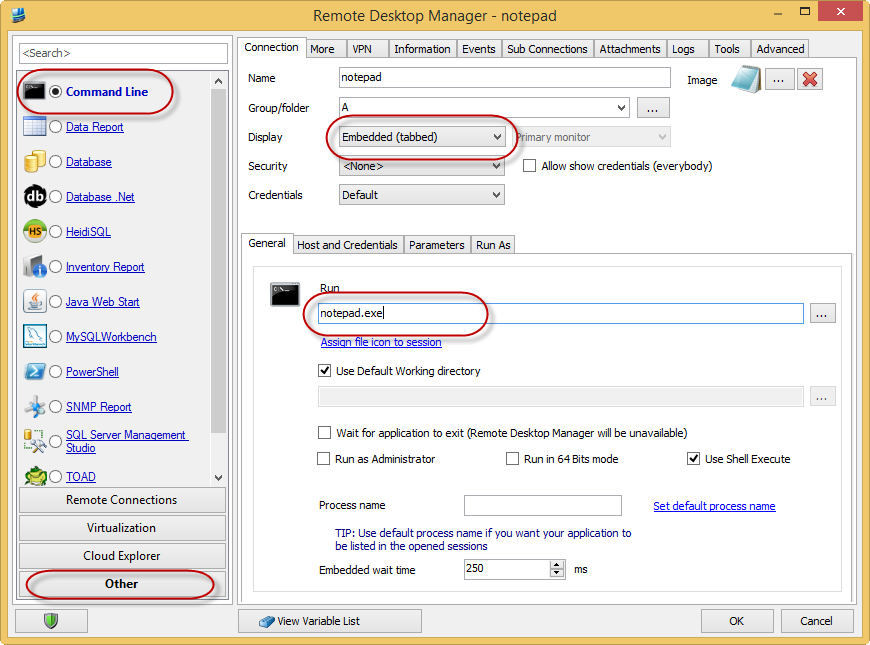
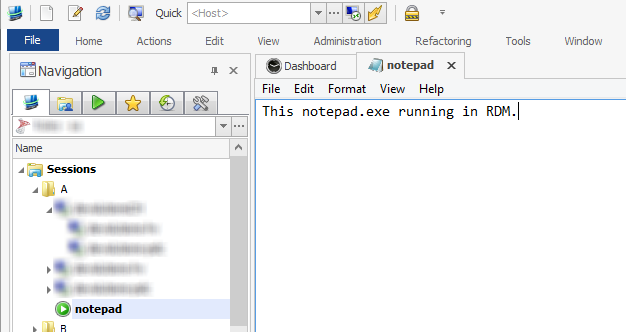
Could you try to embed NotePad.exe. You can import the notepad.rdm file below or do it manually.
Now run the session, you should see notepad.exe hosted within RDM. Does it work?
Stéfane Lavergne
notepad.rdm
2-26-2014 9-47-18 AM.png
2-26-2014 9-46-17 AM.png
Good morning,
it runs in an external Windows not embedded
The Problem is only in Windows 8.1 on an Windows 7 PC it works.
Oliver Servay
Senior IT Systemadministrator
C + M Utescheny Spritzgießtechnik GmbH
Email: O.Servay@utescheny.de
Industriestraße 2-6
75059 Zaisenhausen
Fon: +49 7258 902 392
Fax: +49 7258 902 390
I have the exact same problem as OP except that everything you have suggested has not worked. I restarted my PC like OP said but that did not do anything for me. This was working in Windows 8.1 before I had to format and reinstall Windows to Windows 8. Now it does not work. Could this be a graphics related issue?
@Oliver - thank you for the info, so we are looking at a re-parenting issue, regardless of application (NotePad, Paint or our embedded firefox application.
@bars - I don't think it's a graphics related issue, but at the same time I can't exclude it altogether.
@bars - did you try the v9.1.5.0 build? What does the profiler output look like?
Windows 8 vs 8.1
It worked here on my Windows 8 laptop. I upgraded to 8.1 last week (actually clean install) and it still works. The calls we are making are pure windows native calls.
Stéfane Lavergne
Stefane, here is the result
RDM2.png
Guys I think I got it. After looking over and over your screen shot I notice the small icon
It's a known issue, take a look at this help topic:
http://help.remotedesktopmanager.com/index.html?troubleshooting_putty.htm

Stéfane Lavergne
2-27-2014 8-14-26 AM.png
YES, that worked! Disabling the quick connect button did the trick. Thank you very much for the help!
Yes the Teamviewer 9 Quick Connect
Oliver Servay
Senior IT Systemadministrator
C + M Utescheny Spritzgießtechnik GmbH
Email: O.Servay@utescheny.de
Industriestraße 2-6
75059 Zaisenhausen
Fon: +49 7258 902 392
Fax: +49 7258 902 390