set clipboard is sometimes causing a fall back pop up

so i have a set clipboard with text and sometimes chrome pops up like an alert box with a textbox inside it and you have to copy your stuff out of that pop up, after you use it a few times the pop up will top showing, i am asked my llm and it says it is some kind of fallback thing in psu
All Comments (5)
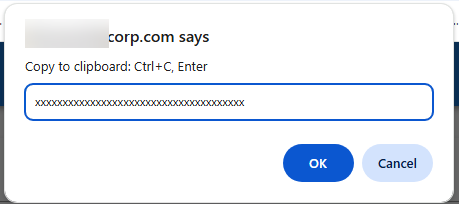
its really a bother
if i keep clicking it, at some point it will just put it on the clipboard instead of doing this pop up
Hi Matthew,
Thank you for the screenshot. You are right that the box is a fallback. When the browser refuses the copy that Set-UDClipboard asks for, the app shows the text in that "Copy to clipboard: Ctrl+C, Enter" box instead, and Set-UDClipboard has no option to turn it off.
https://docs.devolutions.net/powershell-universal/powershell-commands/set-udclipboard
I reproduced the same box in our lab on PowerShell Universal 2026.3.4. In our test browser the copy worked when the script did 3 seconds of work before Set-UDClipboard, and the box appeared every time with 6 or 10 seconds. Clicking again while the script ran made the copy go through. A delay like that in your script could explain what you see, but I cannot confirm it without the script, and it does not explain why the box stops after a few uses.
Please send me three things.
1. What you click that runs Set-UDClipboard.
2. Whether your script does several seconds of work before Set-UDClipboard.
3. The script as it is now, with any passwords or server names removed.
If it does, and the text is already known before that work, you can also try calling Set-UDClipboard first. In our lab that avoided the box every time. Please let me know whether the box still appears after that change.
Best regards,
Michel
Michel Audi
ope, i just found out its an issue where the button click to the set- clipboard causes the psu fall back to happen, shame there isnt a 'help' link in the pop up to explain why i am seeing that because the time between click and set clip is too far apart.
Hi Matthew,
Thank you for letting me know. That matches what we saw in our lab, where the box appeared when several seconds passed between the click and Set-UDClipboard.
There are two changes you can try, depending on when the text is known.
1. If the text is known before the slow work, call Set-UDClipboard first and do the work after it.
2. If the text only exists after the work, keep it in a session variable when the work is done, and add a second button that only runs Set-UDClipboard with it, so the copy happens right after that click.
We tried both changes in our lab on PowerShell Universal 2026.3.4, and in both the copy went through without the box.
You are right that the box gives no hint of why it appears, since it only shows a generic message. I am passing your suggestion of an explanation or a help link to our development team.
Please let me know whether the box still appears after the change. If it does, please send me the script with any passwords or server names removed, and I will look at it.
Kind regards,
Michel Audi