Navigation panel hiding

Version 2026.3.2.1
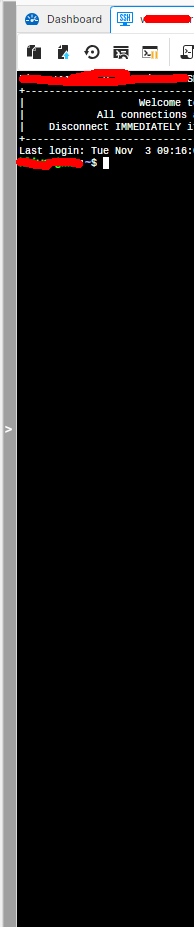
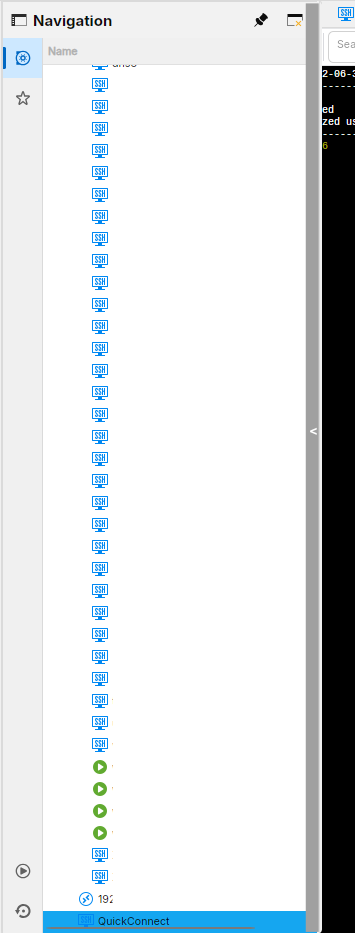
If Navigation panel is unpinned then this panel on the left show with Navigation. When you click on it show navigation panel. It hides when you click on RDM or go outside RDM window with mouse but it does not when clicking on terminal window.
In my opinion pining navigation panel should look different. Here's how I would see it. Slim and simple. Another thing is I think terminal window should always be resized to fit window insted being under navigation panel.
All Comments (3)
Hello Bartlomiej,
Thank you for the detailed description and the screenshots.
I was able to reproduce the first point on Remote Desktop Manager Linux 2026.3.2.1: when the Navigation pane is set to auto-hide and you open it over an SSH session, clicking inside the terminal does not close it, while clicking anywhere else in Remote Desktop Manager does. This is not the expected behaviour, and I have reported it to our development team.
In the meantime, you can close the pane by clicking the ribbon or the menu bar at the top of the window. If you want the terminal to stay fully visible next to the Navigation pane, pin the pane with the pin icon in its header: when it is pinned, the terminal is resized to fit the remaining space. In auto-hide mode, the pane always opens over the session area. That is how auto-hide works, so it does not take space away from the session while it is closed.
For your suggestion about a slimmer collapsed strip with an arrow, please post it as a feature request in the Remote Desktop Manager Linux section of our forum: https://forum.devolutions.net. Our product team reviews the requests posted there.
Best regards,
Alexis Geller Peiro
Just to let you know - same thing happens with RPM popup on tab. Clicking inside terminal is not closing it.
Hello Bartlomiej,
Thank you for letting me know. I was able to reproduce it: the tab context menu also stays open when you click inside the terminal, and I found that other menus, such as the drop-downs in the ribbon, behave the same way. I have added this to the report for our development team.
Until it is fixed, you can close these menus by clicking anywhere outside the terminal, for example on the ribbon, or by pressing Escape before you go back to the terminal.
Best regards,
Alexis Geller Peiro