2026.3.4 - Error Saving User Preferences

So, I had this issue happen back in 2026.3.0, and ultimately working in my lab environment, I reinstalled PSU and the problem disappeared. Now on 2026.3.4, I just upgraded my Prod environment which is a mix of Windows 2025 and RHEL9 servers, and I was using only local accounts waiting on my SSO team to get their portion for OIDC authentication configured. No issues whatsoever with local accounts and saving any user preferences, e.g re-order the menu, change dark/light mode, etc.
I hooked SSO into Prod, and the new accounts now have this problem. The really fun part is that my Test environment with an identical config does NOT have this issue. New SSO user accounts in Test can adjust their user settings.
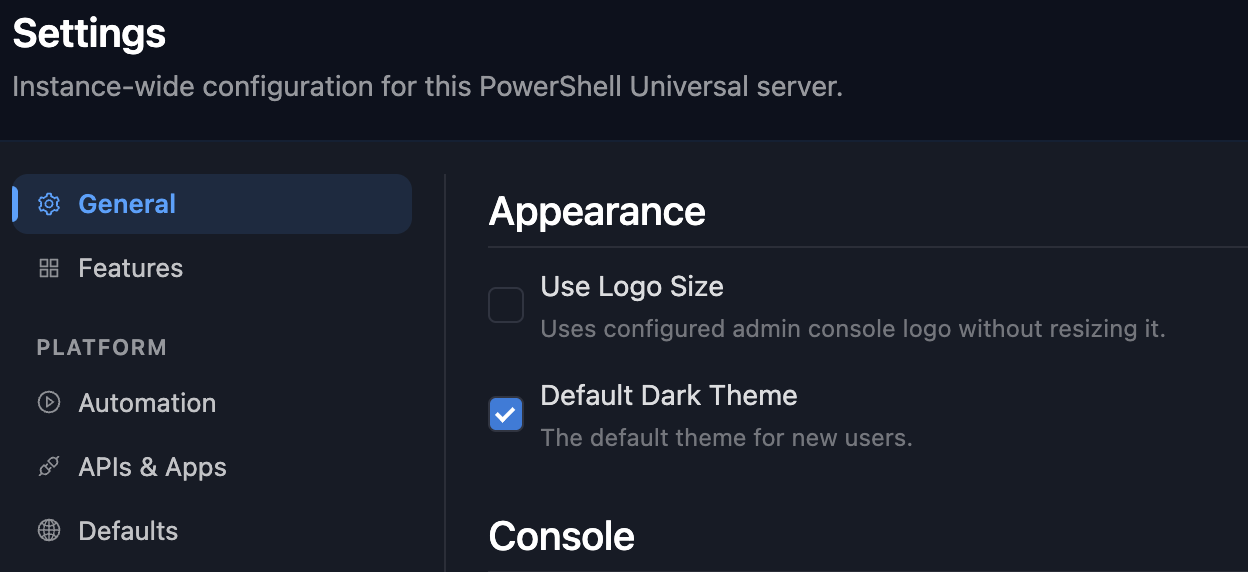
I also have Dark Mode set as the default for all new users, and this settings seems to have no effect either. All users get light mode.
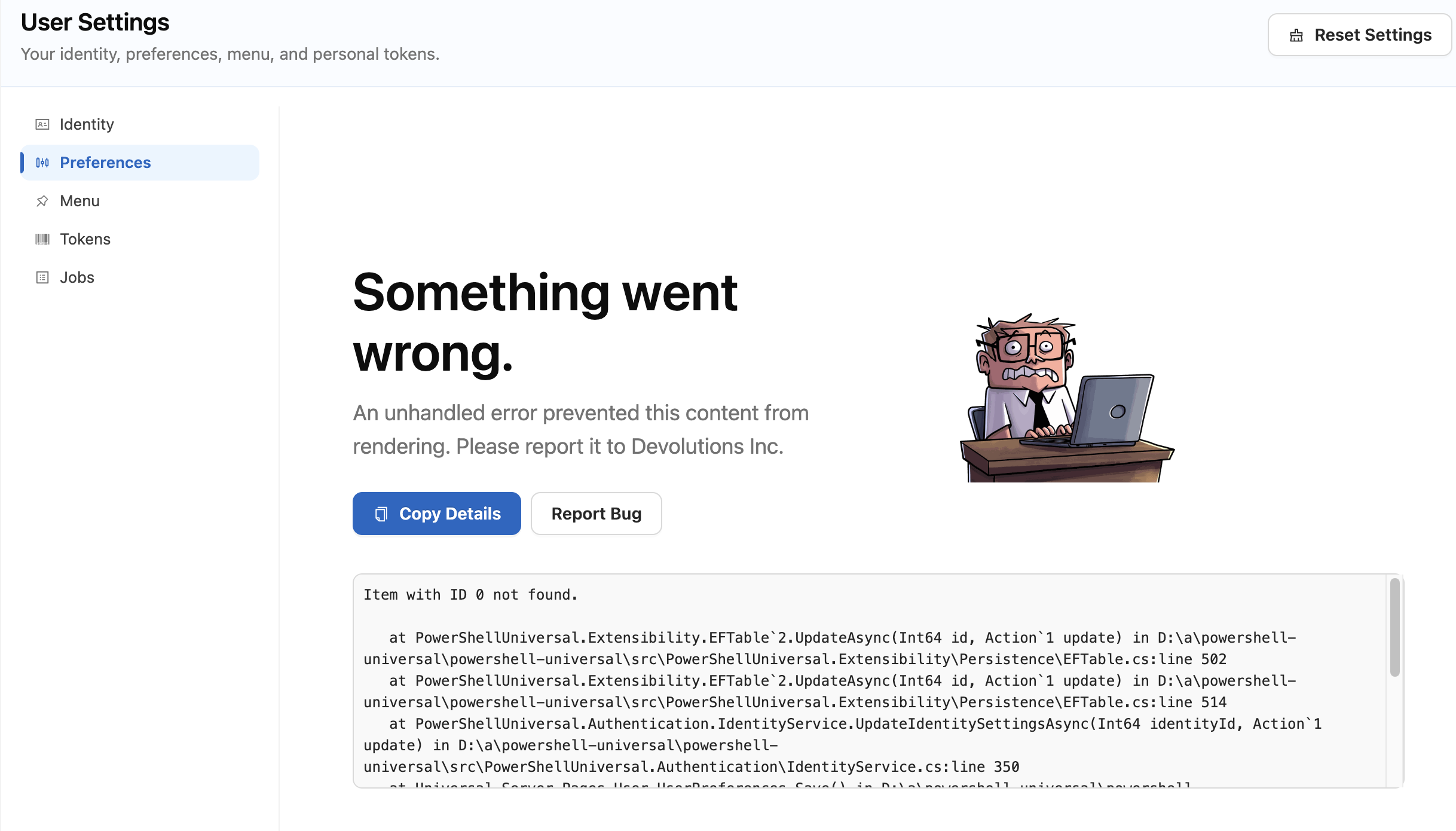
I know the below error is a not really specific. I'm not totally sure what else to check here. Looking for some guidance on what to try next. Thanks!
General Error below:
Item with ID 0 not found.

   at PowerShellUniversal.Extensibility.EFTable`2.UpdateAsync(Int64 id, Action`1 update) in D:\a\powershell-universal\powershell-universal\src\PowerShellUniversal.Extensibility\Persistence\EFTable.cs:line 502
   at PowerShellUniversal.Extensibility.EFTable`2.UpdateAsync(Int64 id, Action`1 update) in D:\a\powershell-universal\powershell-universal\src\PowerShellUniversal.Extensibility\Persistence\EFTable.cs:line 514
   at PowerShellUniversal.Authentication.IdentityService.UpdateIdentitySettingsAsync(Int64 identityId, Action`1 update) in D:\a\powershell-universal\powershell-universal\src\PowerShellUniversal.Authentication\IdentityService.cs:line 350
   at Universal.Server.Pages.User.UserPreferences.Save() in D:\a\powershell-universal\powershell-universal\src\Universal.Server\Pages\User\UserPreferences.razor:line 129
   at Microsoft.AspNetCore.Components.ComponentBase.CallStateHasChangedOnAsyncCompletion(Task task)
   at PowerShellUniversal.SaveButton.Run() in D:\a\powershell-universal\powershell-universal\src\Universal.Server\Shared\Settings\SaveButton.razor:line 36
   at Microsoft.AspNetCore.Components.ComponentBase.CallStateHasChangedOnAsyncCompletion(Task task)
   at AntDesign.Button.HandleOnClick(MouseEventArgs args)
   at Microsoft.AspNetCore.Components.ComponentBase.CallStateHasChangedOnAsyncCompletion(Task task)
   at Microsoft.AspNetCore.Components.RenderTree.Renderer.GetErrorHandledTask(Task taskToHandle, ComponentState owningComponentState)
25890ee3-7d1b-4a8d-bb5d-6a7214b8ef95.png
84b8e8cd-d3f3-42f7-9128-e2faced516f5.png
All Comments (1)
Hi John Mark,
Thank you for the full stack trace and the two screenshots.
The error means the Preferences page did not resolve your SSO session to a saved account in PowerShell Universal. When you click Save, the page writes to the account of the signed-in user. Here it passed ID 0, and no saved account has that ID, so the save fails before any of your choices are applied. The theme selector on that page writes the same way, so it fails too.
To find what differs from Test, I need four things from you.
1. In Prod, sign in with a new SSO account, open User Settings, then Identity, and send me a screenshot of the User Name and the Claims table.
2. Do the same with a new SSO account in Test.
3. With the same Prod account, open the account menu from your initial in the toolbar, click the sun icon beside the language at the bottom of it, and tell me whether the console turns dark and stays dark after a refresh.
4. Tell me whether the error happens on both your Windows and your RHEL servers, or only on one of them. The toolbar shows which server you are on.
You can blur claim values, but please keep the claim types and the User Name visible.
About Default Dark Theme, I reproduced it in our lab on 2026.3.4. With the setting on, a user created afterwards still got a light console at first sign-in. The console uses the theme saved on each user's own account, and light when none is saved, so the setting is not applied to new users, local or SSO. I am passing this to our QA team and will let you know what comes of it.
Best regards,
Michel
Michel Audi