Allow "Clear cache" configuration on web frontend
1 vote

Hi
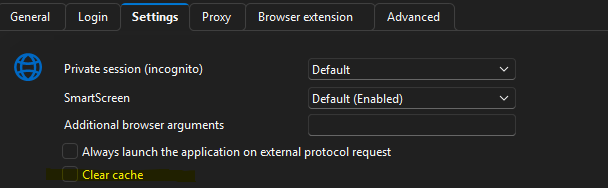
We have a bunch of people using Devolutions Launcher. Among other things, they use it to access webpages and apparently the WebView2 cache becomes a problem over time. In RDM we see the "Clear cache" setting which we assume clears the cache every time the webpage is either launched or closed...could this option please be made available to be configured via Web frontend as well?
Thank you
All Comments (1)
Hi miccol,
Good news: this option is already available in the DVLS web interface.
On a Website entry:
1. In the General section, set Display to Embedded or Undocked.
2. Open the Settings section and check Clear cache.
The option only appears with Embedded or Undocked, because those are the modes that use the built-in WebView2 browser. With External, the page opens in your own browser, so there is no WebView2 cache to clear. This works the same way in RDM.
It has been available since DVLS 2022.2.7.0, so any recent version should have it. If you still don't see it, or the cache isn't cleared when Launcher opens the page, let us know your DVLS and Launcher versions and we'll take a closer look.
Regards,
Sébastien Aubin
Product manager - Password Management