Fresh Install - Service Stops

Attempting to install PSU on a fresh Windows Server 2025 build - tried both a simple install (no customizations) and an install that runs the service as a domain account (with login as service rights). The service starts and then stops quickly (no failure to start error) - this error shows in the event log.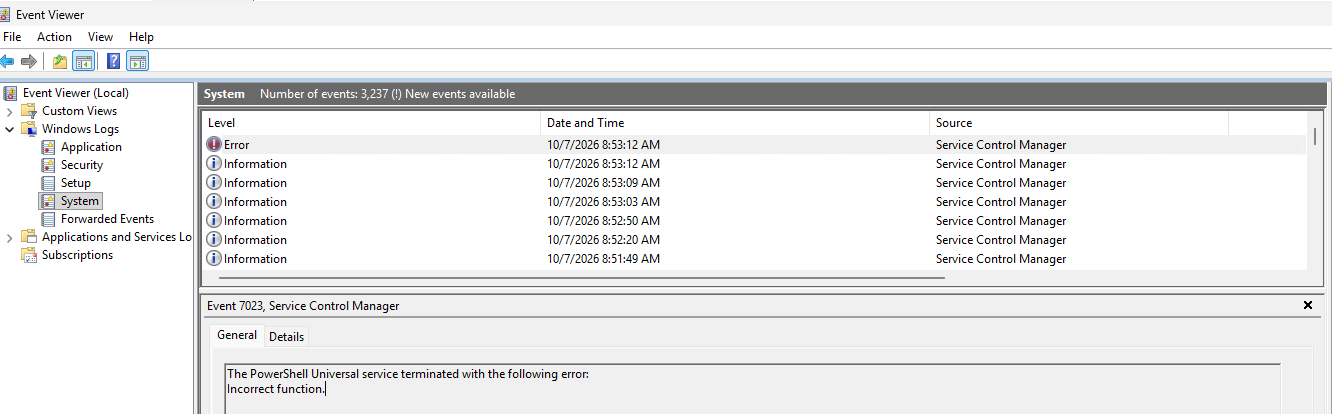
78cfbbc1-e90c-4237-8273-e780d215c86f.png
All Comments (3)
Hello @bcaydelotte
Thank you for the details and screenshot.
The Service Control Manager event confirms that the PowerShell Universal service is terminating after startup, but the "Incorrect function" message by itself does not identify the underlying exception. Since you are seeing the same general behavior on a fresh Windows Server 2025 installation, I would like to correlate the Windows event with the PSU startup logs before making any configuration changes.
Could you please provide the following?
• Exact PowerShell Universal version and build installed.
• Whether the simple installation using the default service identity produced the same Event ID 7023.
• The relevant portion of the PSU system log covering approximately one minute before and after the service stops.
• Any events from Windows Event Viewer > Windows Logs > Application at the same timestamp, especially entries from Universal.Server.exe, .NET Runtime, Application Error, or Windows Error Reporting.
• Whether the service stops consistently on every manual start attempt.
If no PSU system log is generated at all during startup, please let me know as that is also useful information.
Best regards,
Ruben Tapia
PSU version & build = 2026.3.3.0 (fresh download from website)
Correct - whether the system is starting as 'local system' or a service account - the same Event ID 7023 is produced.
It looks like I was originally mistaken - when attempting to install - I initially selected postgresql.
I uninstalled PSU - deleted the appsettings.json file and ran through the install again - letting it install SQLlite with default settings. This created the UniversalAutomation folder and populated it. The service starts without an issue.
Using the MSI with PostgreSQL selected as the database type (all other settings as default):
It actually looks like PostgreSQL isn't installed with the installer - does this have to be staged before I run the install?
The appsettings.json file is configured to look for the DB in %ProgramData%\\UniversalAutomation\\database.db
but there is no UniversalAutomation folder created during the install in that path.
Thanks,
Bryan
systemLog20261008.txt
Hello @bcaydelotte
Thank you for the additional details and the system log.
The log gives us a much clearer picture. PSU is loading the PostgreSQL provider, but it fails while parsing the configured connection string:
System.ArgumentException: Couldn't set data source (Parameter 'data source')
The failure occurs inside the Npgsql PostgreSQL connection-string processing before PSU actually establishes a connection to a PostgreSQL server. This means the immediate issue does not appear to be related to the Windows service account or Windows Server 2025.
Since SQLite works correctly on the same server, I would like to verify what the installer generated when PostgreSQL was selected.
Could you please share only the sanitized portions of appsettings.json containing:
• The Plugins section
• The Data / ConnectionString setting
Also, when selecting PostgreSQL in the MSI, did you enter PostgreSQL connection information, or did you leave the remaining database settings at their defaults?
If the installer selected the PostgreSQL provider while leaving a SQLite-style Data Source value pointing to database.db, that would explain the startup failure. We would then want to reproduce that exact installer flow before determining whether this is an installer issue.
Best regards,
Ruben Tapia