Published Folders Uploads Fails 2026.3.2

 Tested with a .jpg
09fc0cf5-fe5a-42f0-ba07-a97b7be55124.png
All Comments (4)
Hello Dynamic66,
Thank you for reaching out to the Devolutions support team.
Could you be a bit more specific on what the issue is and how I can reproduce it, please?
Best regards,
Patrick Ouimet
Sure,
uploading a non-text file with the following dropdown button fails: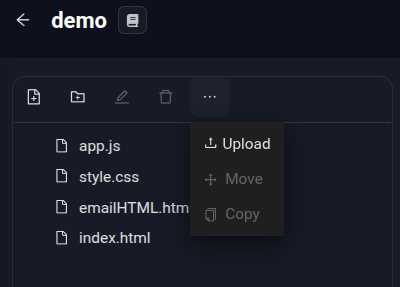
Current workarount:
Use the upload button at the Published Folders overview page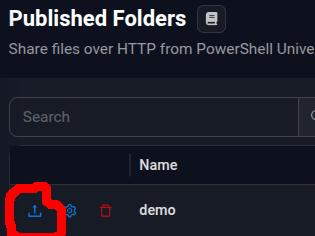
f8469721-41bf-49cf-b537-a266fefecd6a.png
c09ceb6e-c694-4683-923b-c017291a0c4b.png
Hello,
Thank you for the details and the screenshots.
I was able to reproduce the issue on PowerShell Universal 2026.3.2.
Uploading through the "..." > Upload menu inside a published folder can fail, while the upload button on the Published Folders overview page works.
I have reported this to our dev team.
In the meantime, please keep using the upload button on the Published Folders overview page, as you are already doing.
While testing, I also found a related issue with the Delete button inside the published folder view.
Deleting a file from that view may never complete.
It can then block further uploads and deletions in that folder.
If this happens, restarting PowerShell Universal clears it.
Until a fix is available, I recommend deleting files directly from the folder on disk instead.
For reference, here is the documentation on published folders:
https://docs.devolutions.net/powershell-universal/platform/published-folders
I will post an update in this thread when a fix is available.
Best regards,
Patrick Ouimet
Thanks Patrick, renaming has the same issue btw.
Using the integrated Admin Terminal works as a good workaround for deleting and renaming for now.. thanks to the autocomplete features added recently. 👍