Reconnecting host, duplicating tab, sftp

Version 2026.3.0.5 via normal deb package.
Since update to this version my keyboard shortcut for Reconnect (CTRL+R) is no longer working.
When connection to host is active this shrotcut does "(reverse-i-search)`':" on host instead of reconnect.
When host is disconnected nothing is happening.
Another thing with duplicating tab.
I have 5 tabs opened. 4 saved and 1 opened via this field on the bottom (all ssh). Duplicating saved tab works ok. Duplicating this not saved tab works but it works differently. It creates new tab, activates last active tab, then asks for username, password. New duplicated tab is not activated (as it is when saved tab is duplicated).
Clicking on SFTP button while connected to linux host via ssh does nothing.
All Comments (4)
Hello,
Thank you for reaching out, and for the clear write-up of all three issues.
1. Ctrl+R (Reconnect) is sent to the remote host
This is a known problem with keyboard handling in Remote Desktop Manager Linux 2026.3.0.5. While a session is focused, it captures some application shortcuts that should go to RDM. That's why bash receives Ctrl+R and opens reverse-i-search. Until it's fixed, please use the Reconnect command from the menu or from the tab's context menu instead of the shortcut.
2. Duplicating a Quick Connect tab
We have reproduced this on our side. When you duplicate a session opened from the Quick Connect bar, the new tab stays in the background and RDM switches to the previously active tab. Being asked for a username and password is expected here, because a Quick Connect session has no saved credentials to copy. The new tab should still become active, as it does for saved entries. We are reporting this to our development team.
3. The SFTP button does nothing
We have also reproduced this and are reporting it to our development team.
We will update you as soon as we have news on these fixes, and we'll let you know which version includes them.
Best regards,
Carl Marien
Version 2026.3.2.1
Reconnect - shortcut works but reconnect ALWAYS happens in last tab no matter in witch activated tab I use it. (tested having 5 tabs opened and doing reconnect in each. tab 5 was the only on being reconnected each time)
Duplicate Quick Connect - no change.
SFTP - opens. It would be nice to have option to hide hidden files/folders on list. Also it would be nice to have sort options - right now folders are in some order instead of alphabetical.
Hello,
Thank you for testing version 2026.3.2.1 and for the detailed feedback.
1. Reconnect always applies to the last tab
We tried this on our side with several SSH tabs open in 2026.3.2.1, and we could not reproduce it. Reconnect applied to the active tab each time. To help us find what is different in your setup, could you send us:
A screenshot of RDM showing your open tabs, ideally taken just after you trigger Reconnect and the wrong tab reconnects.
How you start the reconnect: the Ctrl+R shortcut, the menu (which menu?), or the tab’s right-click context menu. If you use more than one, please tell us whether they all behave the same way.
Whether your tabs are docked in the main window or undocked/detached.
2. Duplicating a Quick Connect tab
Thank you for confirming. This is still with our development team, and we’ll let you know when a fix is available.
3. SFTP
We’re glad the SFTP button now opens the browser. Thank you for the suggestions: an option to hide hidden files and folders, and sorting options such as alphabetical order for folders. We’ll pass both to our development team as feature requests.
Best regards,
Carl Marien
All tabs are docked in main window. This only happens when using shortcut. Via other means it is okay. Seems to me that function called by shortcut get always highest id of opened tab instead of active tab. Moving tab order does not change this behaviour - always last opened tab gets reconnected.
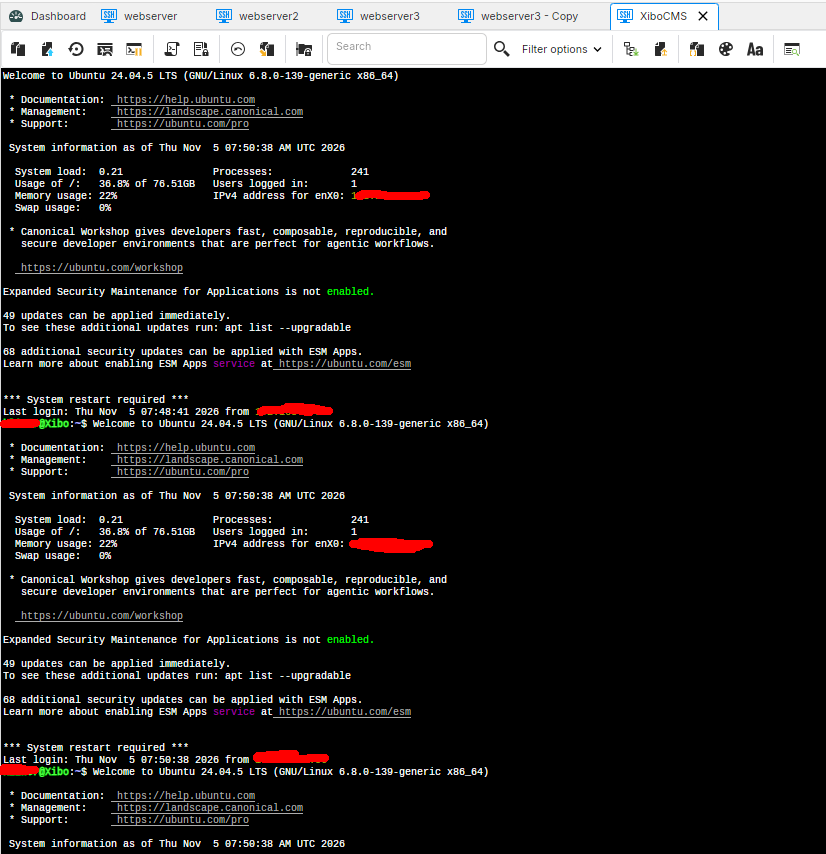
In every tab I did Ctrl+R (my reconnect shortcut) and every time it happened in XiboCMS tab.