Version 2026.3.8 Error throwed "This application requires Microsoft .NET version 4.7"
Version 2026.3.8 Error throwed "This application requires Microsoft .NET version 4.7"

RDM Version:
2026.3.8.0 (64-bit)
Runtime:
.NET 10.0.12
PowerShell Module:
2026.3.0
.NET Framework:
4.8.1 (Release 533509)
Get-RDMVersion returns version succesfully but also throws: "This application requires Microsoft .NET version 4.7"
Same behavior with:
- Get-RDMInstance
- Set-RDMCurrentWorkspace
- Get-RDMEntry
- Get-RDMUserGroup
- Get-RDMRole
Get-RDMDataSource works correctly.
Issue reproducible in:
- PowerShell 7.6.6
- Embedded RDM Cmdlet Console
53457e7c-9eb6-4738-b80d-83d9de223336.png
Recommended Answer
Hello @Marcel G,
Version 2026.3.1 of the Devolutions.PowerShell module introduces a fix for the issue discussed in this thread. Let us know if you need anything else.
Best regards,
Christian
All Comments (5)
Hello @Marcel G,
The '.NET 4.7' error is a generic fallback message; I don't believe there's actually a problem with your .NET version.
Your observation that Get-RDMDataSource works while the others don't was the most useful clue in the report, it points at a specific part of our cmdlet start-up path. Based on that, could you try this:Disable-RDMTelemetryGet-RDMVersion
If the error goes away, we've found where it's coming from and you have a working stopgap in the meantime. The setting persists across sessions, so you can leave it off: usage telemetry is optional and turning it off won't affect any functionality. Once we ship a proper fix you can turn it back on with Enable-RDMTelemetry. Either way, could you let us know the result?
Best regards,
Christian
Hi Cristian,
Unfortunately, disabling-RDMTelemetry beforehand does not provide a solution; however, I do observe that these message(s) only occur when I start a Cmdlet in a data source with with Active Directory Interactive (With MFA Support) account: See below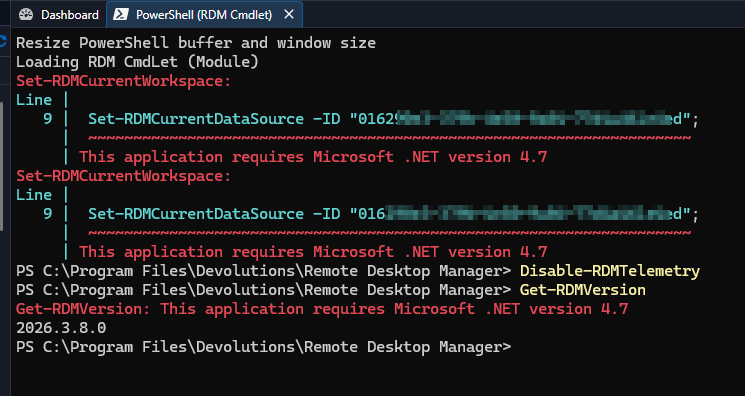
If I switch to the a data source/Workspace, with SQL Server authentication it works as expected.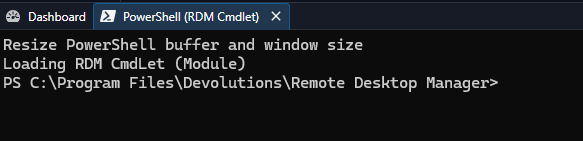
Perhaps this can provide more clues/directions regarding this problem for you?
Regards, Marcel
2c510c2d-283c-4e84-94ca-a575f2d2d513.png
1c8477d1-c1e3-433f-8899-f1b234ee4764.png
Hello @Marcel G,
Thanks for pointing out that it only happens with Active Directory Interactive, that observation is what let us pin it down. A fix is done and verified, and will ship in an upcoming release; we'll tell you when it's out. In the meantime, as you say, changing your login method to SQL Server authentication should avoid those errors, if that's possible for you.
Best regards,
Christian
Hello @Marcel G,
Version 2026.3.1 of the Devolutions.PowerShell module introduces a fix for the issue discussed in this thread. Let us know if you need anything else.
Best regards,
Christian
Hi Cristian,
Thanks for the update! I've installed the new version and tested it -- the issue is indeed resolved.
Looks like we can call this one fixed, just in time for the weekend :-)
Have a great weekend!