Clicking on the column picker under jobs throws the following error.
Clicking on the column picker under jobs throws the following error.

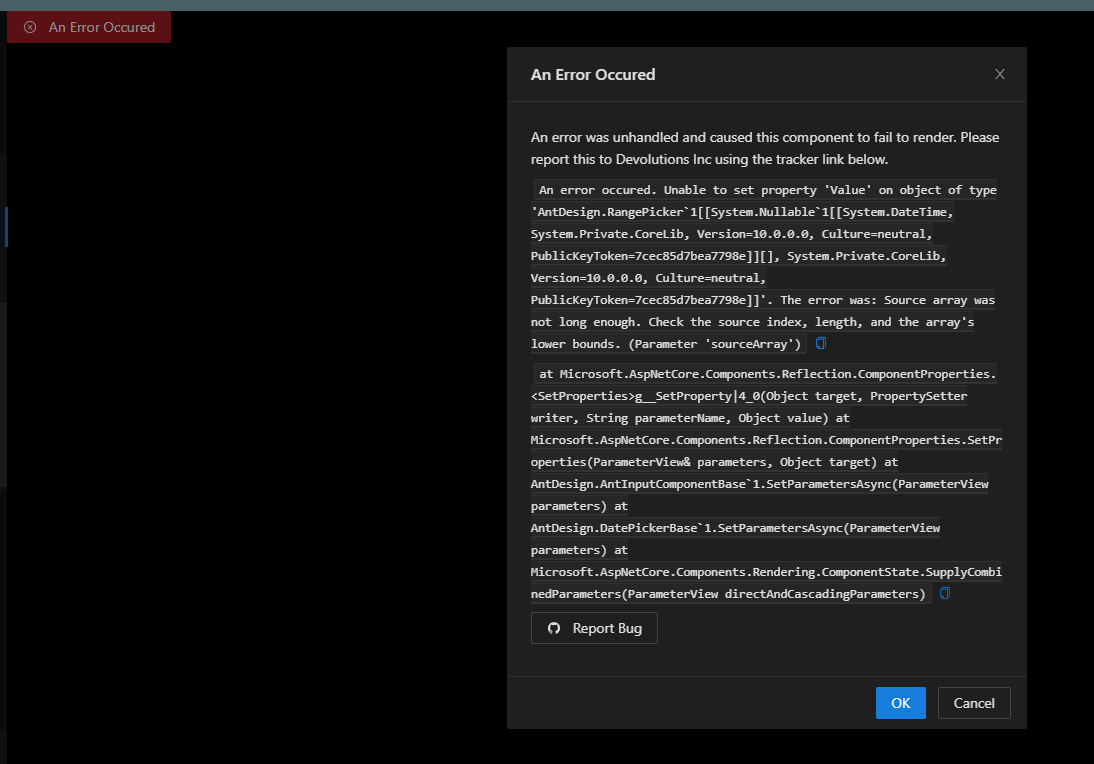
b2814df2-d792-4da4-a056-ce0c5a511f2f.png
All Comments (3)
Hello @michaelhanson1458
Thank you for reporting this and for providing the additional screenshot.
I noticed that this appears to match the behavior you previously reported in topic 56022 regarding the Jobs table column selector. The new screenshot is particularly useful because it provides a more detailed exception involving the `AntDesign.RangePicker<DateTime?>` component.
To avoid duplicating the troubleshooting already completed, could you please confirm whether this new report is from the same PowerShell Universal instance and environment as topic 56022?
If it is the same environment, we can associate this additional exception with the existing investigation and continue from the information already collected.
If this is a different environment, please confirm:
* PSU hosting method, such as Windows Service, IIS, or ZIP.
* Server operating system.
* Database type.
* Whether the behavior affects all PSU users or only your account.
Because this is a public forum, please sanitize all evidence before posting. Remove credentials, tokens, license keys, cookies, private keys, full connection strings, email addresses, usernames, customer data, tenant or account identifiers, internal domains, hostnames, IP addresses, and private URLs. Please do not upload unredacted HAR files, memory dumps, database backups, or complete configuration files to this public thread.
References:
https://forum.devolutions.net/topics/56022/error-clicking-column-selector-in-jobs-table
Best regards,
Ruben Tapia
No this was found in my dev instance of PSU. However, its running the same version of psu and the only difference is one is prod is using sql and dev is sqlite
Hello @michaelhanson1458
Thank you for confirming that.
That is useful information, especially since the same behavior is occurring on two different PSU instances running the same version, with production using SQL and development using SQLite.
This week, I will work on setting up a lab environment and try to reproduce the issue under comparable conditions. I will focus on the Jobs table column picker behavior and compare the results against the exception shown in your screenshot.
In parallel, could you please run one additional test on your side? If possible, try opening the Jobs column picker using a different PSU user account and let me know whether the same error occurs.
That result will help us determine whether the behavior is tied to a specific user state or whether it affects the environment more broadly.
Once I have completed the lab testing, I will update this thread with the findings and next steps.
Best regards,
Ruben Tapia