Error clicking column selector in Jobs table

When viewing the jobs table admin/automation/jobs
and clicking on the column selector here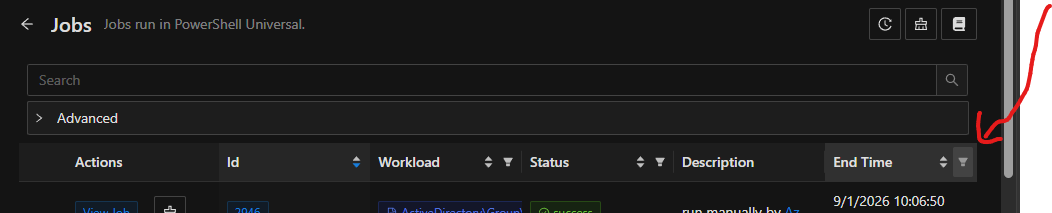
it throws an error.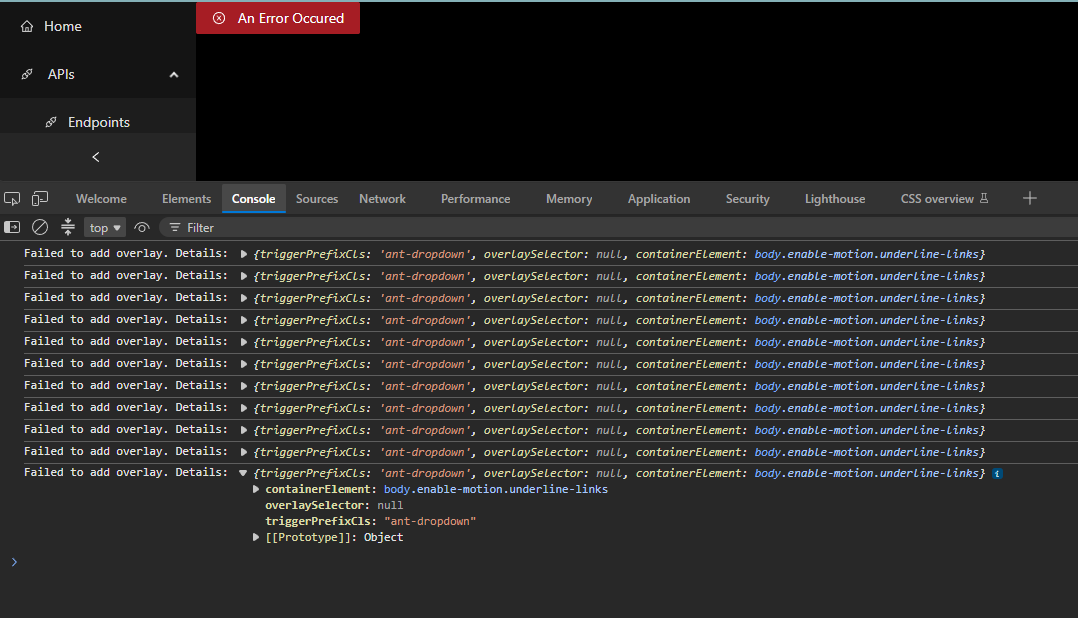
f17feafb-735c-4bb4-a603-2740cac72e3a.png
0b15ce34-6d5d-43ca-85c2-6e3d2582073f.png
All Comments (4)
Hello @michaelhanson1458
Thank you for reporting this and for including the screenshots.
We reviewed the behavior you described when opening the column selector in the Jobs table. There was a previous issue involving the Jobs table column selector addressed in PowerShell Universal 2026.1.4.0, so before determining whether this is related or potentially a different behavior, could you please confirm the following?
* Your exact PowerShell Universal version and build.
* Browser and browser version.
* Whether the issue also occurs in a private/incognito window or in another browser.
* If it still occurs, please provide the first relevant console error and stack trace generated immediately after clicking the column selector.
Because this is a public forum, please sanitize all evidence before posting. Remove credentials, tokens, license keys, cookies, private keys, full connection strings, email addresses, usernames, customer data, tenant or account identifiers, internal domains, hostnames, IP addresses, and private URLs. Please do not upload unredacted HAR files, memory dumps, database backups, or complete configuration files to this public thread.
References:
https://devolutions.net/powershell-universal/release-notes
Best regards,
Ruben Tapia
* Your exact PowerShell Universal version and build.
2026.2.5
* Browser and browser version.
- edge
* Whether the issue also occurs in a private/incognito window or in another browser.
Both
* If it still occurs, please provide the first relevant console error and stack trace generated immediately after clicking the column selector.
- already posted everything I could find in the console error
6fc0d706-98bf-465b-86bf-a104f5e37d45.png
Hello @michaelhanson1458
Thank you for confirming the PSU version and browser testing.
Since the issue is occurring on PowerShell Universal 2026.2.5 and you were also able to reproduce it under the alternate browser conditions, we will now attempt to reproduce the behavior in our lab using the same PSU version.
We will specifically validate the Jobs table column selector behavior and review the browser console during the test. Once we complete the reproduction attempt, we will update this thread with our findings and determine the appropriate next step.
Best regards,
@michaelhanson1458
We completed an initial reproduction attempt using PowerShell Universal 2026.2.5, build 32409143550.
In our isolated Windows lab, the Jobs table column selector opened successfully. We tested it with an empty Jobs table and with synthetic job data, including changing the visible columns. We also repeated the selector test three times in Chrome, and it worked consistently without producing the UI error shown in your environment.
At this point, we have not reproduced the reported failure, but the result is still inconclusive because there are differences between our lab and your environment.
To help us narrow those differences, could you please confirm:
- PSU hosting method, such as Windows Service, IIS, or ZIP.
- Server operating system.
- Database type.
- Whether the issue affects other PSU users or only your account.
- Approximately how many Jobs are displayed when the issue occurs.