Scheduled Script creates Folder with Transcript within Repository-Folder
Scheduled Script creates Folder with Transcript within Repository-Folder

Hello!
our Powershell Universal Installation is on Version 2026.2.3.
Im having a issue with scheduled scripts on Environment Powershell 5.1
After every Script-Run the Script creates a Folder with the current date.
Inside theres a transcript file (which i cant provide because of sensetive information). If needed, i can edit it 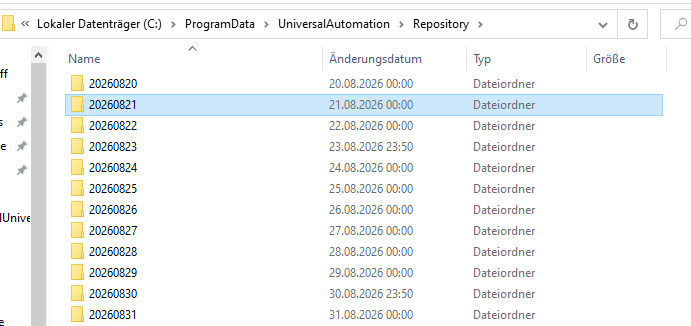
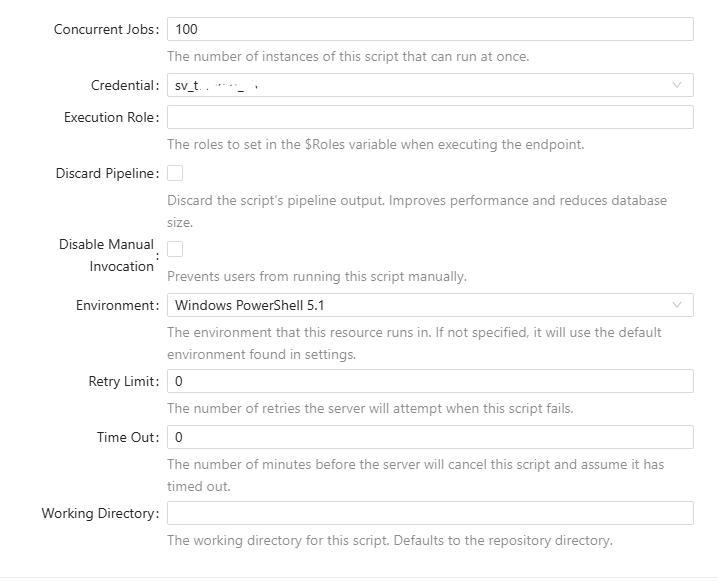
Thanks in advance for your help!
Transcript_2.png
Transcript_1.png
All Comments (3)
Hello @Light
Thank you for the detailed information and screenshots.
Based on the folder naming pattern and the transcript file being generated, one of the first items I would like to rule out is Windows PowerShell transcription at the server level, especially since the script is running under Windows PowerShell 5.1.
Could you please check the following?
Whether Turn on PowerShell Transcription is enabled through Local or Domain Group Policy on the PSU server.
Whether an OutputDirectory is configured for that policy.
Whether the affected script, a PowerShell profile, or any Environment startup script contains Start-Transcript.
Does the same behavior occur if you create a minimal PSU script containing only Get-Date, configure it for Windows PowerShell 5.1, and execute it?
There is no need to share the existing transcript itself, especially since you mentioned that it contains sensitive information.
Because this is a public forum, please sanitize all evidence before posting. Remove credentials, tokens, license keys, cookies, private keys, full connection strings, email addresses, usernames, customer data, tenant or account identifiers, internal domains, hostnames, IP addresses, and private URLs. Please do not upload unredacted HAR files, memory dumps, database backups, or complete configuration files to this public thread.
These checks should help us determine whether the transcript is being generated by the Windows PowerShell environment or specifically during PSU execution.
Best regards,
Ruben Tapia
Hello @Light
Thank you for the detailed information and screenshots.
Based on the folder naming pattern and the transcript file being generated, one of the first items I would like to rule out is Windows PowerShell transcription at the server level, especially since the script is running under Windows PowerShell 5.1.
Could you please check the following?
Whether Turn on PowerShell Transcription is enabled through Local or Domain Group Policy on the PSU server.
Whether an OutputDirectory is configured for that policy.
Whether the affected script, a PowerShell profile, or any Environment startup script contains Start-Transcript.
Does the same behavior occur if you create a minimal PSU script containing only Get-Date, configure it for Windows PowerShell 5.1, and execute it?
There is no need to share the existing transcript itself, especially since you mentioned that it contains sensitive information.
Because this is a public forum, please sanitize all evidence before posting. Remove credentials, tokens, license keys, cookies, private keys, full connection strings, email addresses, usernames, customer data, tenant or account identifiers, internal domains, hostnames, IP addresses, and private URLs. Please do not upload unredacted HAR files, memory dumps, database backups, or complete configuration files to this public thread.
These checks should help us determine whether the transcript is being generated by the Windows PowerShell environment or specifically during PSU execution.
Best regards,
Ruben Tapia
Hello @rubentapia
thanks for your detailed answer. Because of that i could find the problem.(administrative cmd -> rsop)
It's indeed a group policy which enables powershell transcription for our domain-joined servers.
I could find a lot more transcripts in the C:\Users Folders.
Now i need to find out how to configure the group policy.
Thank you very much for your kind help!
Best Regards,
Dennis
Hello @Light
Thank you for the detailed information and screenshots.
Based on the folder naming pattern and the transcript file being generated, one of the first items I would like to rule out is Windows PowerShell transcription at the server level, especially since the script is running under Windows PowerShell 5.1.
Could you please check the following?
Whether Turn on PowerShell Transcription is enabled through Local or Domain Group Policy on the PSU server.
Whether an OutputDirectory is configured for that policy.
Whether the affected script, a PowerShell profile, or any Environment startup script contains Start-Transcript.
Does the same behavior occur if you create a minimal PSU script containing only Get-Date, configure it for Windows PowerShell 5.1, and execute it?
There is no need to share the existing transcript itself, especially since you mentioned that it contains sensitive information.
Because this is a public forum, please sanitize all evidence before posting. Remove credentials, tokens, license keys, cookies, private keys, full connection strings, email addresses, usernames, customer data, tenant or account identifiers, internal domains, hostnames, IP addresses, and private URLs. Please do not upload unredacted HAR files, memory dumps, database backups, or complete configuration files to this public thread.
These checks should help us determine whether the transcript is being generated by the Windows PowerShell environment or specifically during PSU execution.
Best regards,
Ruben Tapia
Hello @rubentapia
thanks for your detailed answer. Because of that i could find the problem.(administrative cmd -> rsop)
It's indeed a group policy which enables powershell transcription for our domain-joined servers.
I could find a lot more transcripts in the C:\Users Folders.
Now i need to find out how to configure the group policy.
Thank you very much for your kind help!
Best Regards,
Dennis
@Light
Thank you for confirming this. That explains the behavior you were seeing.
Since PowerShell Transcription is being enabled through a domain Group Policy, this configuration is outside PowerShell Universal itself. However, I can provide some general guidance on what to review.
For Windows PowerShell, the policy is typically located under:
Computer Configuration
> Administrative Templates
> Windows Components
> Windows PowerShell
> Turn on PowerShell Transcription
Since this is a domain-managed policy, I would recommend reviewing the applicable GPO with your Active Directory or security administrator rather than changing only the local policy on the PSU server.
From there, you can evaluate whether your organization wants to:
- Keep transcription enabled and configure a dedicated Output Directory outside the PSU Repository.
- Disable transcription if it is not required by your auditing or security policies.
- Review permissions on the transcript location, since these files may contain sensitive PowerShell input and output.
If transcription is intentionally required in your environment, using a dedicated and appropriately secured location would be preferable to allowing transcripts to be created inside application directories or user profile folders.
References:
https://learn.microsoft.com/en-us/powershell/module/microsoft.powershell.core/about/about_group_policy_settings?view=powershell-7.6
Best regards,
Ruben Tapia