Backup Manager failed - Cant open File

We are experiencing an issue with the Backup Manager and SQL database backups. Our infrastructure is configured as follows:
- 1 server running Devolutions Server (DVLS)
- 1 server running Microsoft SQL Server - SQL Server service account: Network Service -
No Active Directory environment
The following backup paths are configured in the Backup Manager: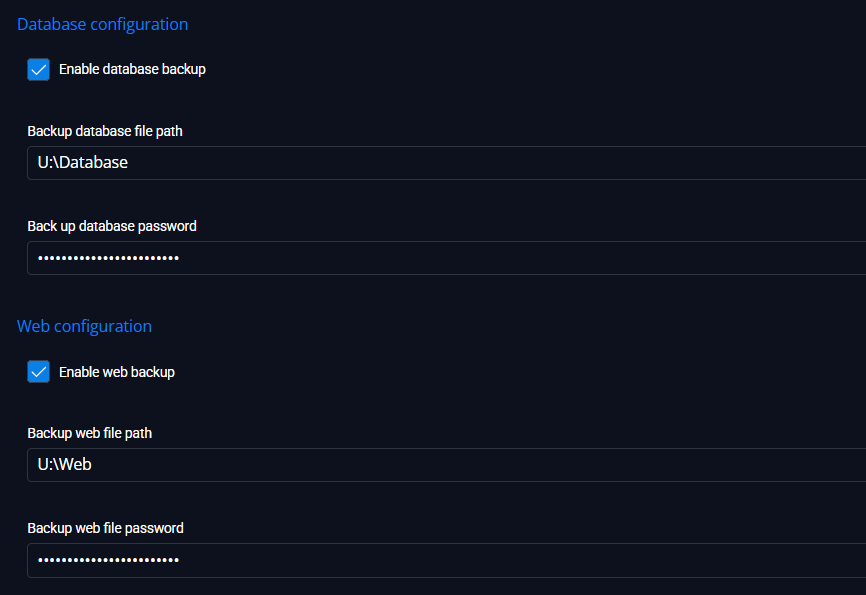
The U: drive is a local drive on the Devolutions Server (DVLS) server and at the same time is mapped as a network drive on the Microsoft SQL Server.
I have also tested the Backup Manager using a UNC path instead of the mapped drive, as well as a local drive directly on the Microsoft SQL Server itself. The result is the same in all cases and the backup fails with the same error message.
The following error message is displayed:
744ff3ee-99a3-435b-8cd3-990b650b84c8.png
4a9e9b82-5918-40e2-8837-68d37864b4fc.png
All Comments (3)
Hello Florian,
Thank you for the detailed description, that helps a lot.
The behavior you are seeing is expected in your current setup, and it comes from how the DVLS Backup Manager coordinates the backup between the two hosts.
The Backup Manager runs the backup command on the SQL Server, which means the SQL Server service account is the one writing the .bak file, while the DVLS Scheduler (or Runner for a manual "Back Up Now") is the one that reads that file back to zip, encrypt and clean it up. For this to work, the destination path must be reachable and writable from both hosts by the accounts running those services, using exactly the same path string.
Two things in your current configuration make that impossible:
First, the U: drive. Mapped drive letters only exist inside the interactive session that created them, so the SQL Server service and the DVLS Scheduler service never see U:. That alone is enough to produce the "Can't open file" error.
Second, the SQL Server service account is Network Service, and there is no Active Directory. On the network, Network Service presents itself as the SQL host's computer account, which has no identity your DVLS host or a file share can authenticate. So any UNC path you provide will also fail for the SQL side.
To make Backup Manager work reliably in your environment, we recommend:
Choose a UNC path on a CIFS/SMB share reachable from both hosts, for example \\FILESERVER\DVLSBackup\. This replaces the U: mapping entirely.
Grant "Modify" on that share and on the underlying folder to every account involved: the SQL Server service account, the DVLS Scheduler service account, the DVLS Runner service account, and, if you use web backup, the IIS Application Pool identity.
Because there is no Active Directory, switch the SQL Server service account away from Network Service to a dedicated local Windows account that also exists, with the same username and password, on the machine that hosts the share. This is the standard workgroup pattern that gives SQL a network identity the file server can validate. Alternatively, host the share on the SQL Server itself and grant the two DVLS service accounts (again as mirrored local accounts) Modify permissions on that share.
Before re-enabling the schedule, run a manual write test as each service account from each host to the chosen UNC path, to confirm the "Can't open file" error is gone.
If restructuring the service identity is not possible right now, an interim workaround is to disable the DVLS Backup Manager and schedule the SQL backup directly on the SQL Server, either via a SQL Agent job or a Windows Task Scheduler task that runs sqlcmd BACKUP DATABASE locally, then archives the .bak elsewhere in a second step. That avoids the cross-machine handshake entirely.
Reference documentation:
Backup Manager: https://docs.devolutions.net/server/web-interface/administration/backup/backup-manager
If you can share the exact error text visible in the two screenshots you attached to the forum post, and confirm your DVLS version, I can validate all of the above against your specific build.
Best regards,
Patrick Ouimet
Thank you for your response.
I have created a network share that is accessible from both servers, but authentication with a username and password is required.
Can the credentials be configured in the Backup Manager, or must they be stored or assigned elsewhere?
Hello Florian,
Thank you for the update.
To answer directly, no, the DVLS Backup Manager does not expose a credential field for the backup destination.
There is no "connect as" or "run as" input for the SMB path in its UI.
Access to the share is always performed under the identity of the Windows service accounts that touch the .bak file, which in your setup are the SQL Server service account and the DVLS Scheduler service account (plus the DVLS Runner service account if you use manual "Back Up Now", and the IIS application pool identity if you use web backup).
Because you do not have Active Directory, the supported way to authenticate those services to a password-protected share is the "mirrored local account" workgroup pattern.
Concretely:
Create a dedicated local Windows account, for example DVLSBackupSvc, with the same username and the same password on three machines: the file server hosting the share, the SQL Server host, and the DVLS host.
Grant that account Modify on the SMB share, and Modify on the underlying NTFS folder.
Change the SQL Server service to log on as that account (using SQL Server Configuration Manager, so ACLs and permissions are applied correctly), instead of Network Service.
Change the DVLS Scheduler service (and the DVLS Runner service, if manual backups are in scope) to log on as that same account.
If you also perform backups through the web UI, set the DVLS application pool identity in IIS to that same account.
Once every service runs under this mirrored account, Windows can present valid credentials to the share transparently, and Backup Manager itself does not need to know anything about them.
Before re-enabling the schedule, please validate manually from each host by opening a command prompt as that service account (runas /user:.\DVLSBackupSvc cmd) and performing a copy and a delete against the UNC path. If both succeed on both hosts, the "Can't open File" error should be gone.
An alternative, if creating a dedicated account across three machines is inconvenient, is to host the share directly on the SQL Server itself and grant the DVLS service account (mirrored locally on the SQL host) Modify on that share. This removes one host from the authentication chain.
Please note that pre-caching credentials with cmdkey under a service account profile is not recommended and not supported for Backup Manager, as the credential store is per-user and brittle across password rotations.
Best regards,
Patrick Ouimet