Bug or undocumented procedure - file system watcher

Dear team,
I experienced some behavior which I can't tell if the feature works as expected and it's just not documented or if it's a possible bug.
Findings
According to the official docs the file system watcher is activated by default and from what I saw in the UI you can either chose to enable / disable "Auto-reload".
With the "auto-reload" and file system watcher enabled, my understanding would be that if I make some changes through an editor on the file itself and save the changes, my changes should applied automatically.
To test this, I added a new endpoint to the default endpoints.ps1 file (no custom path) by simply editing and saving the file on the local instance through VSCode.
Regardless if the "auto-reload" feature is enabled or disabled while I do see the changes in the history tab: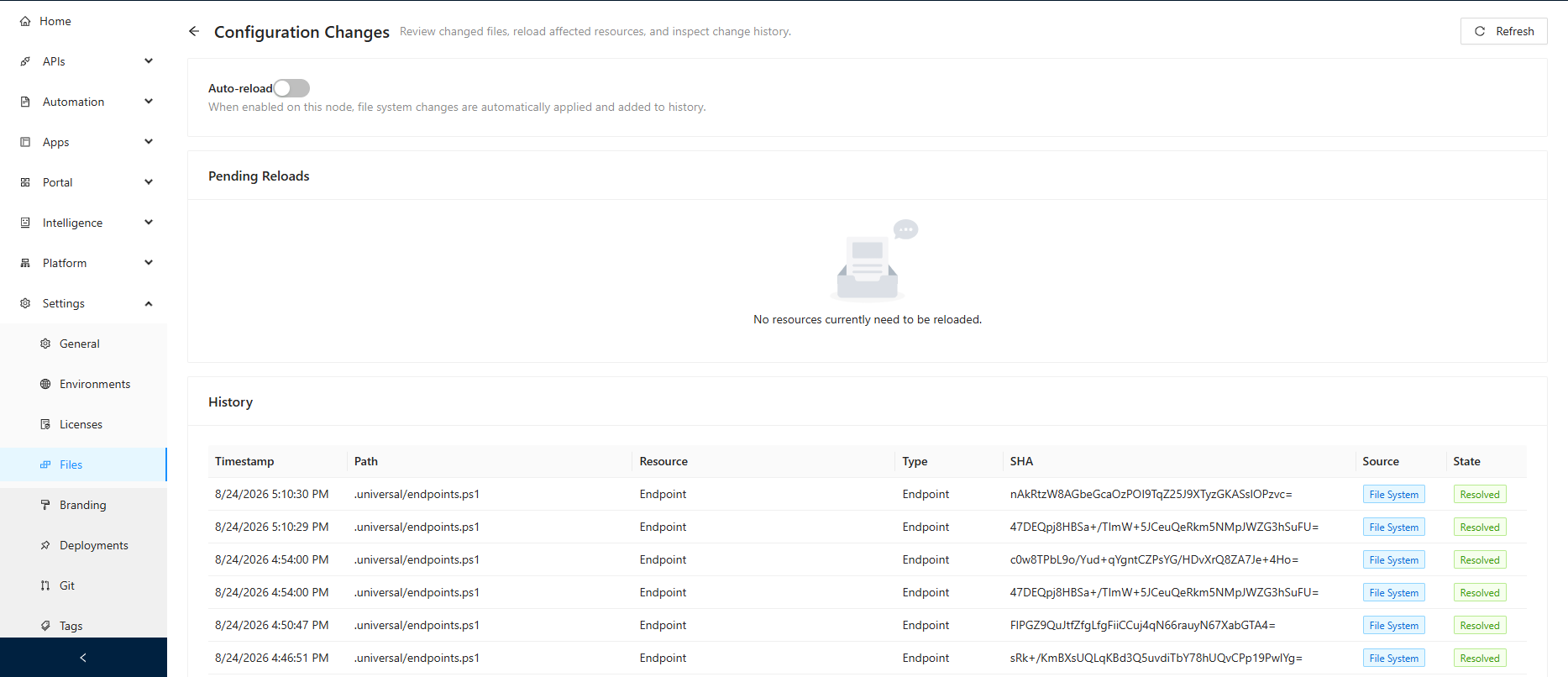
Before config the reload:
Get-PSUEndpoint -UseDefaultCredentials | Select-Object -Property Url

Url
---
/VSCodeExtensionTest/defaultEndpointsFile
/VSCodeExtensionTest/customEndpointsFile
/FileWatcherTest/defaultEndpointsFile
/FileWatcherTest/newEndpointAgain
After the config reload:
Get-PSUEndpoint -UseDefaultCredentials | Select-Object -Property Url

Url
---
/VSCodeExtensionTest/defaultEndpointsFile
/VSCodeExtensionTest/customEndpointsFile
/FileWatcherTest/defaultEndpointsFile
/FileWatcherTest/newEndpointAgain
/FileWatcherTest/newEndpointPSModuleCheck # <-- manually added endpoint
However, the newly added endpoint doesn't show up in the APIs->Endpoints section (neither in the PSU Admin UI nor if I check it through the PSU PowerShell module) until I explicitly reload the endpoints configuration: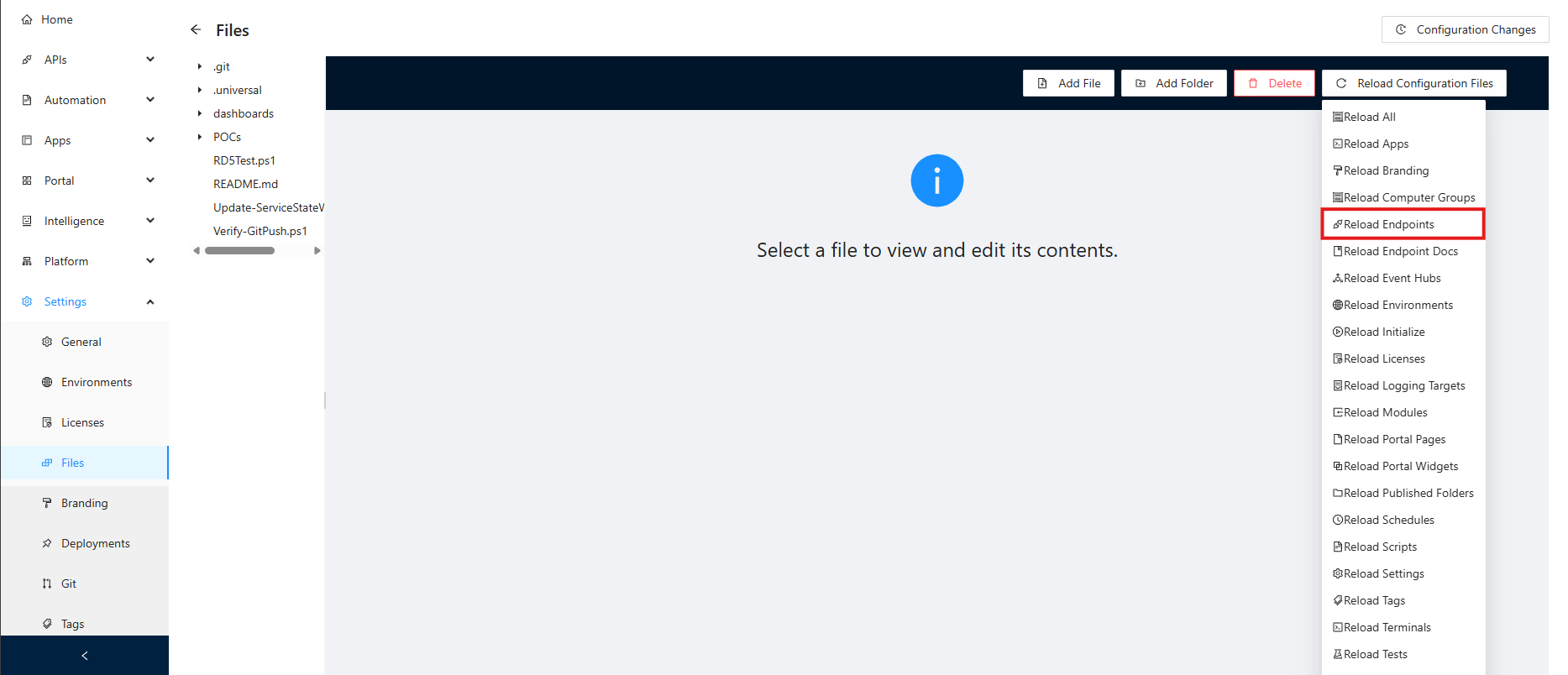
If I check the endpoints.ps1 in the UIs Settings->Files section though, I see the changes I made previously even before the config reload so assume that it isn't a permission issue or a user error.
Setup
PSU Version: Version 2026.2.4
Developer License (although issue seems to be identical on our productive server)
Windows Server Version 24H2 (OS Build 26100.33158)
VSCode Version: 1.134.0
Questions
Since I couldn't find further details in the official docs it raises some questions for me:
- Does this feature work as expected?
- If so, what exactly does the "auto-reload" feature / explicit "Pending Reload" actually apply / change?
- Could you point me out where I can find more detailed infos in the official docs?
- If it's not and a bug:
- Is it already a known issue and if so is there an ETA for the fix?
Please let me know if you need any further infos and thank you in advance for your efforts.
Best regards,
Viktor
e09d529f-f03c-4722-90b2-7d51be6c5a55.png
37b0e34d-c9be-4b09-af9e-f301d5f9c6db.png
All Comments (5)
Hello viktorkiss,
Thank you for the detailed report and for documenting the behavior before and after the explicit configuration reload.
I reviewed the scenario and the current documentation. The documentation confirms that Code First Editing uses a file system watcher to detect changes within the repository. However, before characterizing the specific behavior you are seeing as expected, undocumented, or a potential bug, I would like to validate it against PSU 2026.2.4.
I will reproduce the scenario using the default `endpoints.ps1` file and compare the behavior with `Auto Reload` enabled and disabled. I will specifically verify whether:
* The file modification is detected in change tracking.
* The configuration enters a `Pending Reload` state.
* The new endpoint becomes available through `Get-PSUEndpoint`.
* The endpoint appears under `APIs > Endpoints`.
* An explicit configuration reload is required before the endpoint becomes active.
The distinction you identified is particularly useful because the file itself is clearly being detected, while the effective endpoint configuration does not appear to be updated until the manual reload.
Once we have validated this behavior independently, we will have a better basis for determining whether this is expected behavior that requires clarification in the documentation or something that needs further investigation.
References:
https://docs.devolutions.net/powershell-universal/config/best-practices
Best regards,
Ruben Tapia
Hello viktorkiss,
I completed an independent reproduction of the behavior you reported.
On PSU 2026.2.4, with Auto Reload visibly enabled and `Computer.EditMode=1`, I modified the default `.universal/endpoints.ps1` externally. PSU detected the change and recorded it as `File System / Resolved`, with no pending reload shown.
However, the new endpoint was not added to the effective configuration and continued returning HTTP 404 until I explicitly reloaded the endpoint configuration. After the reload, the endpoint became available and returned HTTP 200.
I repeated the Auto Reload-enabled scenario three times with the same result, so the behavior is deterministic in the lab.
I also performed a clean comparison with PSU 2026.2.3 and reproduced the same sequence there. Based on that comparison, the available evidence does not indicate a regression introduced specifically in 2026.2.4.
The explicit endpoint configuration reload is therefore a validated workaround for the behavior we reproduced.
At this point, we have enough evidence to distinguish the file-system change detection from the automatic application of the endpoint configuration. The remaining question is whether this is the intended Auto Reload behavior or a product issue requiring correction.
I will update the thread once we have a confirmed interpretation of the intended behavior.
Best regards,
Ruben Tapia
Hi Ruben,
I was just wondering if you had time to check this and might have some information you could share publicly?
Thx in advance!
Best regards,
Viktor
Hello viktorkiss,
Thank you for your patience on this case.
I reproduced it on 2026.2.4.0, but I can't reproduce it on 2026.3.0.0.
Could you update your PSU to 2026.3.0.0 and let us know if the issue persists?
I suggest 2026.3.0.0 instead of 2026.3.1.0 to avoid some minor issues.
Best regards,
Patrick Ouimet
Hi Patrick,
Thank you for the update. I'll try to verify this next week and will keep you posted.
BR,
Viktor