Script Documentation
1 vote

Script documentation would be helpful only if we could switch between a view and edit mode in the Admin console. Currently, I don't believe there is any way to view it unless you use GitHub or copy and paste the md somewhere else. Preferably, have an option with split screen to have live view and edit as well.
All Comments (4)
@davidwruck That's good feedback. You can see the documentation via the circled button but it's not really obvious. I've opened an improvement issue for this. 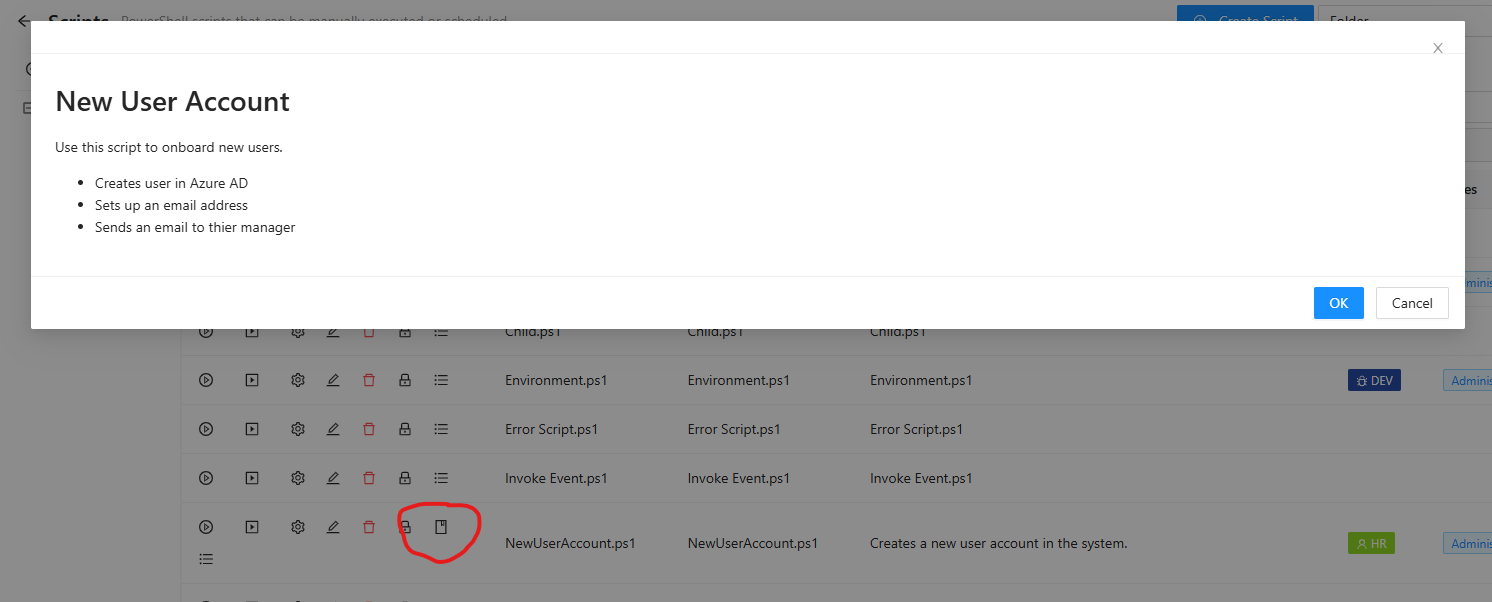
Adam Driscoll
PowerShell Expert and Software Architect at Devolutions
cb997387-9fb2-42cc-969f-22966803ff38.png
Got it. At least that is something. I was just on the editing documentation tab and didn't see any buttons to view.
How do I create documentation that results in that button being visible?
There does not appear to be an option in the UI, and when I add comment-based help to my script it doesn't make this icon appear either. Comment-based help does result in the description parameter appearing in the "run script" modal.
@malcolmradelet You can click the Pencil edit icon and on the script's page, there is a Documentation tab that will allow you to enter the markdown that then appears under that button.
Adam Driscoll
PowerShell Expert and Software Architect at Devolutions