Restricting access to edit a script "Execution Role"

We have some secret variables that contain tokens or keys for sensitive systems. We assigned a new role to them, but it seems like the only way to access the variables is by assigning the script to this role. If we update the script "Execution Role" to our custom role everything works great. But... we don't want anyone to just be able to assign this new role.
For example:
Author A can write scripts and access all variables
Author B can write scripts, but we don't want them to access Secret1
Author B simply writes a script and assigns it to the "Secret1 Access" role and then just outputs the value to the terminal. Now they know the value.
I want to be able to say "Only authors in Secret1 Access role can assign scripts to the Secret1 Access role". How can I do that?
All Comments (9)
Hello malcolmradelet,
Thank you for describing the scenario so clearly. I understand the concern: restricting a Secret Variable by role does not provide the intended protection if an author who should not have access can simply assign that same role as the script's Execution Role.
Before recommending a configuration, I would like to confirm exactly how your author permissions are currently configured and whether the Execution Role assignment can be independently restricted in your PSU version.
Could you please confirm:
* Your exact PowerShell Universal version.
* How Author B is currently granted permission to create or edit scripts. For example, through a built-in role, custom role, or configured platform permissions.
* Whether Author B can both create new scripts and modify existing scripts.
* Whether Author B can currently select any configured role from the Execution Role field when editing a script.
I will review this specifically from the perspective of preventing privilege escalation through Execution Role assignment rather than simply restricting access to the Secret Variable itself.
References:
https://docs.devolutions.net/powershell-universal/platform/variables
https://docs.devolutions.net/powershell-universal/security/enterprise-security/permissions
Best regards,
Ruben Tapia
Hi Ruben, I created a test to demonstrate:
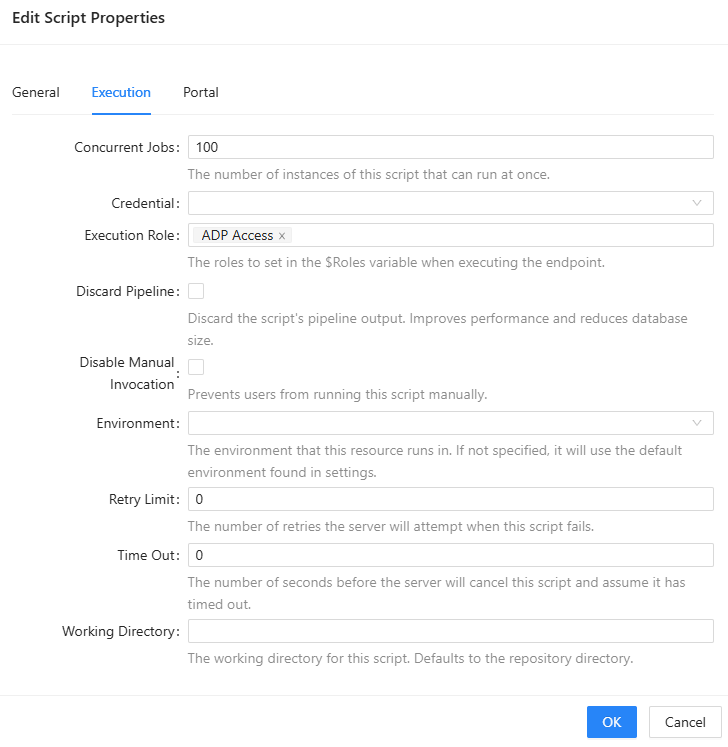
Script
Name: Test-RBAC.ps1
Execution Role: Null/Not Assigned
# Script contents

$Secret:TestADPCred
Identity
Name: TestRBAC
Role: Script Editor, Reader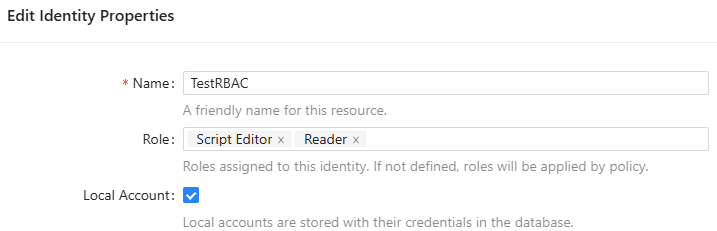
Secret
Name: TestADPCred
Roles: ADP Access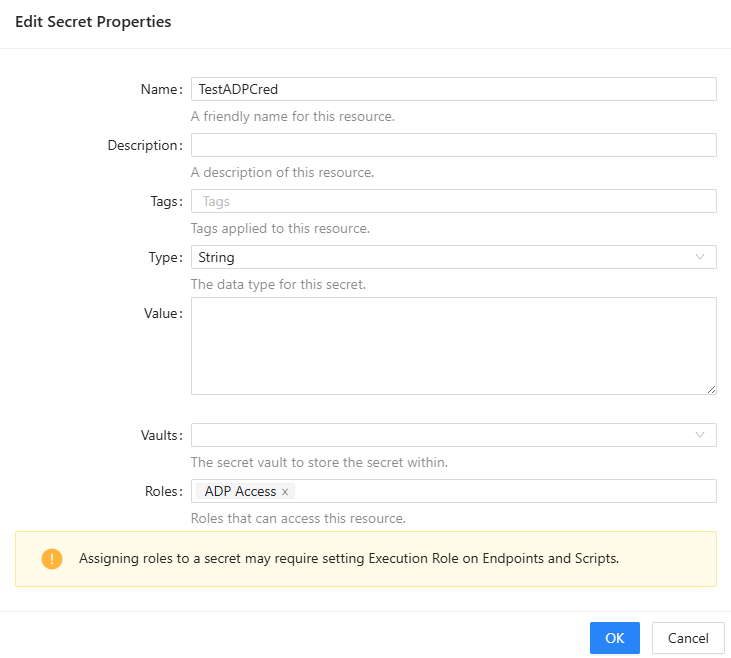
Action taken by User TestRBAC
- Log in to the admin portal
- Edit the Test-RBAC.ps1 script settings
- Assign ADP Access role to the Execution Role setting
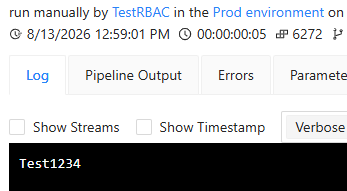
- Run the script normally
- Review the output and see the value of the TestADPCred variable
Request
No user should be able to assign execution roles they are not members of. If user "TestRBAC" is not a member of "ADP Access" it should not be able to assign scripts to this role.
19cbf081-3cbe-4bd3-89af-ebd347560f18.png
6a28abbc-76c4-4e0e-956e-09544cfcfe7a.png
9d3eacea-a2e9-424d-9f1e-368654783f04.png
2f0be2a2-51f6-4d5d-89c7-4e70bc8b4f03.png
I would also like to suggest that if an identity is not a member of a scripts execution role, it should not be able to view the job output either.
Hello malcolmradelet,
Thank you for putting together the detailed test and screenshots. This clearly demonstrates the scenario you are concerned about.
Based on the configuration you provided, I do not think we need you to perform an additional test at this point. Your example already isolates the important behavior: an identity that is not a member of `ADP Access` can edit the script, assign `ADP Access` as its Execution Role, and then retrieve a Secret Variable protected by that role.
We are going to reproduce this scenario in a controlled environment and verify the behavior independently. We will also test your second observation separately regarding whether an identity that is not a member of a script's Execution Role can view that script's Job Output.
If you have not already provided it, please confirm the exact PowerShell Universal version used for this test so that we can match the environment as closely as possible.
References:
https://docs.devolutions.net/powershell-universal/platform/variables
https://docs.devolutions.net/powershell-universal/security/enterprise-security/permissions
Best regards,
Ruben Tapia
Hi,
Prod - 2026.2.2
Dev - 2026.2.4
Both produce the same result
Hello malcolmradelet,
Thank you for confirming the versions.
Since you are seeing the same behavior in both PowerShell Universal 2026.2.2 in Production and 2026.2.4 in Development, we have enough information to proceed with an independent reproduction.
We will reproduce the Execution Role and Secret Variable scenario in our lab during the course of today. We will also validate the Job Output access behavior separately so that both authorization concerns are evaluated independently.
Once the testing is complete, I will update the thread with our findings and the appropriate next steps based on the evidence.
Best regards,
Ruben Tapia
Hello malcolmradelet,
Thank you again for the detailed reproduction steps and screenshots.
We completed our independent lab validation using PowerShell Universal 2026.2.2 and 2026.2.4.
We were able to reproduce the behavior consistently on both versions:
* An identity without membership in the privileged role was able to assign that role as the script's `Execution Role`.
* Before the privileged Execution Role was assigned, the protected Secret Variable was not accessible.
* After assigning the privileged Execution Role, the script was able to access the protected Secret Variable.
* The behavior was reproduced 3/3 times on both 2026.2.2 and 2026.2.4.
* We also confirmed that the same identity could view the resulting Job Output.
* We did not identify a supported workaround during the validation.
Because the behavior was reproducible across both versions and involves an authorization boundary, we have escalated the case internally for Development review and confirmation of the intended behavior.
I will update this thread once we receive further guidance from Development.
Best regards,
Ruben Tapia
Thank you for investigating so quickly.
Hello malcolmradelet,
Thank you for your patience while we reviewed this with Development.
Development has confirmed that the behavior around `Execution Role` assignment is a current product limitation.
At this time, if a user has the `Script Editor` role, there is no effective way to prevent that user from editing the script's `Execution Role`. This means the current permission model does not provide a separate control that allows script editing while restricting which execution roles that user can assign.
Our lab testing reproduced the behavior consistently on both PowerShell Universal 2026.2.2 and 2026.2.4, which aligns with Development's assessment.
The team is looking at improving this permission model and the overall execution-role experience in a future version. We do not have a specific release or timeline to share at this point.
Thank you for bringing this scenario to our attention and for providing the detailed reproduction that helped us validate it.
Best regards,
Ruben Tapia