Using non-admin account for report purposes

Hello, I have troubles switching to a non-administrator account in a report script. The usage is simple, I connect with it to collect and list all entries of specific vaults. I dont want, however, this service account to access the passwords/secrets of the credentials entries. Only certain properties. Obviously administrator can, but whenever I change to a USER, even if I allow everything to it, script cannot make a connection.
Is it possible to use low level access account for automated export purposes?
Thanks!
All Comments (14)
Excuse me, I posted it twice in the forum. Wasn't aware that there is a review going on before the topics appear.
Hi ,
Yes, that is possible. What is blocking you is not a vault permission, which is why allowing the account everything inside the vaults changed nothing.
Devolutions Server records which kinds of client may sign in with an account, per account and instance-wide. The PowerShell module signs in as a Scripting client, or as CLI with -AsApplication; on the account it sits under Application access, in the Access section, where Scripting has a row to set to Allow. An administrator skips this check, so your admin account cannot show it to you.
That row is allowed by default, so if yours was never changed, check also that the authentication type your service account uses is enabled instance-wide, and whether an MFA requirement applies to it, which a scripted login cannot answer. On the user-and-password path the module reports only that the login failed, never which check refused it.
For unattended work use an application identity instead, under Administration - Application identities: you grant it only the vaults it needs, its account type is always accepted, MFA does not apply, and it is created with CLI access allowed, so the sample's New-DSSession -AsApplication connects as it stands (check CLI is allowed in the instance-wide application list too). It also returns the server's own message, which names a client-access refusal specifically, and whether it is the account's own setting or the instance-wide one, though not the other two.
https://docs.devolutions.net/server/web-interface/administration/user-and-security-management/applications-identities
https://docs.devolutions.net/powershell/devolutions-server-powershell/powershell-connectivity-methods-to-devolutions-server
Give it View on the vaults or entries, and withhold View password and Connect (execute) - the two rights that hand back the credential. Note that the export function itself requires View password as well as Edit and the vault's export permission, so a password-blind account gets a short file rather than an error; build the report by listing the entries and picking the properties you want.
If it still will not connect, post your Devolutions Server version and what your script reports.
Best regards,
Michel
Michel Audi
Thank you Michel, I am trying your way but I am still having issues. Cant connect with the app identity either.
I created a new app identity, gave it access to all vaults (there is no CLI allowed in the Application identities set up or I cannot find it).
Then I created the new credential in my credential store (used a combination of name/secret and also app ID/secret for a test)
Still cannot authenticate.
This is what I have:
-------
$CredentialName = "svc-PwdmReportExporterAppIdentity"
$Credentials = Get-AutomationPSCredential -Name $CredentialName # this is to retriever the stored credential from an Azure automation account credential store
$BaseURI = "https://pwdm.blabla.bla"
New-DSSession -Credential $Credentials -BaseURI $BaseURI -AsApplication
--------
Hi ,
You are right, and it is not something you overlooked as an application identity has no CLI setting of its own. That row is instance-wide, under Administration > System settings > Application access, in the Applications table - one line per client, with an "Is allowed" column, and the line you want is Cli.
First, capture what the server says, because with -AsApplication it does return its own reason:
try { New-DSSession -Credential $Credentials -BaseURI $BaseURI -AsApplication -ErrorAction Stop } catch { Write-Output $_.Exception.Message }
Otherwise the failure is a non-terminating error in a runbook: the script carries on and the text goes to the job's error stream, not your output. Three of the messages you can get:
1. "Invalid username or password, please verify your credentials." - the username has to be the
Application ID and not the identity's name, which you may already have tried; the same text covers
a secret that does not match.
2. "Application access denied by system settings. Please contact your administrator." - the Cli line
above is not allowed.
3. "The request timed out." - no answer at all rather than a refusal; that limit is the module's own
and defaults to 15 seconds, so try -Timeout 120.
Either way, post what it prints and your Devolutions Server version. Several of the other checks share one generic wording, so the exact text is what narrows it down.
The secret is shown only while you create the identity. If it was not copied then, use Regenerate application secret - and update the credential stored in your Automation account with the new value, or the login fails with the first message above.
Best regards,
Michel
Michel Audi
Hello again, an update:
Appears that the app connects properly, authenticates now using the app ID and its secret. Next step is failing though. It is about not able to get data from PWDM.
$AllEntries = (Get-DSEntry -VaultID $ServiceAccountRegistryVauldId -All).Data
This doesn't collect anything. I thoroughly checked the Vault's permissions and added the application as reader, as contributor, also with custom permissions, no change. The App just cannot retrieve anything from the Vault. I wonder what the proper permissions should look like?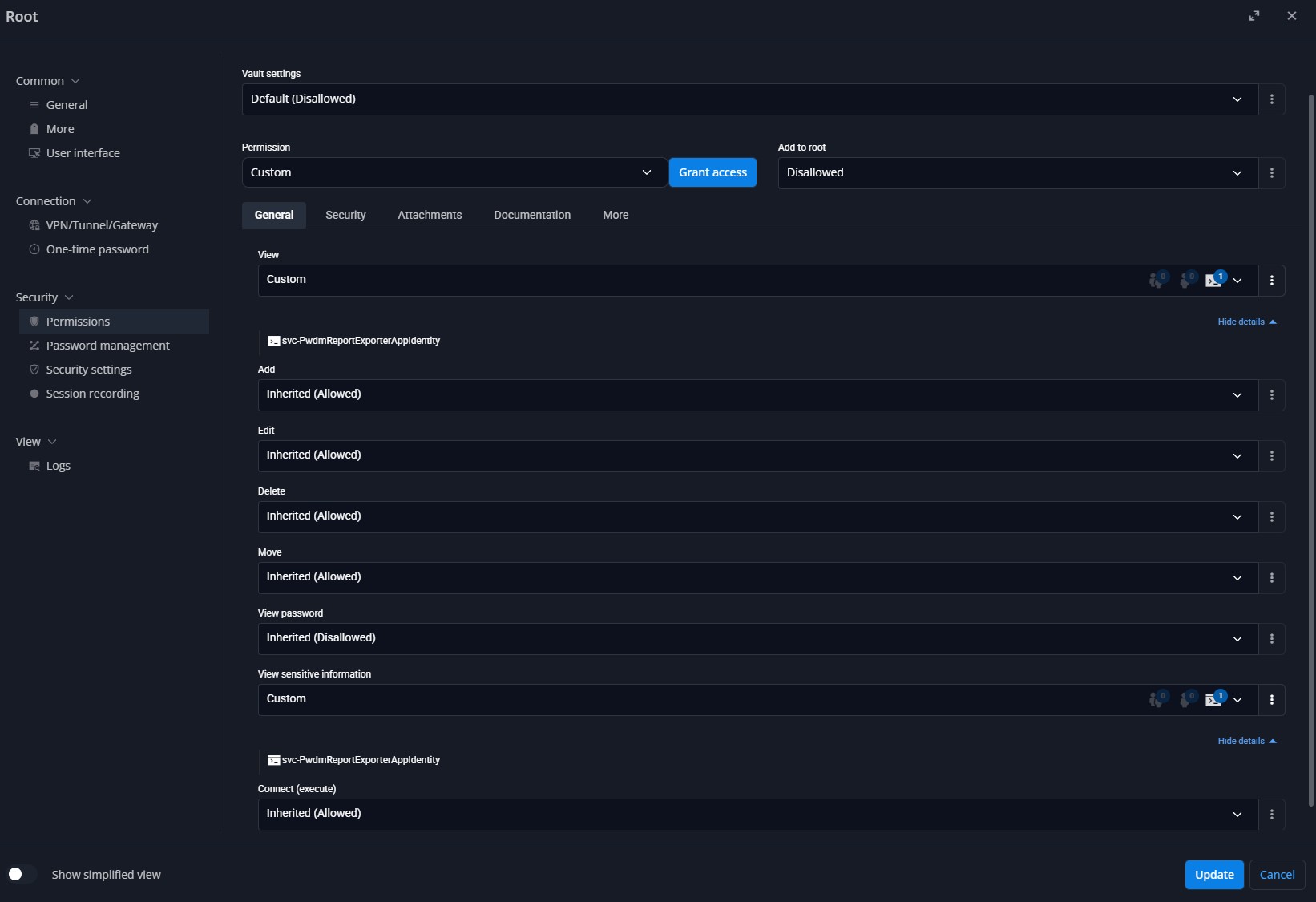
Please advice! Thanks!
Screenshot 2026-08-14 211957.JPG
Hey ,
Good, the login is behind you. For this next step the likeliest cause is the script rather than the permissions, and it is worth ruling out first because it produces exactly what you are seeing, with no error at all - which is why nothing you changed on the vault made any difference.
Since module version 2024.2 many of the DS cmdlets no longer return a ServerResponse wrapper. Get-DSEntry writes the entries themselves onto the pipeline, so the ".Data" on the end of your line resolves to nothing even when the call worked. It does not leave you with an empty variable, though:
$AllEntries comes back with one blank element per entry it retrieved, so if the count is non-zero and every value in it is empty, that confirms it. Drop it:
$AllEntries = Get-DSEntry -VaultID $ServiceAccountRegistryVauldId -All
If you would rather leave the rest of the script alone, add -AsLegacyResponse to that call instead and the old .Data shape comes back.
If it still comes back with nothing, then it is worth looking at permissions - and a refusal here is not silent. A vault the identity may not read makes the call report an error rather than return nothing, and in a runbook that error goes to the job's Errors stream, not your output. Print $Error[0] immediately after the call and you will have it either way.
On a recent module the wording is "Failed to retrieve the contents of vault '<id>'. Verify that the vault ID is valid and that you have permission to access it." On an older one you get an unexpected-exception error from Get-DSFolders that says nothing about permissions at all - read that one as the same thing.
As for which permission it is: listing a vault's entries is gated on the identity's own access to that vault's content, which you grant on the application identity itself. That is a separate layer from the per-entry permissions you were adjusting on the vault.
It takes one of two forms depending on your instance. If the identity's dialog has a Vaults tab, ticking the vault there is the grant, and you said you gave the identity access to all vaults - so that part is already done, which puts this back on the .Data above. If it shows Role assignments instead, add an assignment scoped to that vault; the built-in Vault User role carries that one permission and nothing else, which makes it the right starting point for a read-only report.
Two version numbers would still help: your Devolutions Server version, and the module version from Get-Module -ListAvailable Devolutions.PowerShell. The module version is what decides which of those two error texts you get.
Best regards,
Michel
Michel Audi
Hello, login indeed is not a problem anymore. However, I still cant get to the data in the vaults. Tried without the .Data wrapper, added -AsLegacyResponse , no change. In fact I had to update the powershell module to a more recent version. Tried two new versions to be precise. Same error that the vaults are empty and nothing is being retrieved. I use this simple check after I connect:
# Collect all entries from the vault
$AllEntries = (Get-DSEntry -VaultID $ServiceAccountRegistryVauldId -All).Data
# Check if there is any data
if (-not $AllEntries) {
Write-Error "No data retrieved from PWDM"
throw "Script terminated due to no data from PWDM."
}
...and so on
I found this explicit permission at the vault Permission tab where I could add Application Identity as a "reader" to the vault. No result, same behavior. 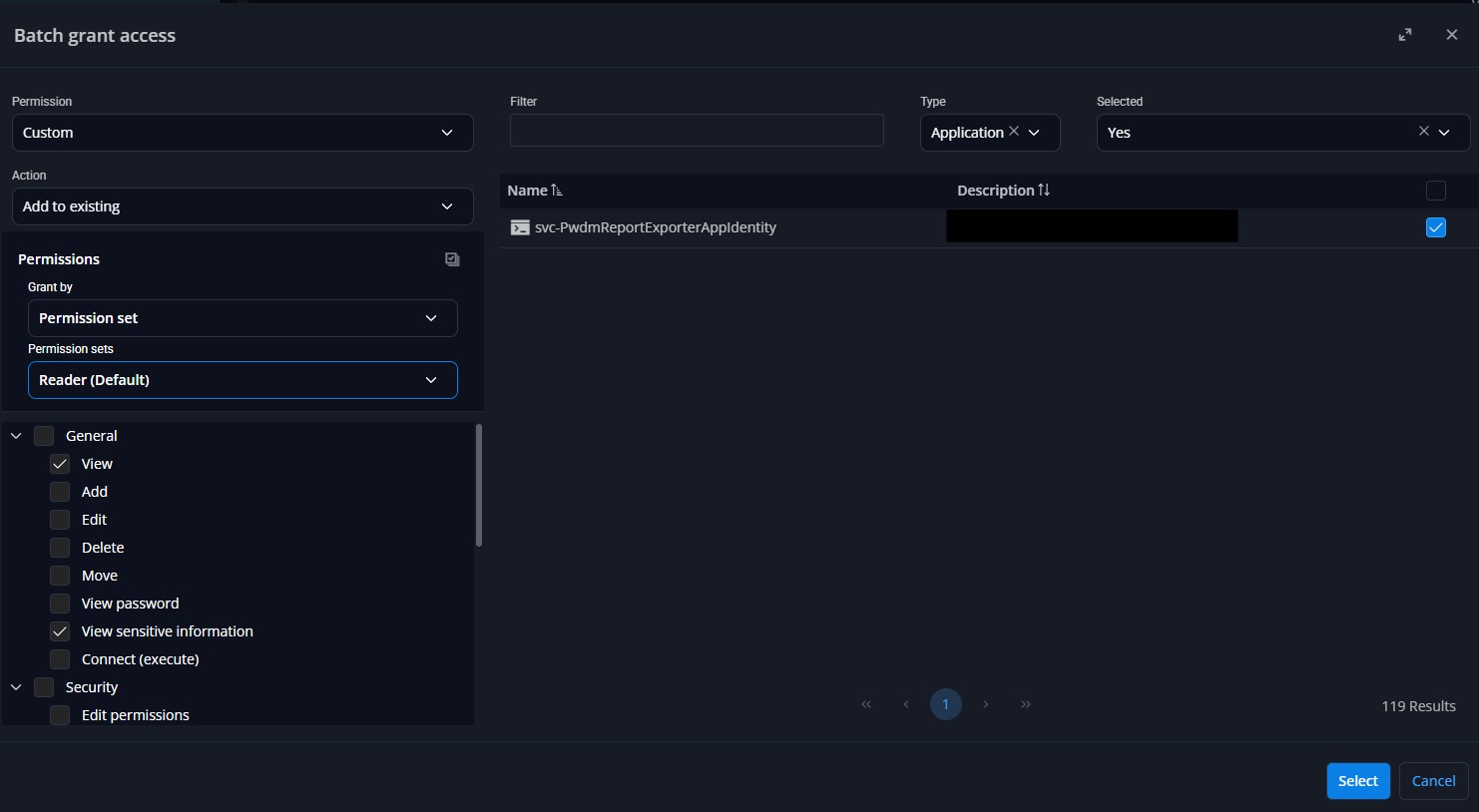
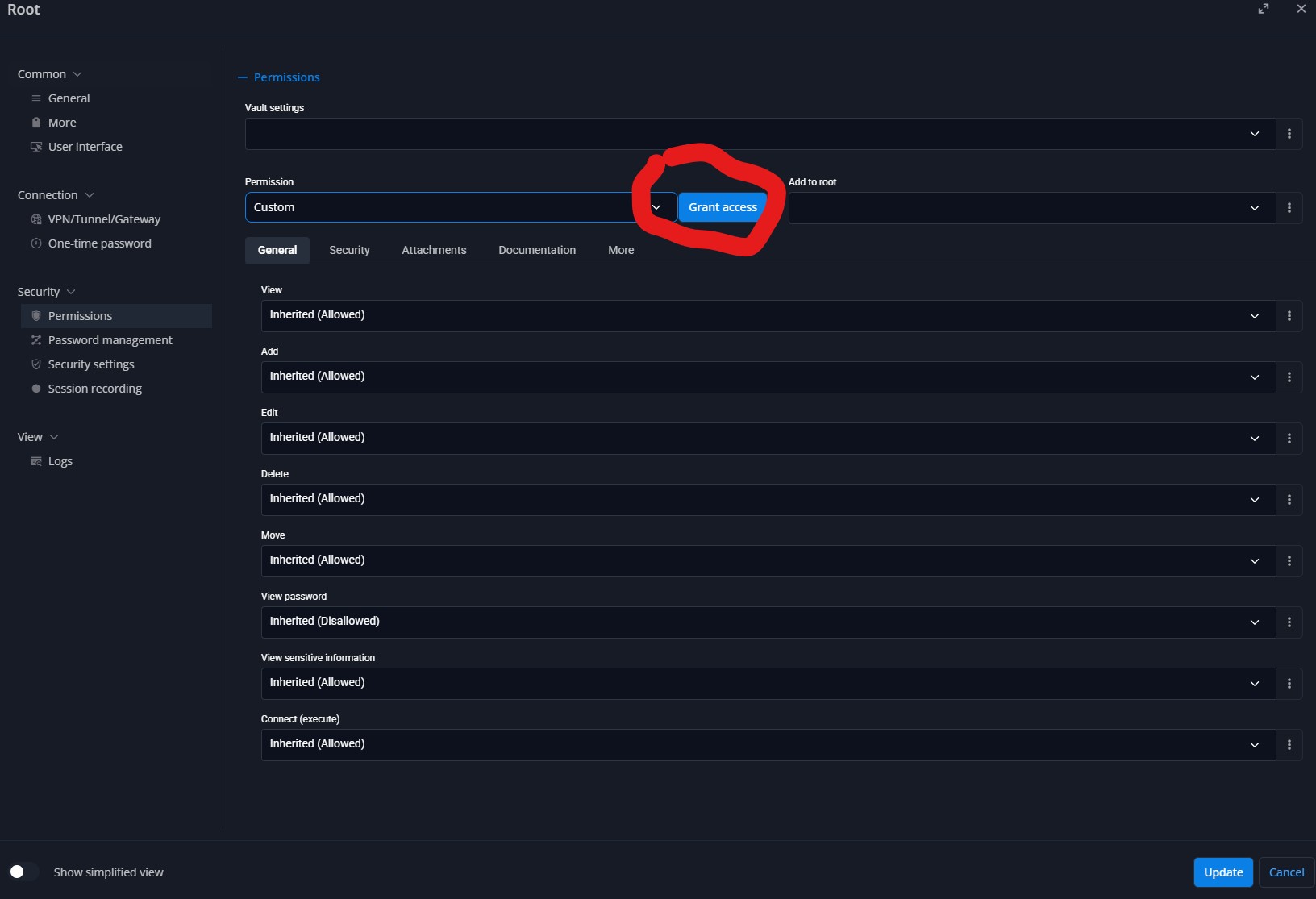
I am sure I am missing something tiny to make it work. The moment I change to a user account, script runs flawlessly.
Screenshot 2026-08-17 091306.JPG
Screenshot 2026-08-17 091717.JPG
Hi pgeorgiev,
Good news first: this is not a limitation of application identities. On my lab server here (Devolutions Server 2026.2.9, module 2026.2.3) one lists vault entries normally - Get-DSEntry -VaultID <id> -All returned 42, 10, 4 and 1 entries from four different vaults. So something specific is refusing yours.
Three things to send me, and none of them changes anything on your server:
Get-DSVault -All | Select-Object ID, Name
Get-Module -ListAvailable Devolutions.PowerShell
Get-DSPublicServerInfo -URL $BaseURI
The last needs no session and prints your Devolutions Server version.
The first lists the standard shared vaults this identity is allowed to read the contents of, which is the same permission Get-DSEntry -All needs - so if your vault is in it, permissions are not your problem. Read the other way it is weaker: PAM vaults and a few special vault types never appear there even when they are readable, so an absence only means something if yours is an ordinary
vault.
Then, in the same session:
$e = Get-DSEntry -VaultID $ServiceAccountRegistryVauldId -All
@($e).Count
$Error[0]
A count above zero means the entries did come back and the problem is further down your script. Your own check cannot tell you that, by the way: (...).Data gives one blank element per entry, so "if (-not $AllEntries)" fires on a vault holding a single entry even when the call succeeded.
A count of zero is either a refusal or a vault with nothing to return, and $Error[0] is what separates them - which is where the module version comes in. From module 2026.2.1 onwards a refusal reads "Failed to retrieve the contents of vault '<id>'. Verify that the vault ID is valid and that you have permission to access it."; on an earlier one the same condition surfaces only as an unexpected-exception error from Get-DSFolders that says nothing about permissions. Either way, in a runbook that text goes to the job's Errors stream rather than your output, so it can pass
unnoticed.
One reassurance about the grant: you were in the right place. The Applications list on the vault and the Vaults tab on the application identity write the same thing, so either is fine some instances show a Role assignments tab on the identity instead of a Vaults tab.
Best regards,
Michel
Michel Audi
Hello! I can post the results right away but I must tell you that I changed a few things.
Accessible vaults:
Get-DSVault -All | Select-Object ID, Name

Devolutions PowerShell module:
Get-Module -ListAvailable Devolutions.PowerShell
Devolutions.PowerShell 2024.1.5 C:\Program Files\PowerShell\Modules\Devolutions.PowerShell\2024.1.5\Devolutions.PowerS.
Devolutions.PowerShell 2026.1.3 C:\Program Files\WindowsPowerShell\Modules\Devolutions.PowerShell\2026.1.3\Devolutions.
Devolutions.PowerShell 2024.1.5 C:\Program Files\WindowsPowerShell\Modules\Devolutions.PowerShell\2024.1.5\Devolutions.

Devolutions Server version:
Get-DSPublicServerInfo -URL $BaseURI

Test target vault:
$e = Get-DSEntry -VaultID $ServiceAccountRegistryVauldId -All
@($e).Count
$Error[0]
Entry count: 1
No result for Accessible vaults which is strange.
Modules are a mess but this is not a problem. I have 2026.2.3 and 2026.1.3 as well, stored somewhere else. I can force the script to use 2026.1.3 like this anytime:
Import-Module "C:\Program Files\WindowsPowerShell\Modules\Devolutions.PowerShell\2026.1.3\Devolutions.PowerShell.psd1" -Force
It didn't make a difference. I cannot however use 2026.2.3 until I upgrade PS7 on my server.
Right now the Devolution server is 2026.1.16.0 (script cannot acquire the version it seems)
The count is 1, there is indeed 1 vault that the application is expected to read.
If you think that the real issue is in PowerShell modules compatibility and that I don't use the very last possible version I can upgrade PowerShell 7 first and then load 2026.2.3 but I doubt it will change anything.
One important detail - I am running the script in an Azure runbook that pushes it on a Hybrid Worker server which connects to the actual Devolution server. So there is a middleman, sort of. Still, it worked fined with a User.
Hi pgeorgiev,
Two things are going on. The module version is why none of those checks could answer anything but it is not what is emptying your result.
Your outputs are the shape those calls take on the 2024.1.5 you have. There the cmdlets still return the old ServerResponse wrapper, so Get-DSEntry -VaultID <id> -All hands back one object whether it retrieved entries or nothing - on a vault of 56 entries here it was still one object, so "Entry count: 1" could not tell us either way. Get-DSVault -All | Select-Object ID, Name prints only the headers, because the wrapper carries no ID or Name. -AsLegacyResponse does not exist in that build; it fails with "A parameter cannot be found that matches parameter name 'AsLegacyResponse'".
And GetDSPublicServerInfo errored rather than printing a version.
The forced import tells us nothing either. The module is PowerShell 7 only every published build is Core edition and each has a floor: 2024.x needs 7.4, 2025.1-2026.1 need 7.5, 2026.2 needs 7.6. Azure Automation runbooks run on 5.1, 7.4 or 7.6, so on a 7.4 worker 2026.1.3 cannot load, and that failure goes to the job's Errors stream, not your output. You do not need that upgrade here.
The second thing is your own observation: the same script works with a user account. That rules out the syntax and the module, and leaves what this identity may read. So keep the .Data - it is correct on 2024.1.5 - take the forced Import-Module line out, and put this immediately before your own Get-DSEntry call, then post what it prints. Also tell me what you changed.
Write-Output ("PowerShell: " + $PSVersionTable.PSVersion)
Get-Module Devolutions.PowerShell | ForEach-Object { Write-Output ("Module: " + $_.Version + " " + $_.Path) }
$Error.Clear()
$v = Get-DSVault -All
Write-Output ("Vaults: " + ((@($v.Data) | ForEach-Object { $_.ID }) -join ' | '))
$r = Get-DSEntry -VaultID $ServiceAccountRegistryVauldId -All
Write-Output ("Entries: " + (@($r.Data) | Where-Object { $_ }).Count)
Write-Output ("Error: " + $Error[0])
Entries is the real count - it reads what is inside the wrapper, and here it printed 56 where the call returned entries and 0 where it returned nothing. If the Module line comes back 2024.1.5 and Entries is 0, the grant is what we look at next.
Best regards,
Michel
Michel Audi
Hello Michel, here it is with App Identity:
PowerShell: 7.5.4
Module: 2024.1.5 C:\Program Files\PowerShell\Modules\Devolutions.PowerShell\2024.1.5\Devolutions.PowerShell.dll
Vaults: 00000000-0000-0000-0000-000000000000 | 4fd60773-5b3f-4f2d-91b1-41c9e8c27d18 | 61b46bf6-5187-49f0-99cf-b270928f47df
Entries: 0
This is what I get when I use admin user account:
PowerShell: 7.5.4
Module: 2024.1.5 C:\Program Files\PowerShell\Modules\Devolutions.PowerShell\2024.1.5\Devolutions.PowerShell.dll
Vaults: 00000000-0000-0000-0000-000000000000 | 4fd60773-5b3f-4f2d-91b1-41c9e8c27d18 | 61b46bf6-5187-49f0-99cf-b270928f47df
Entries: 877
So the app identity sees the vaults, but cannot read inside. Is it something with the permission? Maybe if I give more granular ones? or folder by folder, because I have many folders inside. What if there were custom permissions on each folder... will this override the top permissions of the App Identity on the Vault?
Hi pgeorgiev,
Thanks for running that. I took it back to the top of the thread and went through the whole thing again from your original question,and I think this is the piece we have been missing.
The module and the script are both fine.
First one thing to rule out, because the rest depends on it: is the vault you pass in $ServiceAccountRegistryVauldId one of the three the script printed? That list only contains vaults this identity is a member of, so anything else a PAM vault, or simply a vault it was never added to would not appear there and would be a different problem. For a PAM vault in particular, access is granted on the PAM vaults tab of the same identity.
Assuming it is one of the three, here is what is happening. Being a member of a vault and being able to read what is inside it are two separate things. The vault list reflects membership, so the three IDs your application identity printed are three vaults it is already a member of. The entries inside have their own permissions on top of that, and any entry the identity is not allowed to view is filtered out of the result, so the call comes back with an empty list rather than an error. Your admin account returns 877 because an administrator is not subject to that filter at all.
That permission is matched against the identity itself and against the user groups it belongs to. Before you use that, one caution: the same matching applies to every right, View password included. If the group you pick is also granted View password on those entries, the service account will be able to read the secrets, which is the opposite of what you set out to do. So check what the group is granted first, not only that it is granted View.
With that checked, the fix is to put the identity in the group your entries are already granted to: Administration - Application identities - your identity - User groups.
As for where the blocking permission lives, there are four levels: the entries themselves, any folder above them, the vault, and the server-wide default for vault contents. A folder can carry its own custom permission, and a custom View permission does not add to what is granted above it the identity needs View at the entry and at every folder above it. So a single custom folder permission blocks everything underneath it for anyone not listed on it, whatever is granted higher up. That is also why more granular permissions do not help on their own they only count if the identity, or one of its groups, is listed at each level on the way down.
If more than one of your vaults behaves the same way, start at the server-wide default, since it is the only level common to all of them.
Sorry it has taken a few rounds to get to this. An entry the identity may not read is simply left out of the result, so a vault whose entries it cannot read looks exactly like a vault with nothing in it - which is what made this so hard to pin down from the output alone.
Best regards,
Michel
Michel Audi
Hello Michel, I was finally able to get some results. Indeed placing a custom Read permission on a folder inside the Vault did the job. This particular folder contains other sub-folders and it caught them with their content too for the export. I have ~15 folders, no trouble to put Read this app identity across them all.
One detail - you cant make an App Identity a member of a group. Groups show up in the Edit section, I see the list, but the checkmark is greyed out. So no chance there. Anyway I was able to finally hit the core issue.
Thanks a lot for the directions and the patience.
Hi pgeorgiev,
Glad that did it, and thank you for coming back to close the loop.
One thing worth knowing: an application identity can be put in a user group, but only a group created in Devolutions Server itself. Groups that come from your directory are read only there, which is why the checkmark would not take. It is not specific to application identities.
Before you do the other fifteen, one caution. Where a folder's Permission reads Inherited, what it gives comes from above it, and setting a View row to Custom replaces that instead of adding to it: a folder whose View list does not name you is refused outright. So everyone not on that list loses the folder, and everything under it.
In the same dialog, in this order: set the folder's Permission to Custom, then set the View row to "Custom + Inherited" rather than "Custom" - that one keeps what is inherited and adds the identity on top. It is offered only on those individual rows, not in the Permission dropdown above them.
Two exceptions. On a folder nested below another it will not help you, since there View follows what is granted above. And where a folder's Permission reads Allowed or Disallowed rather than Inherited, moving it to Custom changes the other rights on that folder, so leave those ones until you have looked at them.
Best regards,
Michel
Michel Audi