Problem with SAML "The SSL connection could not be established, see inner exception."
Problem with SAML "The SSL connection could not be established, see inner exception."

Hello,
since a few weeks I sporadically encounter the following Error, when I open an App (also includes Portal and Admin page) or call an Endpoint: (I added the inner exception as attachment)
After some time (with refreshing and cookie delete) it works again.
I already tried the following:
- Service / Server Restart (solved the issue for a few hours)
- Changed the Security Environment from "Integrated" to "Powershell 7"
- Fiddled a bit with my Saml Configuration (enabled, disabled "Load metadata" and recreated the whole Authentication Method
- Updated from 2026.2.2.0 to 2026.2.3.0
My Saml2 Method looks like this: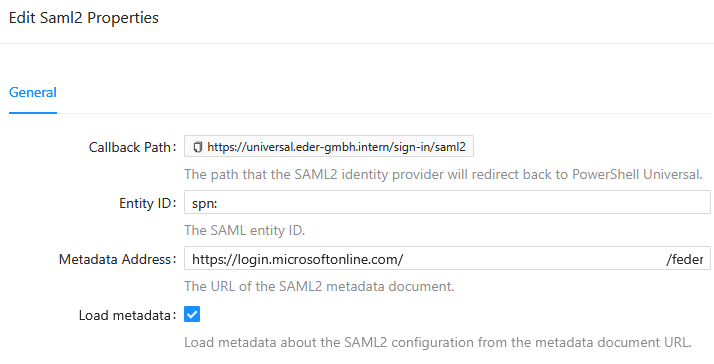
Do you have a suggestion how I can get this fixed?
Thank you.
saml.png
2026-07-30 084501.355 +0200 [ERR][S.txt
grafik.png
Recommended Answer
Hello mganslmaier,
Thank you for providing the complete exception. The inner exception identifies a more specific cause than the outer SSL message.
The metadata request fails because a certificate-validation callback is attempting to execute a PowerShell script block, shown in the stack trace as `$true`, from a thread where no PowerShell Runspace is available:
`System.Management.Automation.PSInvalidOperationException: There is no Runspace available to run scripts in this thread.`
This suggests that a custom certificate-validation callback may have been registered in the PSU process, potentially through an App, Endpoint, module, PowerShell profile, startup script, or other custom code. The restart temporarily resolving the issue is also consistent with process-level state being reset.
Could you please search your PSU repository, imported modules, and PowerShell profiles for references to the following?
ServerCertificateValidationCallback
CertificateValidationCallback
RemoteCertificateValidationCallback
ServicePointManager
DangerousAcceptAnyServerCertificateValidator
{ $true }
Please also confirm:
1. Whether any App, Endpoint, script, scheduled job, or module runs shortly before the issue begins.
2. Whether disabling `Load metadata`, followed by a PSU service restart, prevents the issue from returning.
3. Your PSU hosting method, such as Windows Service, IIS, or Docker.
4. Whether the behavior occurs in a clean test installation without custom modules or repository scripts.
Please do not retain any callback that accepts all certificates as a permanent workaround because it bypasses TLS certificate validation.
Because this is a public forum, please sanitize all evidence before posting. Remove credentials, tokens, license keys, cookies, private keys, full connection strings, email addresses, usernames, customer data, tenant or account identifiers, internal domains, hostnames, IP addresses, and private URLs. Please do not upload unredacted HAR files, memory dumps, database backups, or complete configuration files to this public thread.
Best regards,
Ruben Tapia
All Comments (2)
Hello Ruben Tapia,
thank you for the quick respond.
I searched my repository for the suggestions and found the following in an Endpoint:
[System.Net.ServicePointManager]::ServerCertificateValidationCallback = { $true };
(this was needed on my local computer to call an Aruba Switch API)
After I removed it and restarted the service the error seems to be gone.
Thank you very much!
Best regards,
Maxi
Hello mganslmaier,
Thank you for confirming the result.
I am glad to hear that removing the custom `ServerCertificateValidationCallback` from the Endpoint and restarting the PSU service resolved the SAML metadata connection error.
The callback was modifying certificate validation globally within the PSU process. When the SAML metadata request later attempted to use it from a thread without an available PowerShell Runspace, it produced the reported SSL exception.
For future connections to the Aruba Switch API, we recommend correcting the certificate trust chain rather than using a callback that accepts all certificates, since that callback bypasses TLS certificate validation and can affect other connections within the same process.
Thank you for sharing your findings. This topic can now be marked as resolved.
Best regards,
Ruben Tapia