Upgrade Failure "duplicate column name: DebugPreference"

I am attempting to upgrade PSU from v5.5.0 to v26.2.3.0, both initial install and upgrade are being done via MSI. The v26 MSI upgrade process itself completes successfully without error. However, post upgrade when first trying to start the PSU service the below error throws and the service will not start. I don't recall ever doing anything unique/special with this PSU installation, but as of now I am unable to get past it. Are there intermediate version(s) I need to step through instead of a straight jump to 26.2.3.0?
[FTL] Fatal error starting PowerShell Universal as a Windows service.
Microsoft.Data.Sqlite.SqliteException (0x80004005): SQLite Error 1: 'duplicate column name: DebugPreference'.
   at Microsoft.Data.Sqlite.SqliteException.ThrowExceptionForRC(Int32 rc, sqlite3 db)
   at Microsoft.Data.Sqlite.SqliteCommand.PrepareAndEnumerateStatements()+MoveNext()
   at Microsoft.Data.Sqlite.SqliteCommand.GetStatements()+MoveNext()
   at Microsoft.Data.Sqlite.SqliteDataReader.NextResult()
   at Microsoft.Data.Sqlite.SqliteCommand.ExecuteReader(CommandBehavior behavior)
   at Microsoft.Data.Sqlite.SqliteCommand.ExecuteReader()
   at Microsoft.Data.Sqlite.SqliteCommand.ExecuteNonQuery()
   at Microsoft.EntityFrameworkCore.Storage.RelationalCommand.ExecuteNonQuery(RelationalCommandParameterObject parameterObject)
   at Microsoft.EntityFrameworkCore.Migrations.MigrationCommand.ExecuteNonQuery(IRelationalConnection connection, IReadOnlyDictionary2 parameterValues)    at Microsoft.EntityFrameworkCore.Migrations.Internal.MigrationCommandExecutor.Execute(IReadOnlyList1 migrationCommands, IRelationalConnection connection, MigrationExecutionState executionState, Boolean beginTransaction, Boolean commitTransaction, Nullable1 isolationLevel)    at Microsoft.EntityFrameworkCore.Migrations.Internal.MigrationCommandExecutor.<>c.<ExecuteNonQuery>b__3_1(DbContext _, ValueTuple6 s)
   at Microsoft.EntityFrameworkCore.Storage.NonRetryingExecutionStrategy.ExecuteTState,TResult
   at Microsoft.EntityFrameworkCore.Migrations.Internal.MigrationCommandExecutor.ExecuteNonQuery(IReadOnlyList1 migrationCommands, IRelationalConnection connection, MigrationExecutionState executionState, Boolean commitTransaction, Nullable1 isolationLevel)
   at Microsoft.EntityFrameworkCore.Migrations.Internal.Migrator.MigrateImplementation(DbContext context, String targetMigration, MigrationExecutionState state, Boolean useTransaction)
   at Microsoft.EntityFrameworkCore.Migrations.Internal.Migrator.<>c.<Migrate>b__20_1(DbContext c, ValueTuple4 s)    at Microsoft.EntityFrameworkCore.Storage.NonRetryingExecutionStrategy.Execute[TState,TResult](TState state, Func3 operation, Func3 verifySucceeded)    at Microsoft.EntityFrameworkCore.Migrations.Internal.Migrator.Migrate(String targetMigration)    at Microsoft.EntityFrameworkCore.RelationalDatabaseFacadeExtensions.Migrate(DatabaseFacade databaseFacade)    at PowerShellUniversal.SQLite.DatabaseFeature.InitializeDatabase(IConfiguration configuration, ILogger logger) in D:\a\powershell-universal\powershell-universal\src\PowerShellUniversal.SQLite\Plugin.cs:line 72    at Universal.Server.Services.SystemPluginService.InitializeDatabase(IConfiguration configuration) in D:\a\powershell-universal\powershell-universal\src\Universal.Server\Services\SystemPluginService.cs:line 58    at Universal.Server.Startup.InitializeDatabase(ISystemPluginService systemPluginService) in D:\a\powershell-universal\powershell-universal\src\Universal.Server\Startup.cs:line 340    at Universal.Server.Startup.ConfigureServices(IServiceCollection services) in D:\a\powershell-universal\powershell-universal\src\Universal.Server\Startup.cs:line 82    at System.Reflection.MethodBaseInvoker.InterpretedInvoke_Method(Object obj, IntPtr* args)    at System.Reflection.MethodBaseInvoker.InvokeDirectByRefWithFewArgs(Object obj, Span1 copyOfArgs, BindingFlags invokeAttr)
   at System.Reflection.MethodBaseInvoker.InvokeWithOneArg(Object obj, BindingFlags invokeAttr, Binder binder, Object[] parameters, CultureInfo culture)
   at System.Reflection.RuntimeMethodInfo.Invoke(Object obj, BindingFlags invokeAttr, Binder binder, Object[] parameters, CultureInfo culture)
   at Microsoft.AspNetCore.Hosting.ConfigureServicesBuilder.InvokeCore(Object instance, IServiceCollection services)
   at Microsoft.AspNetCore.Hosting.GenericWebHostBuilder.UseStartup(Type startupType, HostBuilderContext context, IServiceCollection services, Object instance)
   at Microsoft.AspNetCore.Hosting.GenericWebHostBuilder.<>c__DisplayClass7_0.<UseStartup>b__0(HostBuilderContext context, IServiceCollection services)
   at Microsoft.Extensions.Hosting.HostBuilder.InitializeServiceProvider()
   at Microsoft.Extensions.Hosting.HostBuilder.Build()
   at Universal.Server.PowerShellUniversalWindowsService.StartHostAsync(CancellationToken cancellationToken) in D:\a\powershell-universal\powershell-universal\src\Universal.Server\PowerShellUniversalWindowsService.cs:line 61
All Comments (29)
Hello geofforlebeck,
Thank you for providing the upgrade details and complete stack trace.
The MSI installation appears to have completed, but the PSU service is failing during the SQLite schema migration. The error indicates that the migration is attempting to create the `DebugPreference` column when it is already present in the database.
I did not find an official requirement to install intermediate PSU versions before upgrading. For now, please do not manually delete the column or modify the `__EFMigrationsHistory` table, as this could leave the database in an unsupported state.
Could you please confirm the following?
* Is this a production, test, or development instance?
* Was PSU 5.5.0 starting successfully immediately before the upgrade?
* Do you have a backup of the SQLite database, repository, and configuration from before the upgrade?
* Were there any previous upgrade attempts or database restorations on this installation?
* Are you using the default SQLite database location or a custom path?
Please preserve a copy of the current database before attempting any rollback or additional upgrade.
Because this is a public forum, please sanitize all evidence before posting. Remove credentials, tokens, license keys, cookies, private keys, full connection strings, email addresses, usernames, customer data, tenant or account identifiers, internal domains, hostnames, IP addresses, and private URLs. Please do not upload unredacted HAR files, memory dumps, database backups, or complete configuration files to this public thread.
Best regards,
Ruben Tapia
To answer your questions:
- This is a production instance (uses free license as I'm using solely as a job scheduler)
- PSU 5.5.0 is running fine and is running okay prior the upgrade attempt
- Yes, I have backups of everything. This is a VM so I've been using VM snapshots to restore back to v5.5.0 when upgrade fails
- I believe there was one or two version upgrades, but cannot say with 100% certainty.
- Default SQLite ("C:\ProgramData\UniversalAutomation\database.db")
Hello geofforlebeck,
Thank you for confirming those details. Since PSU 5.5.0 is working after restoring the VM snapshot, and you have a reliable rollback available, I recommend performing the next test only on a cloned copy of that working snapshot rather than on the production VM.
Please use the following controlled upgrade path:
1. Restore the known-working PSU 5.5.0 snapshot.
2. Clone the VM and keep the production instance unchanged.
3. On the clone, confirm that the PSU service starts normally and that the schedules are available.
4. Stop the PSU service and create an additional copy of `C:\ProgramData\UniversalAutomation`.
5. Upgrade the cloned instance from PSU 5.5.0 to PSU 5.6.13 using the MSI.
6. Start the service once and confirm whether the `duplicate column name: DebugPreference` error appears.
7. If 5.6.13 starts successfully, upgrade the same clone from 5.6.13 to 2026.2.3.0 and test again.
This intermediate test is intended to identify during which upgrade stage the database migration conflict occurs. It is not currently confirmed that an intermediate version is mandatory.
If either stage fails, please stop the service and do not delete the `DebugPreference` column or modify the `__EFMigrationsHistory` table. Please provide the exact stage that failed, the Windows Server version, and the sanitized log from the first failed service start.
Because this is a public forum, please sanitize all evidence before posting. Remove credentials, tokens, license keys, cookies, private keys, full connection strings, email addresses, usernames, customer data, tenant or account identifiers, internal domains, hostnames, IP addresses, and private URLs. Please do not upload unredacted HAR files, memory dumps, database backups, or complete configuration files to this public thread.
Best regards,
Ruben Tapia
Ruben,
I was not able to specifically find v5.6.13, but I did attempt using 5.6.1 MSI and it still failed.
- The failure occurred at the point the MSI installer tries to start the service (i.e., the very last step of the MSI installer).
- This is running on a up-to-date patched Windows Server 2022 installation.
The error upon starting:
2026-07-29 20:26:26.809 -07:00 [FTL] Fatal error starting PowerShell Universal.
Microsoft.Data.Sqlite.SqliteException (0x80004005): SQLite Error 1: 'duplicate column name: DebugPreference'.
   at Microsoft.Data.Sqlite.SqliteException.ThrowExceptionForRC(Int32 rc, sqlite3 db)
   at Microsoft.Data.Sqlite.SqliteCommand.PrepareAndEnumerateStatements()+MoveNext()
   at Microsoft.Data.Sqlite.SqliteCommand.GetStatements()+MoveNext()
   at Microsoft.Data.Sqlite.SqliteDataReader.NextResult()
   at Microsoft.Data.Sqlite.SqliteCommand.ExecuteReader(CommandBehavior behavior)
   at Microsoft.Data.Sqlite.SqliteCommand.ExecuteReader()
   at Microsoft.Data.Sqlite.SqliteCommand.ExecuteNonQuery()
   at Microsoft.EntityFrameworkCore.Storage.RelationalCommand.ExecuteNonQuery(RelationalCommandParameterObject parameterObject)
   at Microsoft.EntityFrameworkCore.Migrations.MigrationCommand.ExecuteNonQuery(IRelationalConnection connection, IReadOnlyDictionary`2 parameterValues)
   at Microsoft.EntityFrameworkCore.Migrations.Internal.MigrationCommandExecutor.Execute(IReadOnlyList`1 migrationCommands, IRelationalConnection connection, MigrationExecutionState executionState, Boolean beginTransaction, Boolean commitTransaction, Nullable`1 isolationLevel)
   at Microsoft.EntityFrameworkCore.Migrations.Internal.MigrationCommandExecutor.<>c.<ExecuteNonQuery>b__3_1(DbContext _, ValueTuple`6 s)
   at Microsoft.EntityFrameworkCore.Storage.NonRetryingExecutionStrategy.Execute[TState,TResult](TState state, Func`3 operation, Func`3 verifySucceeded)
   at Microsoft.EntityFrameworkCore.Migrations.Internal.MigrationCommandExecutor.ExecuteNonQuery(IReadOnlyList`1 migrationCommands, IRelationalConnection connection, MigrationExecutionState executionState, Boolean commitTransaction, Nullable`1 isolationLevel)
   at Microsoft.EntityFrameworkCore.Migrations.Internal.Migrator.MigrateImplementation(DbContext context, String targetMigration, MigrationExecutionState state, Boolean useTransaction)
   at Microsoft.EntityFrameworkCore.Migrations.Internal.Migrator.<>c.<Migrate>b__20_1(DbContext c, ValueTuple`4 s)
   at Microsoft.EntityFrameworkCore.Storage.NonRetryingExecutionStrategy.Execute[TState,TResult](TState state, Func`3 operation, Func`3 verifySucceeded)
   at Microsoft.EntityFrameworkCore.Migrations.Internal.Migrator.Migrate(String targetMigration)
   at Microsoft.EntityFrameworkCore.RelationalDatabaseFacadeExtensions.Migrate(DatabaseFacade databaseFacade)
   at PowerShellUniversal.SQLite.DatabaseFeature.InitializeDatabase(IConfiguration configuration, ILogger logger) in D:\a\universal\universal\src\PowerShellUniversal.SQLite\Plugin.cs:line 70
   at Universal.Server.Services.SystemPluginService..ctor(IConfiguration configuration) in D:\a\universal\universal\src\Universal.Server\Services\SystemPluginService.cs:line 48
   at Universal.Server.Startup.ConfigureServices(IServiceCollection services) in D:\a\universal\universal\src\Universal.Server\Startup.cs:line 72
   at System.RuntimeMethodHandle.InvokeMethod(Object target, Void** arguments, Signature sig, Boolean isConstructor)
   at System.Reflection.MethodBaseInvoker.InvokeDirectByRefWithFewArgs(Object obj, Span`1 copyOfArgs, BindingFlags invokeAttr)
   at System.Reflection.MethodBaseInvoker.InvokeWithOneArg(Object obj, BindingFlags invokeAttr, Binder binder, Object[] parameters, CultureInfo culture)
   at System.Reflection.RuntimeMethodInfo.Invoke(Object obj, BindingFlags invokeAttr, Binder binder, Object[] parameters, CultureInfo culture)
   at Microsoft.AspNetCore.Hosting.ConfigureServicesBuilder.InvokeCore(Object instance, IServiceCollection services)
   at Microsoft.AspNetCore.Hosting.GenericWebHostBuilder.UseStartup(Type startupType, HostBuilderContext context, IServiceCollection services, Object instance)
   at Microsoft.AspNetCore.Hosting.GenericWebHostBuilder.<>c__DisplayClass7_0.<UseStartup>b__0(HostBuilderContext context, IServiceCollection services)
   at Microsoft.Extensions.Hosting.HostBuilder.InitializeServiceProvider()
   at Microsoft.Extensions.Hosting.HostBuilder.Build()
   at Universal.Server.Program.Main(String[] args) in D:\a\universal\universal\src\Universal.Server\Program.cs:line 37
2026-07-29 20:26:35.257 -07:00 [INF] Using database connection string: Data Source=C:\ProgramData\UniversalAutomation\database.db
Hello geofforlebeck,
Thank you for testing the upgrade to PSU 5.6.1 and confirming that the same error occurs when the MSI attempts to start the service.
Since the failure occurs during the SQLite migration, the next step is to review the complete logs from the failed startup attempt. Please restore the known-working PSU 5.5.0 snapshot, reproduce the upgrade once on the cloned VM, and then collect the following:
* Windows Event Viewer logs from **Windows Logs > Application**
* Windows Event Viewer logs from **Windows Logs > System**
* PowerShell Universal logs from the failed startup attempt
* The approximate date, time, and time zone when the failure occurred
* The exact PSU version used during the failed test
Please export only the relevant Event Viewer time range as `.evtx` files and send the files directly to:
ruben.tapia@ironmansoftware.com
Please include case number **55723** in the email subject.
Do not attach `database.db`, complete configuration files, credentials, tokens, license information, or other customer data unless specifically requested after the initial log review.
Best regards,
Ruben Tapia
Hi Ruben, I reproduced the failure and captured the logs generated. I've emailed them to you.
Hello geofforlebeck,
Thank you for sending the ZIP file. We were able to extract and review the PSU log and Windows Event Viewer files successfully.
The evidence confirms that PSU 5.5.0 shut down normally before the installation. PSU 5.6.1 then failed repeatedly during its initial SQLite migration with the same `duplicate column name: DebugPreference` exception.
The MSI and Service Control Manager errors are secondary results of the PSU process terminating. The evidence does not currently indicate a Windows service permission or MSI installation problem. The remaining question is whether the existing SQLite schema and its Entity Framework migration history are out of sync.
Please perform the following only on a cloned VM restored from the working 5.5.0 snapshot:
1. Stop the PowerShell Universal service.
2. Create another backup copy of `C:\ProgramData\UniversalAutomation\database.db`.
3. Open only the copied database with a SQLite management tool.
4. Run these read-only queries:
PRAGMA quick_check;
SELECT name, sql
FROM sqlite_schema
WHERE type = 'table'
AND sql LIKE '%DebugPreference%';
SELECT MigrationId, ProductVersion
FROM __EFMigrationsHistory
ORDER BY MigrationId;
Please send the complete query results by replying to the same email thread. Do not modify the database, remove the `DebugPreference` column, or add records to `__EFMigrationsHistory`.
As an additional control on the cloned VM, after preserving the original database, you may temporarily move `database.db` outside the active directory and start PSU 5.6.1 once with a new database. Please let us know whether the service starts successfully. This test will help determine whether the problem is isolated to the existing database rather than the PSU installation or Windows service.
Please do not send the complete database unless we specifically request it.
Best regards,
Ruben Tapia
Ruben, I've performed the request above and sent you the details. Also confirming 5.6.1 started without issue when letting it create a fresh DB.
Hello geofforlebeck,
Thank you for completing the tests and providing the database query results.
The results confirm that PSU 5.6.1 starts successfully with a newly created database, while the upgrade failure remains isolated to the existing SQLite database.
We will consult with our Development team to determine whether it is viable to apply a specific correction to the existing database and, if so, what the supported procedure would be. At this stage, we cannot confirm that a database fix will be possible, and we do not have an estimated timeframe for their review.
For now, please continue using the restored PSU 5.5.0 environment and preserve the original database and VM snapshot. Please do not modify the database schema, remove the `DebugPreference` column, or manually change `__EFMigrationsHistory`.
We will update the thread after we receive guidance from Development.
Best regards,
Ruben Tapia
Hello geofforlebeck,
I apologize for the delay in following up on this case.
Based on the troubleshooting completed so far, including the SQLite migration results and the successful test with a newly created database, I have now escalated the case internally for further review.
The purpose of the escalation is to determine whether a supported correction can be applied to the existing database and, if so, what the safest procedure would be. At this point, I do not want to recommend any manual changes to DebugPreference, the database schema, or __EFMigrationsHistory until we receive guidance.
For now, please continue using the restored PSU 5.5.0 environment and preserve the existing database and VM snapshot unchanged.
I will update the thread once I receive additional guidance from the internal review.
Best regards,
Hello geofforlebeck,
We received additional guidance from our internal review and would like to confirm one detail before proceeding further.
Do you recall ever installing or testing a **nightly or pre-release build of PSU 5.5.x** on this same instance before moving to the released PSU 5.5.0 build?
If you are not completely sure, that is perfectly fine. Please let us know anything you remember about the upgrade history around that timeframe.
There is no need to make any database changes or send the database at this stage. We first want to confirm whether the installation history aligns with what we are seeing in the migration records.
Best regards,
Ruben Tapia
Hi @rubentapia, I do not remember with any certainty. I'd like to think "no" (and if I did, rolled it back via VM snapshot so nothing would persist in the DB), but I can't be sure.
Hello geofforlebeck,
Thank you for confirming. Since the previous use of a nightly/pre-release build cannot be confirmed or ruled out, we would like to validate the database state directly before considering any correction.
Please perform the database checks only against a copy of the database from the known-working PSU 5.5.0 snapshot, with the PowerShell Universal service stopped. The goal is to verify the database integrity, migration history, and whether all schema objects associated with the relevant migration are already present.
Please do not modify the database, remove `DebugPreference`, or add anything to `__EFMigrationsHistory` at this stage.
If the query output contains information that you would prefer not to post publicly, you can send the sanitized results directly to:
ruben.tapia@ironmansoftware.com
Please reference case **55723** in the message.
If the information cannot be sufficiently sanitized for email, please let me know. I can also consult with Development to determine whether an approved secure channel can be provided for the required evidence.
Once we have the audit results, we can compare them with the expected migration schema and determine the safest next step.
Best regards,
Ruben Tapia
@rubentapia apologies, but is there more guidance on what "perform the database checks" means? Is that a native/built-in function of PSU or SQLite?
Hello geofforlebeck,
Apologies for the lack of detail in my previous message.
By “perform the database checks,” I mean running specific SQL queries directly against a **copy of the SQLite `database.db` file**. This is not a built-in PowerShell Universal function.
Please perform the checks only on a cloned VM or backup copy of the database:
1. Stop the PowerShell Universal service.
2. Make an additional copy of:
`C:\ProgramData\UniversalAutomation\database.db`
3. Open the copied database using a SQLite client, such as the `sqlite3` command-line utility or a SQLite management tool.
4. Run the following read-only queries:
sql:
PRAGMA quick_check;
SELECT MigrationId, ProductVersion
FROM __EFMigrationsHistory
WHERE MigrationId LIKE '%_5.5%'
OR MigrationId IN (
'20250315212513_5.5.0',
'20250408215435_5.5.0'
)
ORDER BY MigrationId;
SELECT 'Settings' AS TableName, name, type
FROM pragma_table_info('Settings')
WHERE name LIKE '%Preference%'
UNION ALL
SELECT 'Identity', name, type
FROM pragma_table_info('Identity')
WHERE name IN ('ExcludedScripts', 'SelectedScripts')
UNION ALL
SELECT 'Apps', name, type
FROM pragma_table_info('Apps')
WHERE name = 'Critical';
```
Please send the results to:
ruben.tapia@ironmansoftware.com
Please reference case 55723.
Disclaimer: These queries are intended only for diagnostic, read-only validation against a protected copy of the database. Please do not run any `INSERT`, `UPDATE`, `DELETE`, `ALTER`, or other database-modification commands unless we explicitly confirm the next step after reviewing the results.
If you are not comfortable running SQLite queries, please let me know. I can consult with Development about providing an approved secure method for us to review the required database information instead.
Best regards,
Ruben Tapia
I want to point out that you can also run these queries in a running PSU instance by going to Help \ Support Tools \ Database and then use the Query tool to perform these same queries.
Adam Driscoll
PowerShell Expert and Developer at Devolutions
Thanks Adam (long time! hope all is well)
@rubentapia It output as "ok", which I've still sent you the output via email, thanks.
Hello geofforlebeck,
I sent you a detailed guide by email with the exact database checks to run and how to collect the results safely.
Please follow the steps from that email and reply there with the output so we can review it with Development before making any database changes.
Best regards,
Ruben Tapia
@rubentapia sent you a reply via email with the outputs.
Hello geofforlebeck,
Thank you again for providing the database audit results.
We have reviewed the output and shared the findings with our Development team. They are currently reviewing the database migration state in more detail to determine the safest way to proceed.
For now, please do not make any changes to the database schema or `__EFMigrationsHistory`. Please continue using the restored PSU 5.5.0 environment and keep the current database and VM snapshot preserved.
We will update the thread once Development completes their review and provides guidance on the next step.
Best regards,
Ruben Tapia
Hello geofforlebeck,
Development reviewed the previous audit results and would like us to collect a little more detail from the existing database before determining the appropriate correction.
Please go to:
Help > Support Tools > Database > Query
and run each of the following separately:
PRAGMA table_info('Settings');
PRAGMA table_info('Tags');
PRAGMA table_info('Scripts');
SELECT MigrationId, ProductVersion
FROM __EFMigrationsHistory;
Please send the complete results to:
ruben.tapia@ironmansoftware.com
and reference case 55723.
Development is using these results to compare the full table definitions and migration history against the expected schema before deciding what database correction, if any, should be applied.
As before, please do not run any INSERT, UPDATE, DELETE, ALTER, or other database-modification commands at this stage. We want to complete the review first and make sure any change is based on Development’s guidance.
Best regards,
Ruben Tapia
@rubentapia I have run the queries and provided their outputs via email
@geofforlebeck
Thank you for sending the requested query results.
Development is reviewing the additional database information now, and we expect to have further guidance to share with you next week.
For now, please continue using the restored PSU 5.5.0 environment and avoid making any changes to the database schema or __EFMigrationsHistory until we complete the review.
Thank you for your patience while we work through this with the Development team.
Best regards,
Ruben Tapia
Hello @geofforlebeck
Development would like to review a copy of the affected database.db directly so they can reproduce the current migration state and safely test any repair procedure before we provide further instructions.
We will provide you with a private SharePoint upload link for this case. Please use that link to upload a copy of the database from the known-working PSU 5.5.0 state.
Before copying the file, please stop the PowerShell Universal service and preserve your existing VM snapshot and original database unchanged.
Please do not upload the database to this public forum or send it through any other channel unless specifically requested.
Once Development receives the database, they will review the schema and migration state and determine the safest next step.
Best regards,
Hello @geofforlebeck
We have prepared a secure SharePoint upload link for the database file.
Alexandre will send the link to you directly by private message. Please use that link to upload a copy of the affected database.db from the known-working PSU 5.5.0 state.
Before uploading, please stop the PowerShell Universal service and preserve your original database and VM snapshot unchanged.
Because the database may contain sensitive or environment-specific information, please remove or sanitize any sensitive data where possible before uploading. Please do not post the database or the SharePoint link in this public thread.
Once the file is received, Development will use the copy to review the migration state and safely test any required repair procedure.
Best regards,
@rubentapia, the DB file has been uploaded.
@geofforlebeck
Development has completed their review and prepared a correction specifically for this case.
The repair instructions and associated script will be sent to you privately. Please do not make any additional database changes until you receive those instructions.
Best regards,
@rubentapia I was able to run through the instructions and the upgrade looks to have completed and things look healthy: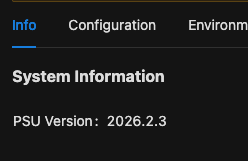
b48402d6-0b6d-44ff-ae7a-a2cba8a85db1.png
@geofforlebeck Thank you for confirming the results.
I’m glad to hear that you were able to complete the repair steps successfully and that the upgrade to PSU 2026.2.3 completed as expected. The screenshot also confirms that the instance is now running PSU 2026.2.3.
At this point, no additional database changes are required. Please continue monitoring the instance normally and keep the database backup and VM snapshot available for the time being.
Thank you as well for your patience throughout the troubleshooting and validation process.
Best regards,