Configurable MCP Server Connection Name in VS Code
1 vote

Problem
When adding a PSU MCP server in VS Code, the connection can be configured either by manually adding /api/v1/mcp to the mcp.json configuration or by using the extension's server connection feature, which automatically appends the endpoint.
In both cases, the resulting MCP server connection is automatically named Universal.Server. As a consequence, multiple PSU MCP server connections appear with the same name, making it impossible to distinguish between them in the VS Code UI.
Expected Behavior
The displayed MCP server name should be configurable or automatically derived from the target server information.
Possible approaches:
Allow specifying a custom display name in the mcp.json configuration.
Use the server hostname as the default connection name.
Fall back to the current Universal.Server name only when no custom name or hostname is available.
Current Behavior
All PSU MCP server connections are displayed as Universal.Server, regardless of the configured endpoint or host.
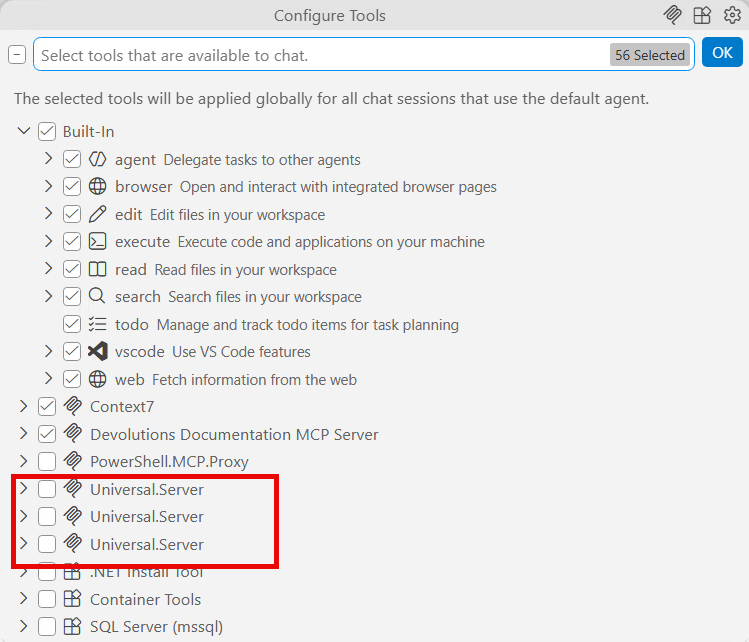
Impact
Users managing multiple PSU MCP server instances cannot easily identify which connection belongs to which environment (e.g. Development, Test, Production) or host, increasing the risk of connecting to the wrong server.
Benefits
Easier management of multiple MCP server connections
Better usability and visibility within VS Code
Reduced risk of connecting to the wrong environment
Consistent behavior with other tools that support custom connection names
All Comments (3)
@callidus2000 That would be very useful. I've opened a feature request in our backlog to get this implemented in an upcoming version.
Adam Driscoll
PowerShell Expert and Software Architect at Devolutions
Hello,
The fix has been implemented and is available in the latest version 2026.3.0.0 of PowerShell Universal.
Could you please confirm that this version works as expected now? We recommend testing this fix in a staging environment prior to deploying it on your production environment.
Thank you for your collaboration.
Best regards,
Maxim Robert