Change Devolutions Launcher standard Terminal colors
1 vote

Hello,
I`m currently searching for an option to set the terminal colors to an adjusted default scheme.
The only option I find throughout all configuration options is to set it for every session I open again. Do you know if there is an option to create a new default that would be pulled for every new SSH/terminal session?
Would be great if there are any recommendations on this.
BR
All Comments (6)
Hi Lukas,
Thanks for checking! Unfortunately, this option is not currently available in Devolutions Launcher — the "Override terminal colors" setting only exists in Remote Desktop Manager, under File – Settings – Entry Types – Terminal – Colors, which lets you set a default color scheme applied to all new SSH/terminal sessions.
Note that if you override the colors on a specific entry in RDM, that override will also be respected when launching that same entry through Devolutions Launcher — but this only applies to the entry you modified, not to all sessions by default.
We'll move your request over to Feature Request so it can be considered for a future release.
Best regards,
Alexis Geller Peiro
Hello,
We've added the possiblity to edit the Terminal colors overrides features to the Launcher settings.
This should be available with the upcoming 2026.3.2 version
Regards,
Jafran Majeau
Hello,
Thank you very much for the information and the implementation.
Looking forward to the version and the option.
Best regards,
Lukas
I was looking for something similar. Having a default color scheme for new SSH or terminal sessions would make things easier, rather than having to set the colors each time.
Hello,
You can likely achieve that by creating a template entry SSH/Terminal and change their tab color. This way any newly created entry would only need to select the template in question.
Regards,
Jafran Majeau
Hello,
And in addition to what my colleague said, you could also change the colors of your terminal in your launcher options by going in File > Settings: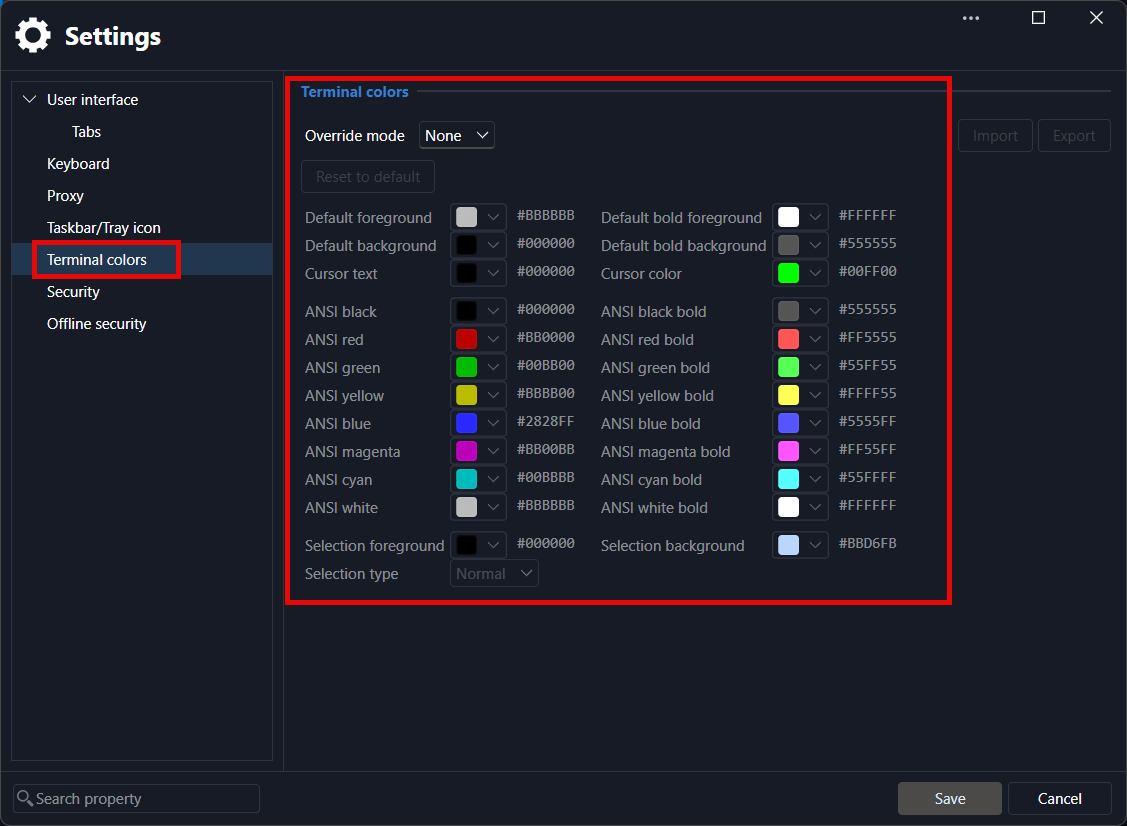
By default, SSH terminal entries will check here for your color profile. This could let you only change it once and it would apply to all of your entries, provided they use the default settings.
Regards,
Hubert Mireault
d91ae166-e174-4a87-ab66-eb84cabddf88.png