Change the session recording path
1 vote

is there plans to give the option in the gateway menu (either in RDM or DVLS or cloud) to be able to set the desire location of recordings, to a different location. without the need to editing the json file manually.
All Comments (8)
Hello,
Thank you for your request. Could you let us know which type of workspace you're using? This is already possible in DVLS. During the Gateway installation in Devolutions Console, you have a field to set that information.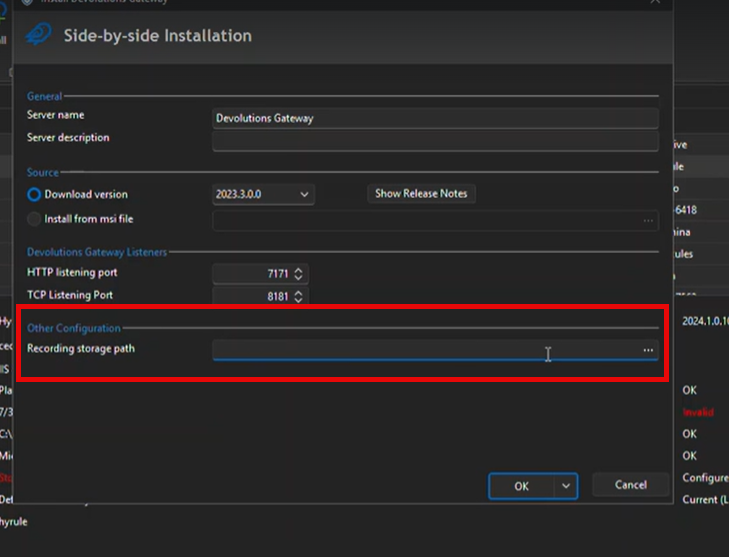
Does this address your need?
Best regards,
François Dubois
924ab975-abdf-4301-a853-4f7a1bb19121.png
in devolutions cloud
Good Morning @Yoffstr,
Currently, this is not an option available from the Cloud. I have created an investigation ticket to see what could be possible regarding this request. I will update you, positively or negatively, as soon as I have update from this ticket.
Regards
Good Afterno @Yoffstr
Quick follow-up on this. We have a question about this. What is the use case for this, do you simply want to be able to change the directory when creating the gateway (during installation, for example), and thus avoid having to manually update the json, or are you expecting something more dynamic, that can be edited at any time from the Cloud?
Once again, thank you for your feedback.
Hi @Dominic Dansereau,
It would be great if we can do both (set the recording path during installation to begin with and also havee the ability to change it at a later date).
Because recording can take up alot of space over time, (and currently there is no way to set a recording retention in the cloud, but i hear it is coming in the September release as per forum request here: auto session recording clean up). It isnt really best from a performance point to have the the recordings on the same drive as the OS, as it may fill up the hard drive if not managed) and bring down the server.
Kind regards
Good Morning @Yoffstr
I understand the concern, and yes, having the ability to automatically clean the disk should help better manage the used space.
Regarding path management, here is where we stand. In short, managing the path directly from the Cloud interface poses certain challenges and potential issues. This will require time and analysis. Compared to adding the ability to select directly from the main installer, which could be a quick win. My suggestion would be to create 2 separate tickets for each of them. The installer should be available in a more short term, and I will see how to prioritize and see what can be done for the dynamic update.
I hope this helps you address this concern.
Let me know if you have any other questions or comments on this request.
Regards
Hi @Dominic Dansereau ,
For managing the recording path from theDev cloud. Could i recommend that Devolutions allow us to make the change to the recording path for the gateway, in the gateway module, once the edit is done and saved, you then push the config to the gateway and it updates accordingly?
kind regards
Good Morning @Yoffstr
I understand the concern, and yes, having the ability to automatically clean the disk should help better manage the used space.
Regarding path management, here is where we stand. In short, managing the path directly from the Cloud interface poses certain challenges and potential issues. This will require time and analysis. Compared to adding the ability to select directly from the main installer, which could be a quick win. My suggestion would be to create 2 separate tickets for each of them. The installer should be available in a more short term, and I will see how to prioritize and see what can be done for the dynamic update.
I hope this helps you address this concern.
Let me know if you have any other questions or comments on this request.
Regards
@Dominic Dansereau
As per your request, i have created seperate tickets:
Change the Session recording path through the Gateway installer:
https://forum.devolutions.net/topics/55715/change-the-session-recording-path--through-gateway-installer
Change the Session recording path through Devoloutions Cloud:
Change the session recording path - through Devolutions Cloud
kind regards